Idea Statica
14-dniowy okres próbny
Centrum wsparciaSamouczkiTekla Structural Designer BIM link do projektowania połączeń (EN)
Tekla Structural Designer BIM link do projektowania połączeń (EN)
SteelConnection designTutorialsConnectionCheckbot

Tekla Structural Designer BIM link do projektowania połączeń (EN)

Ten artykuł jest również dostępny w
ENCZDEESFRITPTNLHUROPLTR
Przetłumaczono przez AI z języka angielskiego

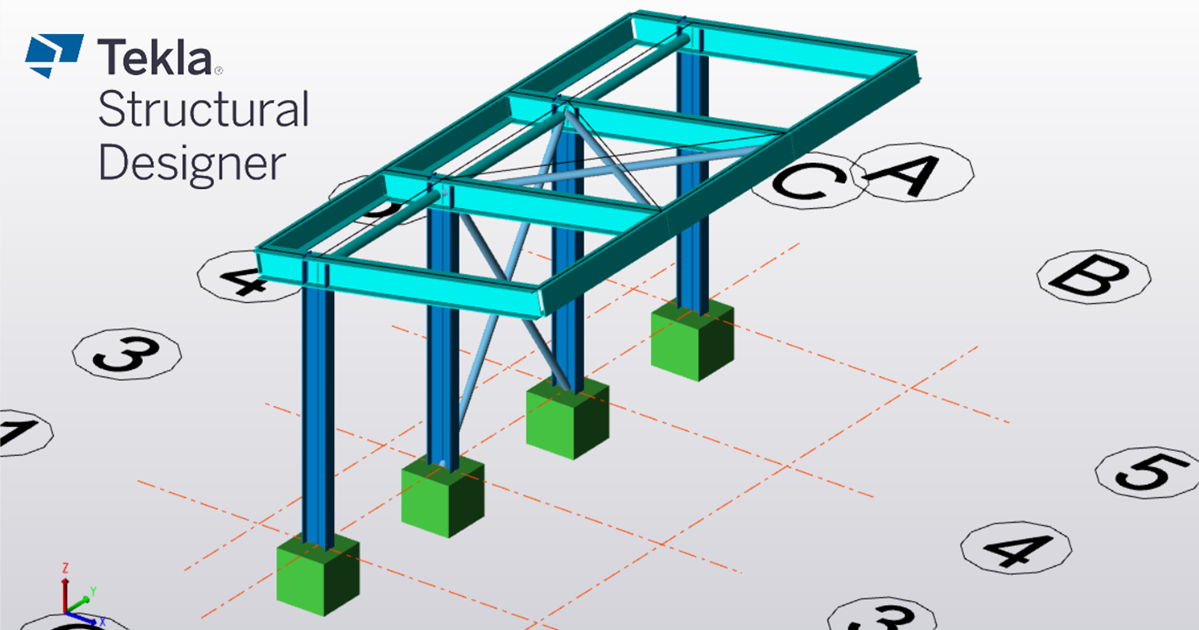
Postępując zgodnie z tym samouczkiem krok po kroku, nauczysz się projektować i wykonywać sprawdzenie normowe połączenia stalowego przy użyciu łącza BIM między Tekla Structural Designer a IDEA StatiCa.

Jak aktywować łącze

  • Pobierz i zainstaluj najnowszą wersję IDEA StatiCa
  • Upewnij się, że używasz obsługiwanej wersji swojego oprogramowania MES

W Tekla Structural Designer 2022 SP2 (lipiec 2022) i nowszych polecenie IDEA StatiCa Checkbot jest wbudowane w aplikację i instalacja łącza BIM nie jest konieczna. Więcej informacji można znaleźć w informacjach o wydaniu.

Jak korzystać z łącza

Pobierz załączony projekt, otwórz go w Tekla Structural Designer 2022.2 lub nowszym i uruchom obliczenia, aby uzyskać siły wewnętrzne w konstrukcji.

Najpierw utwórz połączenia w węzłach w Tekla Structural Designer. Przejdź do okna Connections , kliknij prawym przyciskiem myszy w jego obrębie i wybierz Update Connections.
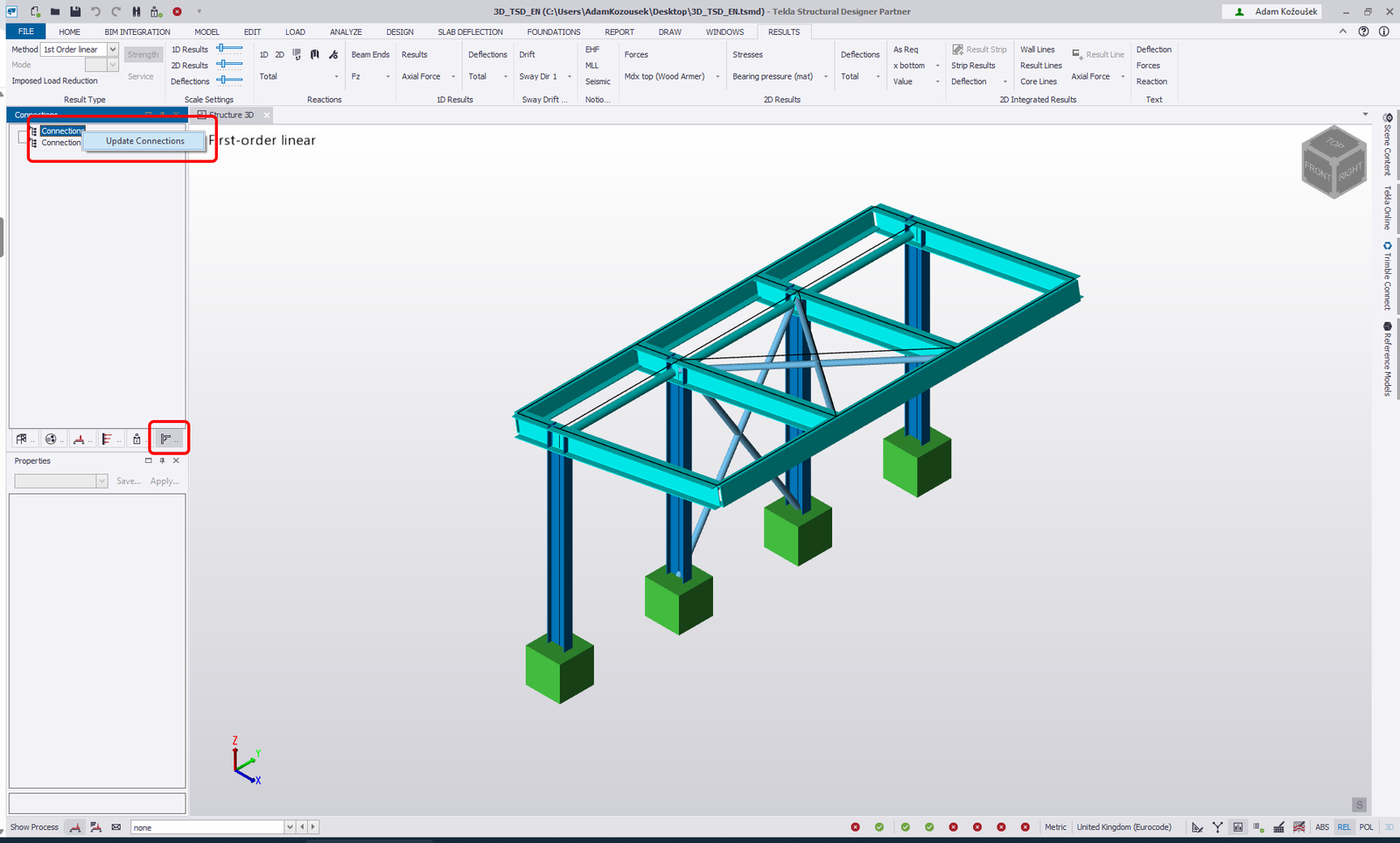
Spowoduje to wypełnienie modelu możliwymi połączeniami wymienionymi w oknie Connections oraz jako pola połączeń w widoku 3D.
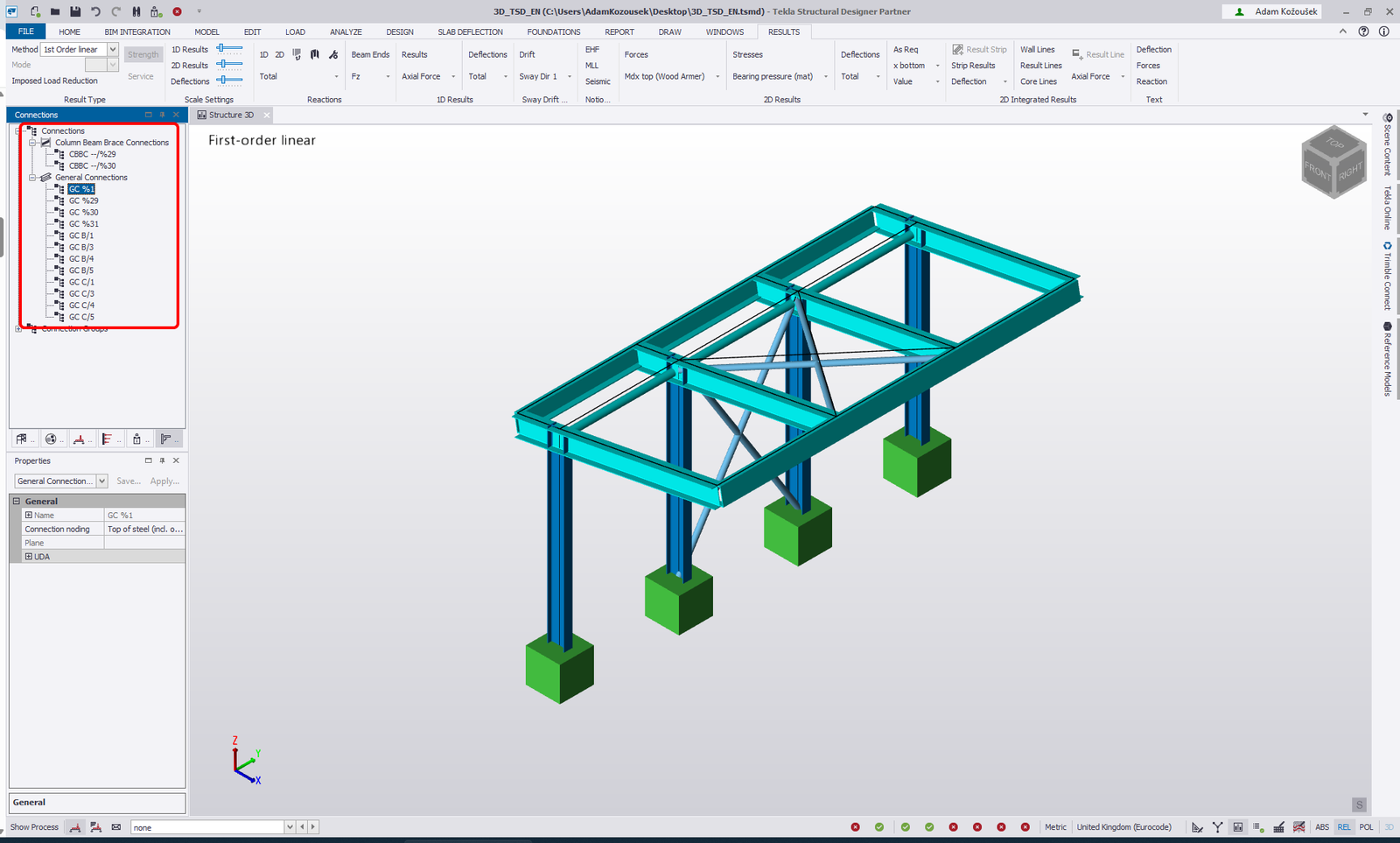
Następnie wyeksportuj połączenia do IDEA StatiCa Checkbot.

Można to zrobić na trzy sposoby:

1 - Kliknij prawym przyciskiem myszy element w oknie Connection i wybierz Export Connection to IDEA StatiCa
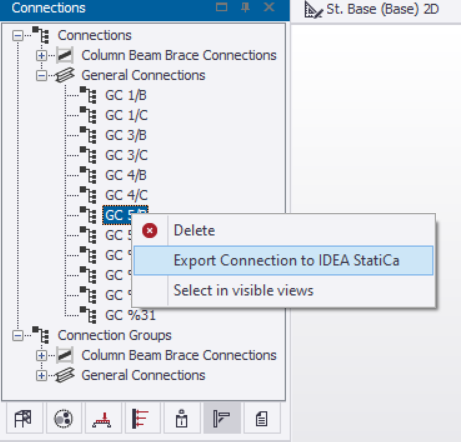
2 - Kliknij prawym przyciskiem myszy pole połączenia i wybierz Export Connection to IDEA StatiCa
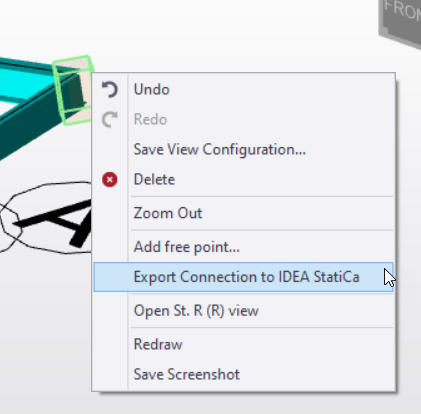
3 - Przejdź do zakładki BIM Integration i wybierz IDEA StatiCa Export.

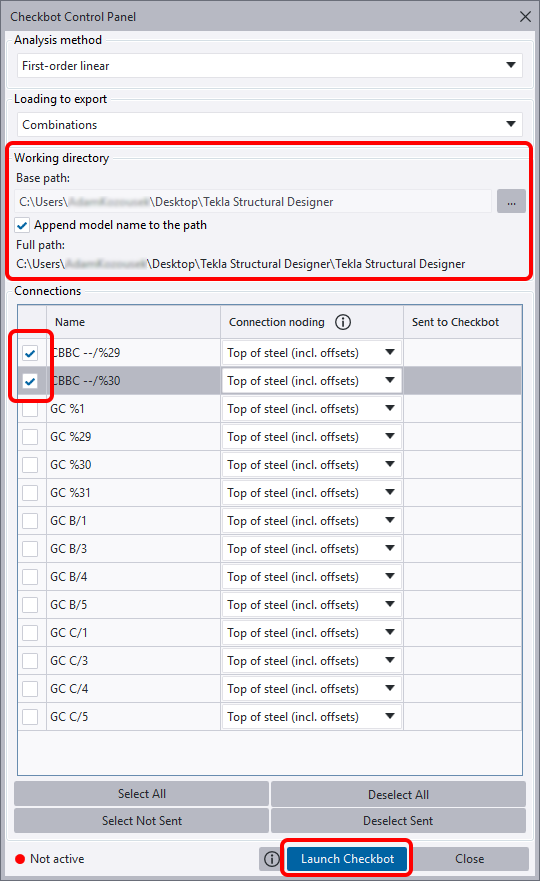
Otworzy się Checkbot Control Panel. Możesz zmienić ścieżkę do folderu, który zostanie utworzony dla projektu Checkbot - zmień Base path na folder, w którym zapisany jest projekt Tekla Structural Designer, i zaznacz Append model name to the path.

Wybierz węzły zakotwienia CBBC --/%29 i CBBC --/%30 i kliknij Launch Checkbot.
Widget #NaN: support_center_article

Name: General BIM Link tutorial - Import

ID: 4014d755-0bf0-43d9-a46c-da9ce928f004

Show Raw Data
{
  "title": {
    "name": "Main headline (H1)",
    "type": "text",
    "value": "Import"
  },
  "preview_image": {
    "name": "Preview image",
    "type": "asset",
    "value": []
  },
  "post_date": {
    "name": "Post date",
    "type": "date_time",
    "value": null,
    "displayTimeZone": null
  },
  "perex_content": {
    "name": "Lead paragraph",
    "type": "text",
    "value": ""
  },
  "content": {
    "images": [
      {
        "description": null,
        "imageId": "9e8f6845-e105-4892-a3bd-9def81d98bb6",
        "url": "https://assets-us-01.kc-usercontent.com:443/66e7a155-be94-0096-73e6-c55dfc7e5788/e734e597-4d88-471b-80f1-6b622107eea4/import%20node.png",
        "height": 1032,
        "width": 1920
      },
      {
        "description": null,
        "imageId": "4cd06b43-6f27-4e21-ab5b-13b6520951eb",
        "url": "https://assets-us-01.kc-usercontent.com:443/66e7a155-be94-0096-73e6-c55dfc7e5788/fc21c861-7d5f-4418-af2a-f7ee319aa914/single%20connection%20in%20checkbot.png",
        "height": 1032,
        "width": 1920
      },
      {
        "description": null,
        "imageId": "be4f07d7-d6e4-4bd3-8acd-2507951101d8",
        "url": "https://assets-us-01.kc-usercontent.com:443/66e7a155-be94-0096-73e6-c55dfc7e5788/43f14268-3a11-43ba-9e9a-b5a84af9d4cf/RFEM%20-%20load%20configurator.png",
        "height": 1136,
        "width": 1918
      },
      {
        "description": null,
        "imageId": "bb64cd03-216e-4036-b058-f51b5bef237a",
        "url": "https://assets-us-01.kc-usercontent.com:443/66e7a155-be94-0096-73e6-c55dfc7e5788/1803d6c5-85a0-42ec-97de-fcb751b17a46/all%20structure.png",
        "height": 1032,
        "width": 1920
      }
    ],
    "linkedItemCodenames": [],
    "linkedItems": [],
    "links": [],
    "name": "Content",
    "type": "rich_text",
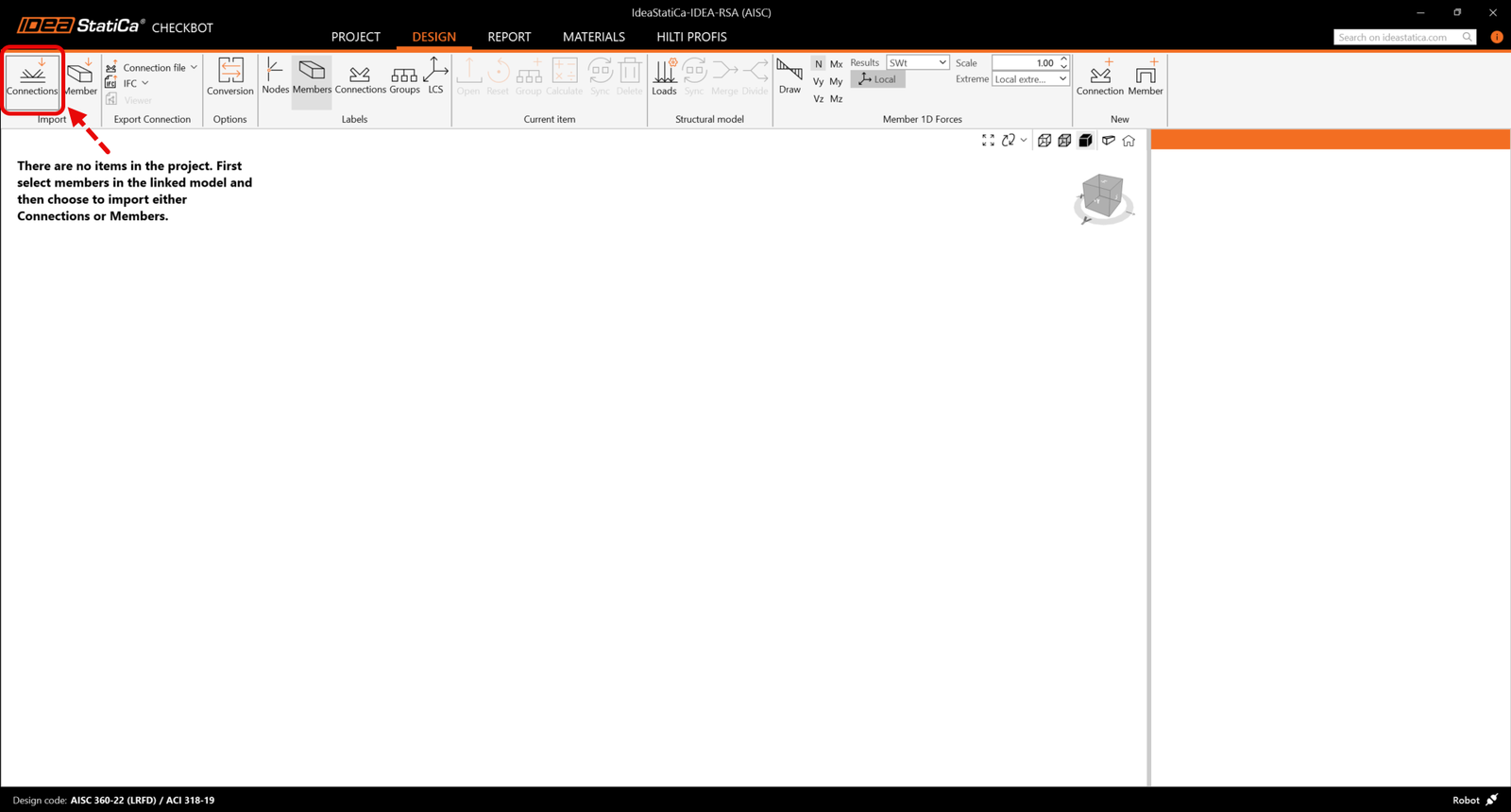
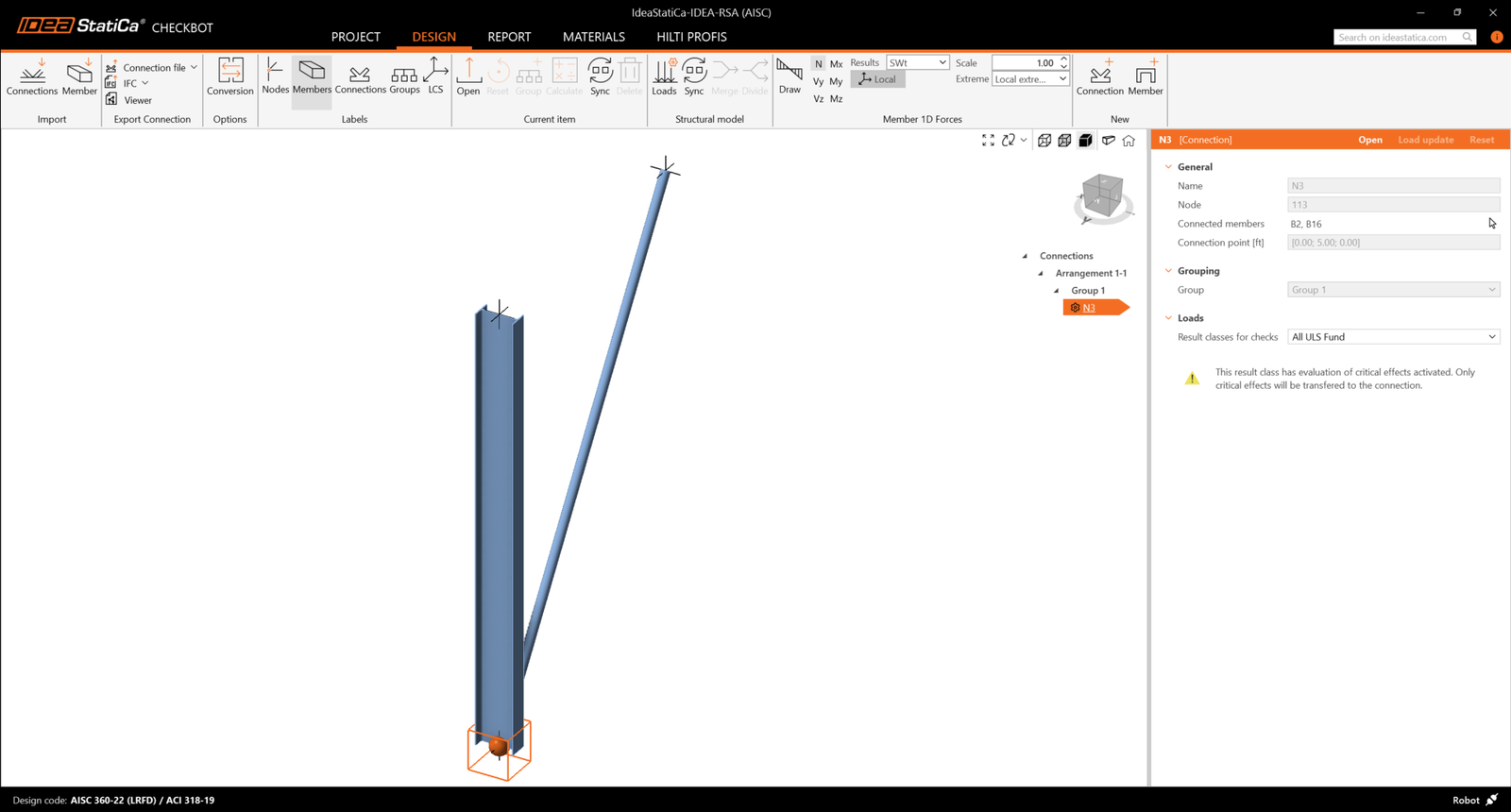
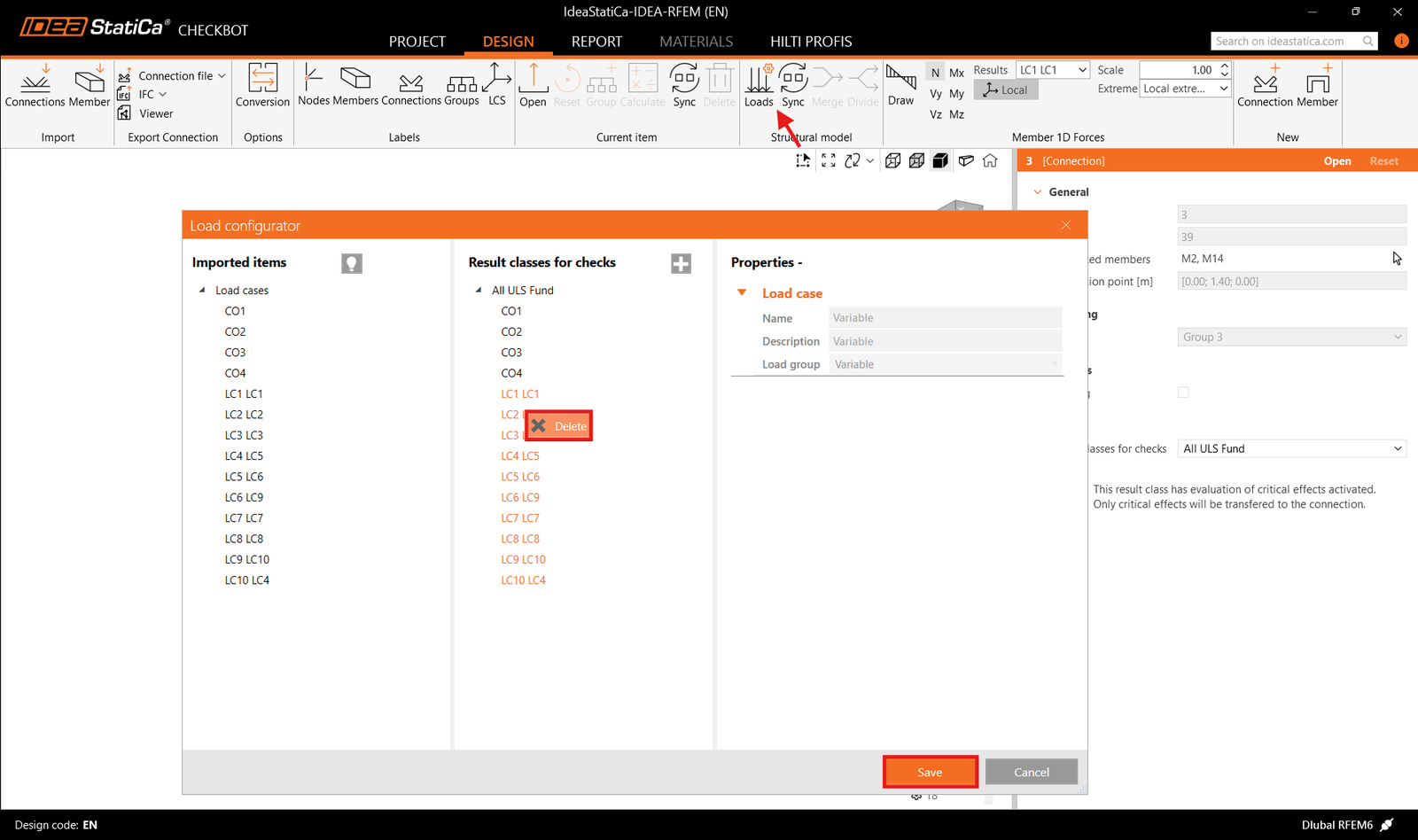
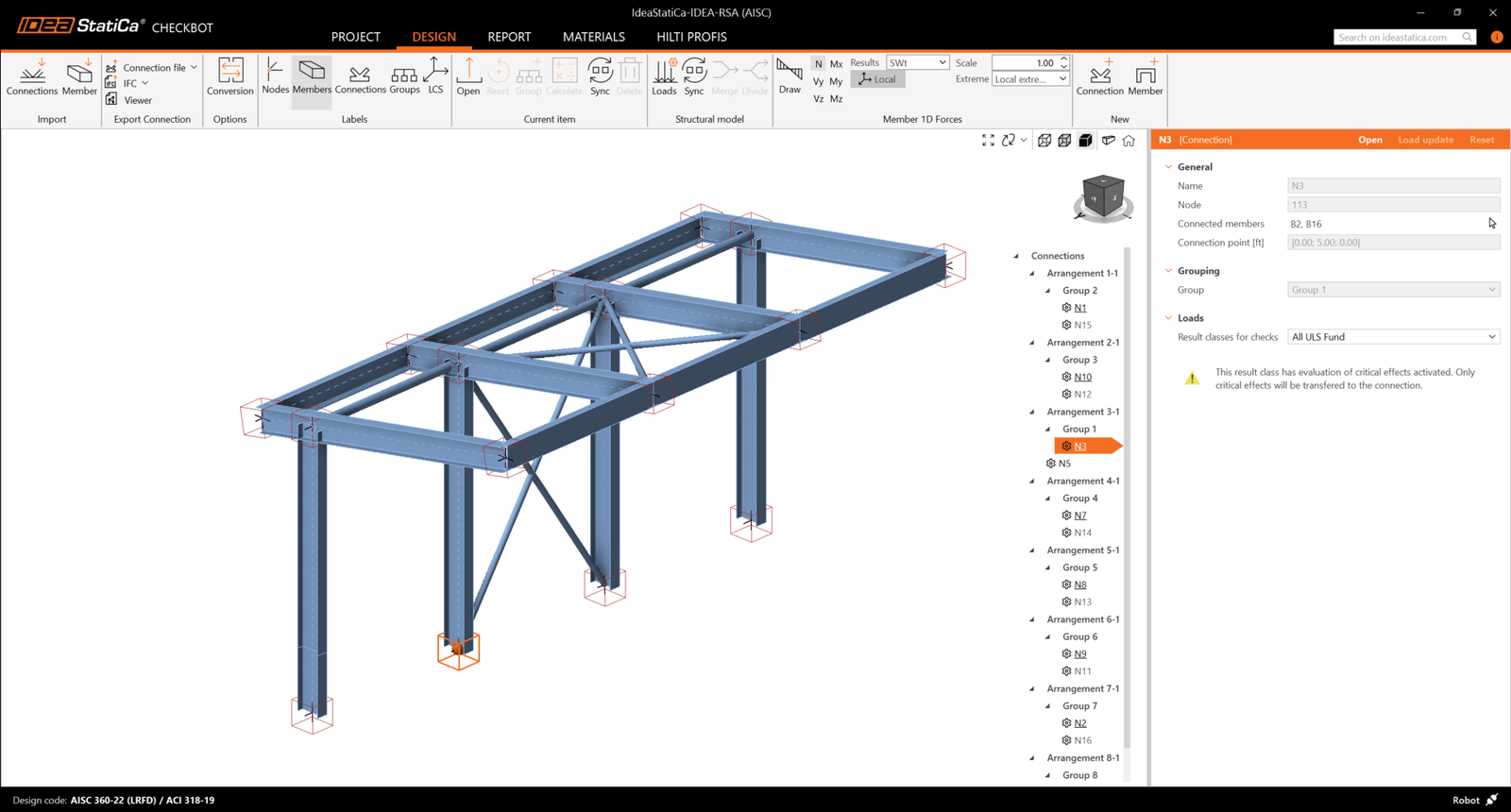
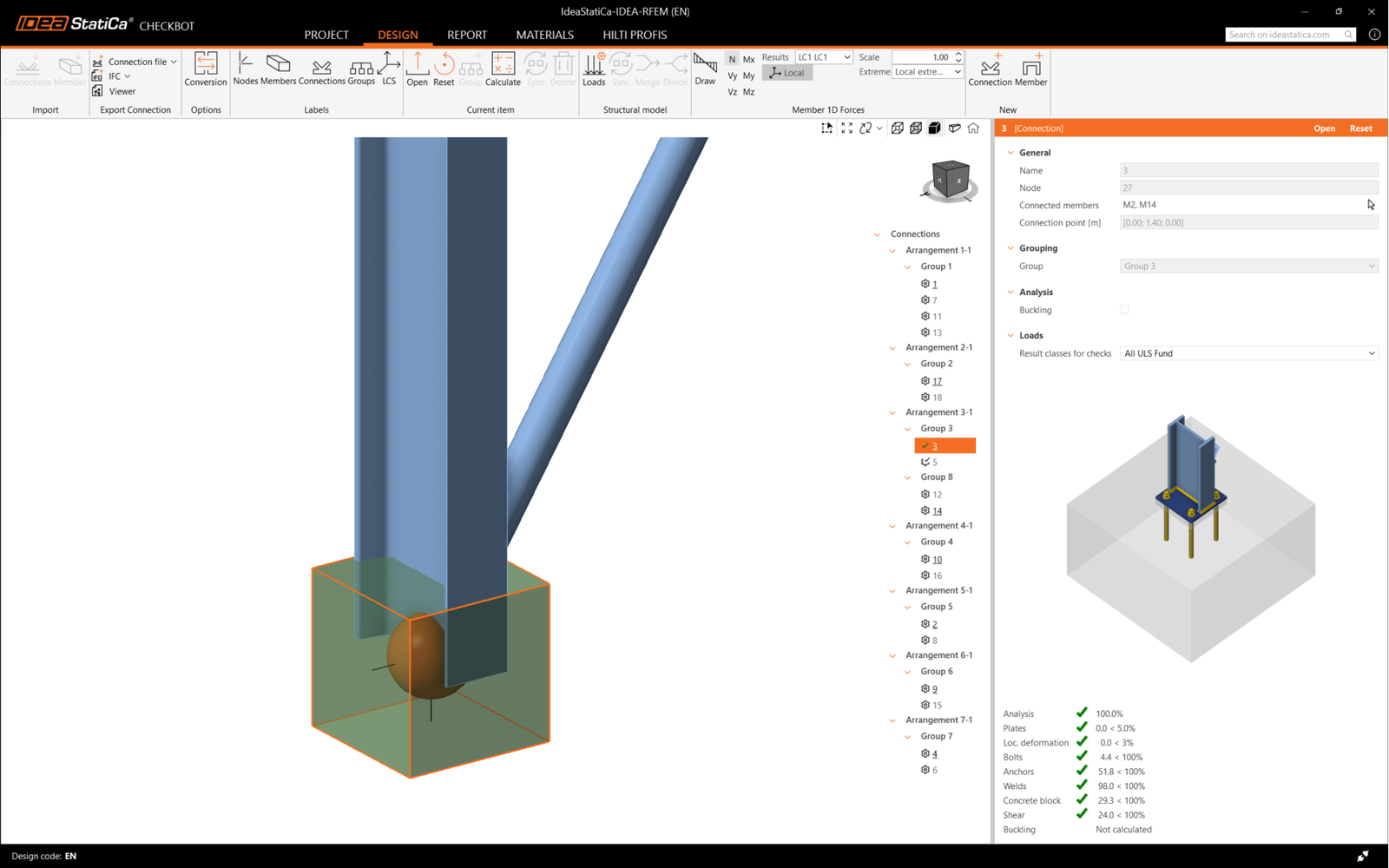
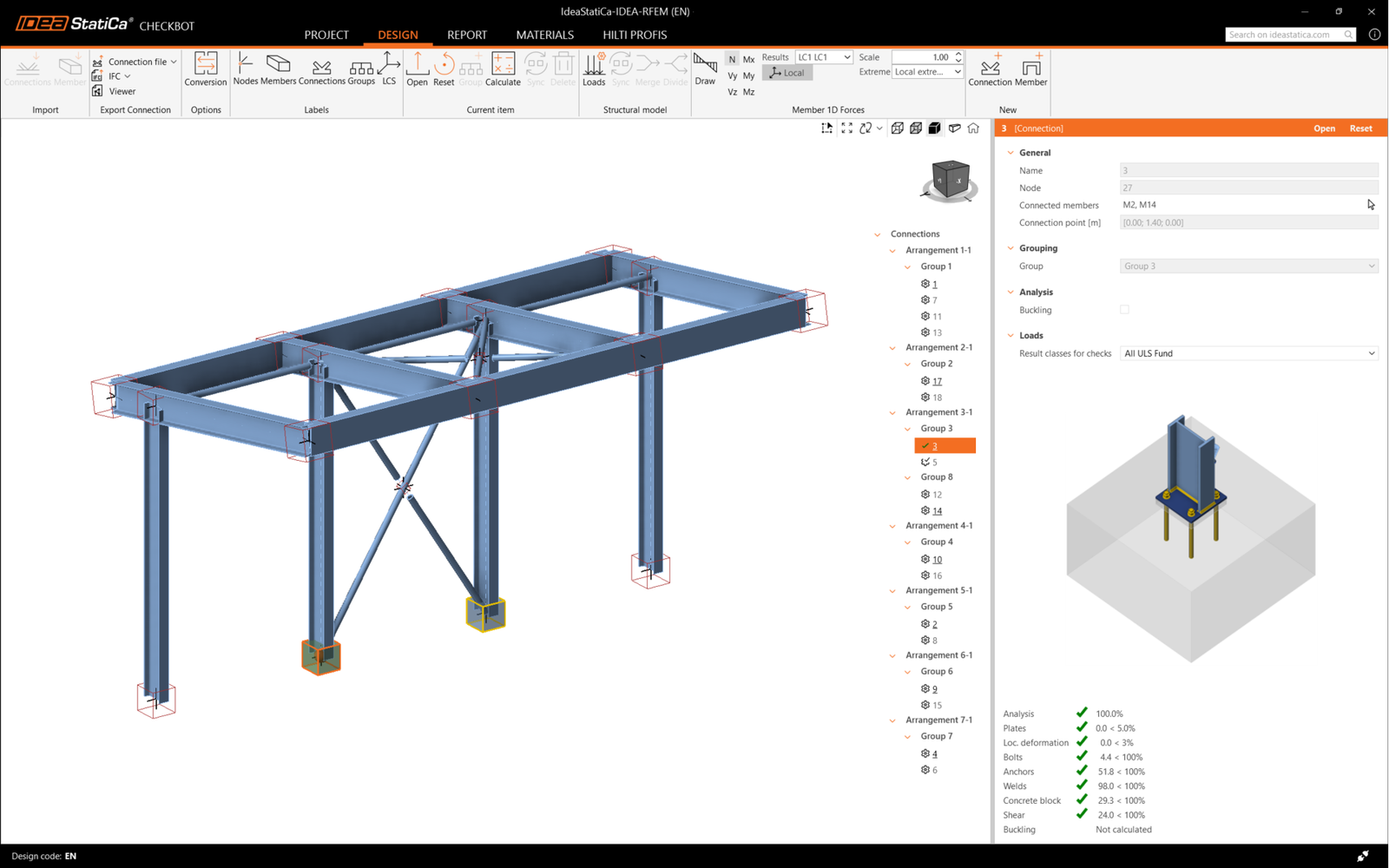
    "value": "<p>Następnie w Checkbot wybierz <strong>Connections</strong>.</p>\n<figure data-asset-id=\"9e8f6845-e105-4892-a3bd-9def81d98bb6\" data-image-id=\"9e8f6845-e105-4892-a3bd-9def81d98bb6\"><img src=\"https://assets-us-01.kc-usercontent.com:443/66e7a155-be94-0096-73e6-c55dfc7e5788/e734e597-4d88-471b-80f1-6b622107eea4/import%20node.png\" data-asset-id=\"9e8f6845-e105-4892-a3bd-9def81d98bb6\" data-image-id=\"9e8f6845-e105-4892-a3bd-9def81d98bb6\" alt=\"\"></figure>\n<p>Spowoduje to import słupa wraz z efektami obciążeń do Checkbot – z tymi samymi współrzędnymi, orientacjami i wymiarami przekrojów, co w modelu MES.</p>\n<p>Należy pamiętać, że numeracja węzłów i elementów może być różna.</p>\n<figure data-asset-id=\"4cd06b43-6f27-4e21-ab5b-13b6520951eb\" data-image-id=\"4cd06b43-6f27-4e21-ab5b-13b6520951eb\"><img src=\"https://assets-us-01.kc-usercontent.com:443/66e7a155-be94-0096-73e6-c55dfc7e5788/fc21c861-7d5f-4418-af2a-f7ee319aa914/single%20connection%20in%20checkbot.png\" data-asset-id=\"4cd06b43-6f27-4e21-ab5b-13b6520951eb\" data-image-id=\"4cd06b43-6f27-4e21-ab5b-13b6520951eb\" alt=\"\"></figure>\n<p><strong>Przed uruchomieniem analizy należy sprawdzić klasy wyników dla sprawdzeń normowych </strong>i odpowiednio dostosować przypadki obciążeń<strong>.</strong> W oknie dialogowym <strong>Load configurator </strong>można zobaczyć wszystkie zaimportowane przypadki obciążeń i kombinacje obciążeń po lewej stronie oraz klasy wyników używane do sprawdzeń normowych w środkowej części. Jeśli niektóre przypadki obciążeń nie są istotne dla weryfikacji projektowej, należy je wykluczyć, klikając prawym przyciskiem myszy na wybrane obciążenia i usuwając je z listy klas wyników.</p>\n<figure data-asset-id=\"be4f07d7-d6e4-4bd3-8acd-2507951101d8\" data-image-id=\"be4f07d7-d6e4-4bd3-8acd-2507951101d8\"><img src=\"https://assets-us-01.kc-usercontent.com:443/66e7a155-be94-0096-73e6-c55dfc7e5788/43f14268-3a11-43ba-9e9a-b5a84af9d4cf/RFEM%20-%20load%20configurator.png\" data-asset-id=\"be4f07d7-d6e4-4bd3-8acd-2507951101d8\" data-image-id=\"be4f07d7-d6e4-4bd3-8acd-2507951101d8\" alt=\"\"></figure>\n<p>Należy pamiętać, że przestrzeń robocza 3D jest zaprojektowana w celu pokazania przeglądu zaimportowanej konstrukcji, a nie szczegółowego widoku rzeczywistych połączeń. Więcej informacji na temat Checkbot można znaleźć <a href=\"https://www.ideastatica.com/support-center/checkbot-bulk-bim-workflows\" title=\"Checkbot\">tutaj</a>.</p>\n<p>W przypadku kilku rozwiązań MES można również importować wiele połączeń do Checkbot w ten sam sposób, jak opisano powyżej. &nbsp;Zamiast wybierać jeden węzeł i połączone elementy, można wybrać wiele węzłów i elementów oraz zaimportować je wszystkie jednocześnie.</p>\n<figure data-asset-id=\"bb64cd03-216e-4036-b058-f51b5bef237a\" data-image-id=\"bb64cd03-216e-4036-b058-f51b5bef237a\"><img src=\"https://assets-us-01.kc-usercontent.com:443/66e7a155-be94-0096-73e6-c55dfc7e5788/1803d6c5-85a0-42ec-97de-fcb751b17a46/all%20structure.png\" data-asset-id=\"bb64cd03-216e-4036-b058-f51b5bef237a\" data-image-id=\"bb64cd03-216e-4036-b058-f51b5bef237a\" alt=\"\"></figure>"
  },
  "linked_items": {
    "name": "Linked items",
    "type": "modular_content",
    "value": [],
    "linkedItems": []
  },
  "regions": {
    "name": "Region",
    "type": "taxonomy",
    "value": [
      {
        "name": "EMEA",
        "codename": "emea"
      },
      {
        "name": "AMER",
        "codename": "amer"
      },
      {
        "name": "APAC",
        "codename": "apac"
      }
    ],
    "taxonomyGroup": "region"
  },
  "product_groups": {
    "name": "Product group",
    "type": "taxonomy",
    "value": [
      {
        "name": "Connection design",
        "codename": "connection_design"
      },
      {
        "name": "Steel",
        "codename": "steel"
      }
    ],
    "taxonomyGroup": "product_group"
  },
  "support_center_article_types": {
    "name": "Support center article",
    "type": "taxonomy",
    "value": [
      {
        "name": "Knowledge base",
        "codename": "knowledgebase_article"
      }
    ],
    "taxonomyGroup": "support_center_article"
  },
  "expertise_levels": {
    "name": "Expertise level",
    "type": "taxonomy",
    "value": [
      {
        "name": "Beginner",
        "codename": "beginner"
      },
      {
        "name": "Intermediate",
        "codename": "intermediate"
      }
    ],
    "taxonomyGroup": "expertise_level"
  },
  "labels": {
    "name": "Labels",
    "type": "taxonomy",
    "value": [
      {
        "name": "Connection",
        "codename": "connection"
      },
      {
        "name": "Checkbot",
        "codename": "checkbot"
      },
      {
        "name": "EN (Eurocode)",
        "codename": "eurocode"
      },
      {
        "name": "BIM link",
        "codename": "bim_links"
      },
      {
        "name": "AISC (USA)",
        "codename": "aisc"
      }
    ],
    "taxonomyGroup": "labels"
  },
  "attachments__files": {
    "name": "Attachments",
    "type": "asset",
    "value": []
  },
  "content_priority__value": {
    "name": "Content priority value",
    "type": "number",
    "value": null
  },
  "options": {
    "name": "Options",
    "type": "multiple_choice",
    "value": []
  },
  "url_slug": {
    "name": "Url slug",
    "type": "url_slug",
    "value": "import"
  },
  "unique_url_slug": {
    "name": "Unique URL slug",
    "type": "custom",
    "value": "[\"import\",\"[autogenerated]\"]"
  },
  "content_settings__sitemap": {
    "name": "Show in sitemap",
    "type": "multiple_choice",
    "value": [
      {
        "name": "default",
        "codename": "default"
      }
    ]
  },
  "content_settings__robots": {
    "name": "Search engine indexing",
    "type": "multiple_choice",
    "value": [
      {
        "name": "default",
        "codename": "default"
      }
    ]
  },
  "content_settings__is_hidden": {
    "name": "Hidden nested content",
    "type": "multiple_choice",
    "value": [
      {
        "name": "yes",
        "codename": "yes"
      }
    ]
  },
  "content_settings__is_topped": {
    "name": "Topped",
    "type": "multiple_choice",
    "value": []
  },
  "metadata__page_title": {
    "name": "Page title",
    "type": "text",
    "value": "Import połączenia stalowego z MES/CAD do Checkbot"
  },
  "metadata__page_description": {
    "name": "Page description",
    "type": "text",
    "value": "Samouczek krok po kroku IDEA StatiCa dotyczący importu połączenia stalowego i jego efektów obciążeń z MES/CAD do Checkbot. Projektowanie konstrukcyjne spawanych i śrubowych połączeń stalowych."
  },
  "metadata__page_keywords": {
    "name": "Page keywords",
    "type": "text",
    "value": ""
  },
  "metadata__canonical_url": {
    "name": "Canonical URL",
    "type": "text",
    "value": ""
  },
  "metadata__og_title": {
    "name": "OG:title",
    "type": "text",
    "value": ""
  },
  "metadata__og_description": {
    "name": "OG:description",
    "type": "text",
    "value": ""
  },
  "metadata__og_image": {
    "name": "OG:image",
    "type": "asset",
    "value": []
  },
  "translation__translation_connector": {
    "name": "Translation Connector",
    "type": "taxonomy",
    "value": [],
    "taxonomyGroup": "languages"
  },
  "translation__force_translation": {
    "name": "Force translation",
    "type": "multiple_choice",
    "value": []
  },
  "translation__translate_standalone_nested_content_items": {
    "name": "Translate standalone nested content items",
    "type": "multiple_choice",
    "value": []
  },
  "translation__last_translation": {
    "images": [],
    "linkedItemCodenames": [],
    "linkedItems": [],
    "links": [],
    "name": "Last translation",
    "type": "rich_text",
    "value": "<p>Translation info:</p>\n<ul>\n  <li>cs-CZ: Never translated</li>\n  <li>de-DE: Never translated</li>\n  <li>en-US: Never translated</li>\n  <li>es-ES: Never translated</li>\n  <li>fr-FR: Never translated</li>\n  <li>hu-HU: Never translated</li>\n  <li>it-IT: Never translated</li>\n  <li>nl-NL: Never translated</li>\n  <li>pl-PL: Translated on 29.4.2026 15:29</li>\n  <li>pt-PT: Never translated</li>\n  <li>ro-RO: Never translated</li>\n  <li>ru-RU: Never translated</li>\n  <li>th-TH: Never translated</li>\n  <li>zh-CN: Never translated</li>\n</ul>\n<p>Publish info:</p>\n<ul>\n  <li>Publish info is available only in the main language</li>\n</ul>"
  },
  "translation__ai_translated": {
    "name": "AI translated",
    "type": "multiple_choice",
    "value": [
      {
        "name": "Translated",
        "codename": "translated"
      }
    ]
  },
  "page_tree_settings__page_label": {
    "name": "Page label",
    "type": "text",
    "value": ""
  },
  "page_tree_settings__path_segment": {
    "name": "Path segment",
    "type": "text",
    "value": ""
  },
  "page_tree_settings__breadcrumb_style": {
    "name": "Breadcrumb style",
    "type": "multiple_choice",
    "value": []
  },
  "page_tree_settings__hide_in_breadcrumbs": {
    "name": "Hide in breadcrumbs",
    "type": "multiple_choice",
    "value": []
  }
}

Widget #NaN: support_center_article

Name: General BIM Link tutorial - Geometry

ID: c25dad44-9532-49cb-8c34-b7d536fec247

Show Raw Data
{
  "title": {
    "name": "Main headline (H1)",
    "type": "text",
    "value": "Geometria"
  },
  "preview_image": {
    "name": "Preview image",
    "type": "asset",
    "value": []
  },
  "post_date": {
    "name": "Post date",
    "type": "date_time",
    "value": null,
    "displayTimeZone": null
  },
  "perex_content": {
    "name": "Lead paragraph",
    "type": "text",
    "value": ""
  },
  "content": {
    "images": [
      {
        "description": null,
        "imageId": "6c4c6a6e-7ce1-4bae-bf35-efa7734a4f6e",
        "url": "https://assets-us-01.kc-usercontent.com:443/66e7a155-be94-0096-73e6-c55dfc7e5788/b89e2ac5-d8cc-486c-b656-940f237d733c/2.png",
        "height": 1000,
        "width": 1199
      },
      {
        "description": null,
        "imageId": "55b67a24-3191-4f70-bcdf-91dc514d1a54",
        "url": "https://assets-us-01.kc-usercontent.com:443/66e7a155-be94-0096-73e6-c55dfc7e5788/95fb28b7-e444-4e2e-aa19-1725d7e0b736/RFEM%20-%20connection.png",
        "height": 1135,
        "width": 1920
      }
    ],
    "linkedItemCodenames": [],
    "linkedItems": [],
    "links": [],
    "name": "Content",
    "type": "rich_text",
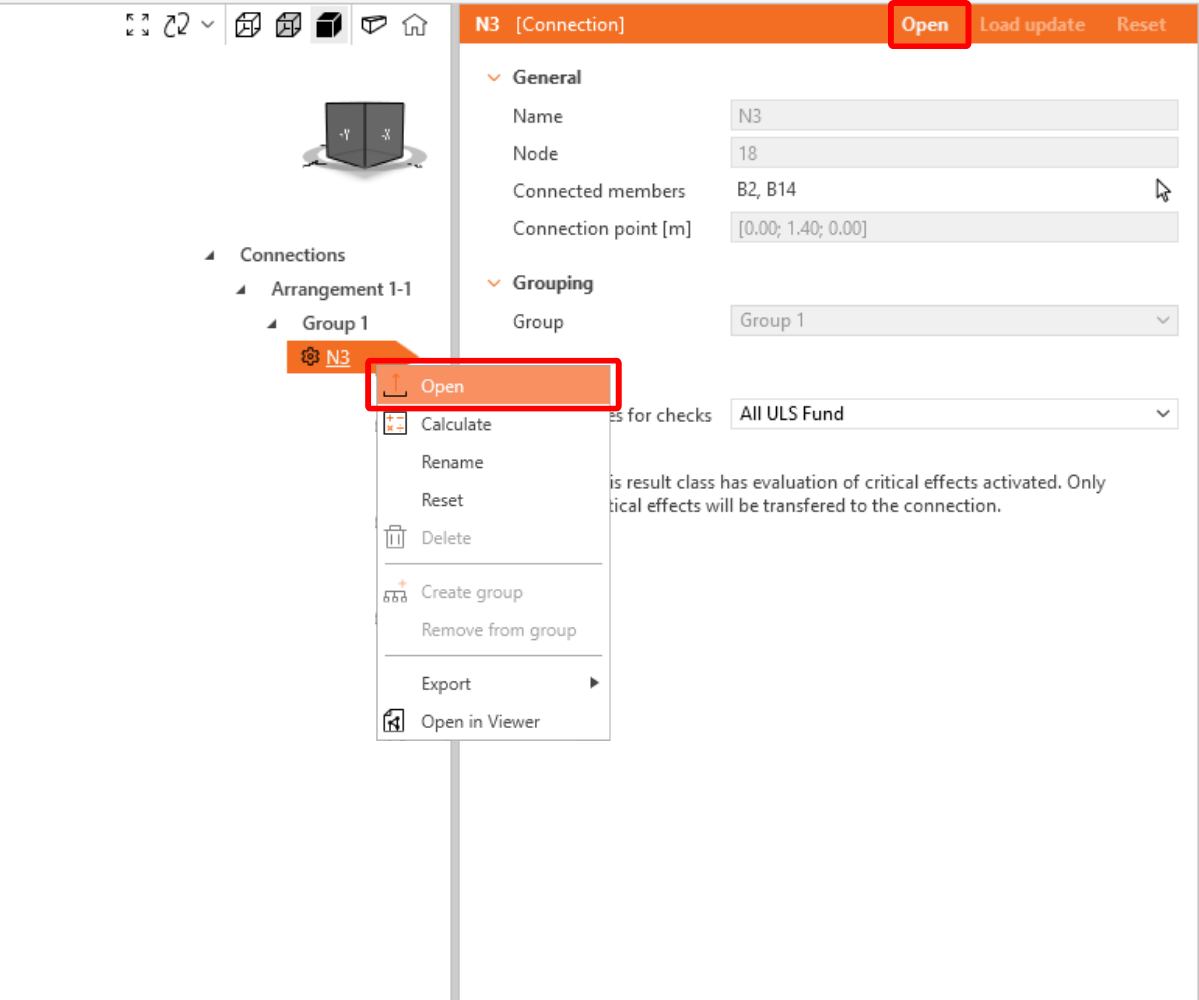
    "value": "<p>Na liście elementów projektu w sekcji Connections, po zaznaczeniu połączenia w Checkbot, można kliknąć prawym przyciskiem myszy i wybrać <strong>Open </strong>lub kliknąć polecenie na wstążce <strong>Open</strong>&nbsp;, aby rozpocząć projektowanie, sprawdzenie normowe i generowanie raportów.</p>\n<figure data-asset-id=\"6c4c6a6e-7ce1-4bae-bf35-efa7734a4f6e\" data-image-id=\"6c4c6a6e-7ce1-4bae-bf35-efa7734a4f6e\"><img src=\"https://assets-us-01.kc-usercontent.com:443/66e7a155-be94-0096-73e6-c55dfc7e5788/b89e2ac5-d8cc-486c-b656-940f237d733c/2.png\" data-asset-id=\"6c4c6a6e-7ce1-4bae-bf35-efa7734a4f6e\" data-image-id=\"6c4c6a6e-7ce1-4bae-bf35-efa7734a4f6e\" alt=\"\"></figure>\n<p>Ustawienia elementów są pobierane z oryginalnej aplikacji MES. Można jednak zmienić rozmiar przekroju dowolnego elementu na głównym ekranie Checkbot, ale spowoduje to zerwanie połączenia z aplikacją MES w bieżącej sesji, chyba że zostanie ono ponownie zsynchronizowane.</p>\n<p>Zaimportowane połączenie jest otwierane w aplikacji IDEA StatiCa Connection.</p>\n<figure data-asset-id=\"55b67a24-3191-4f70-bcdf-91dc514d1a54\" data-image-id=\"55b67a24-3191-4f70-bcdf-91dc514d1a54\"><img src=\"https://assets-us-01.kc-usercontent.com:443/66e7a155-be94-0096-73e6-c55dfc7e5788/95fb28b7-e444-4e2e-aa19-1725d7e0b736/RFEM%20-%20connection.png\" data-asset-id=\"55b67a24-3191-4f70-bcdf-91dc514d1a54\" data-image-id=\"55b67a24-3191-4f70-bcdf-91dc514d1a54\" alt=\"\"></figure>\n<p>W zależności od sposobu zdefiniowania kombinacji przypadków obciążeń, w rozwiązaniu MES mogą być widoczne żadne lub różne efekty obciążeń. &nbsp;Domyślnie IDEA StatiCa wybiera najbardziej niekorzystne dla celów sprawdzenia normowego. (* Niektóre rozwiązania BIM nie są w stanie przechowywać wyników kombinacji przypadków obciążeń)</p>\n<p>Więcej informacji na temat efektów obciążeń można znaleźć <a href=\"https://www.ideastatica.com/support-center/checkbot-bulk-bim-workflows\" title=\"Checkbot\">tutaj</a>.</p>"
  },
  "linked_items": {
    "name": "Linked items",
    "type": "modular_content",
    "value": [],
    "linkedItems": []
  },
  "regions": {
    "name": "Region",
    "type": "taxonomy",
    "value": [
      {
        "name": "EMEA",
        "codename": "emea"
      },
      {
        "name": "AMER",
        "codename": "amer"
      },
      {
        "name": "APAC",
        "codename": "apac"
      }
    ],
    "taxonomyGroup": "region"
  },
  "product_groups": {
    "name": "Product group",
    "type": "taxonomy",
    "value": [
      {
        "name": "Connection design",
        "codename": "connection_design"
      },
      {
        "name": "Steel",
        "codename": "steel"
      }
    ],
    "taxonomyGroup": "product_group"
  },
  "support_center_article_types": {
    "name": "Support center article",
    "type": "taxonomy",
    "value": [
      {
        "name": "Knowledge base",
        "codename": "knowledgebase_article"
      }
    ],
    "taxonomyGroup": "support_center_article"
  },
  "expertise_levels": {
    "name": "Expertise level",
    "type": "taxonomy",
    "value": [
      {
        "name": "Beginner",
        "codename": "beginner"
      },
      {
        "name": "Intermediate",
        "codename": "intermediate"
      }
    ],
    "taxonomyGroup": "expertise_level"
  },
  "labels": {
    "name": "Labels",
    "type": "taxonomy",
    "value": [
      {
        "name": "Connection",
        "codename": "connection"
      },
      {
        "name": "EN (Eurocode)",
        "codename": "eurocode"
      },
      {
        "name": "AISC (USA)",
        "codename": "aisc"
      },
      {
        "name": "BIM link",
        "codename": "bim_links"
      },
      {
        "name": "Checkbot",
        "codename": "checkbot"
      }
    ],
    "taxonomyGroup": "labels"
  },
  "attachments__files": {
    "name": "Attachments",
    "type": "asset",
    "value": []
  },
  "content_priority__value": {
    "name": "Content priority value",
    "type": "number",
    "value": null
  },
  "options": {
    "name": "Options",
    "type": "multiple_choice",
    "value": []
  },
  "url_slug": {
    "name": "Url slug",
    "type": "url_slug",
    "value": "geometry"
  },
  "unique_url_slug": {
    "name": "Unique URL slug",
    "type": "custom",
    "value": "[\"geometry\",\"[autogenerated]\"]"
  },
  "content_settings__sitemap": {
    "name": "Show in sitemap",
    "type": "multiple_choice",
    "value": [
      {
        "name": "default",
        "codename": "default"
      }
    ]
  },
  "content_settings__robots": {
    "name": "Search engine indexing",
    "type": "multiple_choice",
    "value": [
      {
        "name": "default",
        "codename": "default"
      }
    ]
  },
  "content_settings__is_hidden": {
    "name": "Hidden nested content",
    "type": "multiple_choice",
    "value": [
      {
        "name": "yes",
        "codename": "yes"
      }
    ]
  },
  "content_settings__is_topped": {
    "name": "Topped",
    "type": "multiple_choice",
    "value": []
  },
  "metadata__page_title": {
    "name": "Page title",
    "type": "text",
    "value": "Import połączenia stalowego z MES/CAD do Checkbot"
  },
  "metadata__page_description": {
    "name": "Page description",
    "type": "text",
    "value": "Przewodnik krok po kroku IDEA StatiCa dotyczący importu połączenia stalowego i jego efektów obciążeń z MES/CAD do Checkbot. Projektowanie konstrukcyjne spawanych i śrubowych połączeń stalowych."
  },
  "metadata__page_keywords": {
    "name": "Page keywords",
    "type": "text",
    "value": ""
  },
  "metadata__canonical_url": {
    "name": "Canonical URL",
    "type": "text",
    "value": ""
  },
  "metadata__og_title": {
    "name": "OG:title",
    "type": "text",
    "value": ""
  },
  "metadata__og_description": {
    "name": "OG:description",
    "type": "text",
    "value": ""
  },
  "metadata__og_image": {
    "name": "OG:image",
    "type": "asset",
    "value": []
  },
  "translation__translation_connector": {
    "name": "Translation Connector",
    "type": "taxonomy",
    "value": [],
    "taxonomyGroup": "languages"
  },
  "translation__force_translation": {
    "name": "Force translation",
    "type": "multiple_choice",
    "value": []
  },
  "translation__translate_standalone_nested_content_items": {
    "name": "Translate standalone nested content items",
    "type": "multiple_choice",
    "value": []
  },
  "translation__last_translation": {
    "images": [],
    "linkedItemCodenames": [],
    "linkedItems": [],
    "links": [],
    "name": "Last translation",
    "type": "rich_text",
    "value": "<p>Translation info:</p>\n<ul>\n  <li>cs-CZ: Never translated</li>\n  <li>de-DE: Never translated</li>\n  <li>en-US: Never translated</li>\n  <li>es-ES: Never translated</li>\n  <li>fr-FR: Never translated</li>\n  <li>hu-HU: Never translated</li>\n  <li>it-IT: Never translated</li>\n  <li>nl-NL: Never translated</li>\n  <li>pl-PL: Translated on 29.4.2026 15:30</li>\n  <li>pt-PT: Never translated</li>\n  <li>ro-RO: Never translated</li>\n  <li>ru-RU: Never translated</li>\n  <li>th-TH: Never translated</li>\n  <li>zh-CN: Never translated</li>\n</ul>\n<p>Publish info:</p>\n<ul>\n  <li>Publish info is available only in the main language</li>\n</ul>"
  },
  "translation__ai_translated": {
    "name": "AI translated",
    "type": "multiple_choice",
    "value": [
      {
        "name": "Translated",
        "codename": "translated"
      }
    ]
  },
  "page_tree_settings__page_label": {
    "name": "Page label",
    "type": "text",
    "value": ""
  },
  "page_tree_settings__path_segment": {
    "name": "Path segment",
    "type": "text",
    "value": ""
  },
  "page_tree_settings__breadcrumb_style": {
    "name": "Breadcrumb style",
    "type": "multiple_choice",
    "value": []
  },
  "page_tree_settings__hide_in_breadcrumbs": {
    "name": "Hide in breadcrumbs",
    "type": "multiple_choice",
    "value": []
  }
}

Widget #NaN: support_center_article

Name: General BIM Link tutorial - Design Example (EN)

ID: e07071db-5126-40e2-a3ab-7d86be4a2f24

Show Raw Data
{
  "title": {
    "name": "Main headline (H1)",
    "type": "text",
    "value": "Projekt"
  },
  "preview_image": {
    "name": "Preview image",
    "type": "asset",
    "value": []
  },
  "post_date": {
    "name": "Post date",
    "type": "date_time",
    "value": null,
    "displayTimeZone": null
  },
  "perex_content": {
    "name": "Lead paragraph",
    "type": "text",
    "value": ""
  },
  "content": {
    "images": [
      {
        "description": null,
        "imageId": "5d50d85b-4229-49ee-bbfd-873de39cb3e9",
        "url": "https://assets-us-01.kc-usercontent.com:443/66e7a155-be94-0096-73e6-c55dfc7e5788/3b20dc20-a84b-4f94-bcd3-09ddb17bf97c/4.png",
        "height": 1200,
        "width": 1920
      },
      {
        "description": null,
        "imageId": "2f31bf0c-8a40-4523-99e3-38b883907181",
        "url": "https://assets-us-01.kc-usercontent.com:443/66e7a155-be94-0096-73e6-c55dfc7e5788/fab207f8-65d2-436f-b113-7f344aac3621/5.png",
        "height": 143,
        "width": 1920
      },
      {
        "description": null,
        "imageId": "aa53b13b-04e3-40c0-9da7-40d545a500d4",
        "url": "https://assets-us-01.kc-usercontent.com:443/66e7a155-be94-0096-73e6-c55dfc7e5788/94d4a2a5-4eeb-49dd-8dbf-489fd86fa331/Design2B.png",
        "height": 630,
        "width": 1045
      },
      {
        "description": null,
        "imageId": "f5507c07-0f64-469a-ab46-2d9445d77865",
        "url": "https://assets-us-01.kc-usercontent.com:443/66e7a155-be94-0096-73e6-c55dfc7e5788/19d7bb85-18e2-4a99-9b0c-6a210607d43c/Design2Ca.png",
        "height": 441,
        "width": 500
      },
      {
        "description": null,
        "imageId": "817e17bf-e3c3-4e68-a523-504d1ae3af67",
        "url": "https://assets-us-01.kc-usercontent.com:443/66e7a155-be94-0096-73e6-c55dfc7e5788/f9846e79-3e28-46e8-b99b-1399ced3e2b7/Design3Ca.png",
        "height": 510,
        "width": 743
      },
      {
        "description": null,
        "imageId": "b7b90869-cc6f-447e-a24a-49a8d4e66356",
        "url": "https://assets-us-01.kc-usercontent.com:443/66e7a155-be94-0096-73e6-c55dfc7e5788/2d1df896-2a42-43e1-bba1-eafbb7c25b54/RFEM%20-%20connection%20final.png",
        "height": 1200,
        "width": 1920
      },
      {
        "description": null,
        "imageId": "aff89a25-eb57-41a4-a406-5ea04d04427b",
        "url": "https://assets-us-01.kc-usercontent.com:443/66e7a155-be94-0096-73e6-c55dfc7e5788/e2064bf5-fe9f-4f15-86fc-8e371ac2124f/8.png",
        "height": 143,
        "width": 1920
      },
      {
        "description": null,
        "imageId": "10916e97-a2ac-4cef-90f8-e0212129bd66",
        "url": "https://assets-us-01.kc-usercontent.com:443/66e7a155-be94-0096-73e6-c55dfc7e5788/6707198c-521f-4f35-b163-120790d09bba/RFEM%20-%20connection%20failing.png",
        "height": 1200,
        "width": 1920
      },
      {
        "description": null,
        "imageId": "1bfcf362-ab36-4e14-b774-fb5e46663670",
        "url": "https://assets-us-01.kc-usercontent.com:443/66e7a155-be94-0096-73e6-c55dfc7e5788/fa7baf74-b381-4f4f-aab8-1a4b1f4e914a/RFEM%20-%20connection%20failing.png",
        "height": 1200,
        "width": 1920
      },
      {
        "description": null,
        "imageId": "7fbf37d6-f5af-44a4-ae1d-3eb76a2823ed",
        "url": "https://assets-us-01.kc-usercontent.com:443/66e7a155-be94-0096-73e6-c55dfc7e5788/4f9aa168-f31c-4230-a94e-5fb7425cc825/RFEM%20-%20connection%20length.png",
        "height": 1200,
        "width": 1920
      },
      {
        "description": null,
        "imageId": "41af0bb7-1cc4-4e0b-8932-8c5f879cf7a0",
        "url": "https://assets-us-01.kc-usercontent.com:443/66e7a155-be94-0096-73e6-c55dfc7e5788/2b3f0982-263a-4069-a5b7-14778a184e30/RFEM%20-%20ok.png",
        "height": 1200,
        "width": 1920
      },
      {
        "description": null,
        "imageId": "2e83a5fc-2434-4927-b3e2-463303abf93e",
        "url": "https://assets-us-01.kc-usercontent.com:443/66e7a155-be94-0096-73e6-c55dfc7e5788/6c2cdb78-c06c-4ef2-87a8-e8e480861647/report.png",
        "height": 1200,
        "width": 2523
      },
      {
        "description": null,
        "imageId": "0c24db03-0d22-413b-94f7-54a884235afa",
        "url": "https://assets-us-01.kc-usercontent.com:443/66e7a155-be94-0096-73e6-c55dfc7e5788/c9c367ee-919a-477e-adea-097a5792034f/RFEM%20-%20ok%20Checkbot.png",
        "height": 1200,
        "width": 1920
      },
      {
        "description": null,
        "imageId": "37a17af2-1908-46df-bf9b-dc3217b22840",
        "url": "https://assets-us-01.kc-usercontent.com:443/66e7a155-be94-0096-73e6-c55dfc7e5788/33edf21a-db64-4609-8de1-a452d0a8df46/RFEM%20-%20ok%20Checkbot%202.png",
        "height": 1200,
        "width": 1920
      }
    ],
    "linkedItemCodenames": [],
    "linkedItems": [],
    "links": [
      {
        "codename": "rn_23_1__connection_library___the_largest_database",
        "linkId": "37fb73bf-dfd3-46d7-ae57-ee0e9c4cdb75",
        "urlSlug": "connection-library-the-largest-database-of-downloadable-steel-connections",
        "type": "support_center_article"
      },
      {
        "codename": "landing_page___steel_verification",
        "linkId": "06158daa-1491-4e83-ac34-4964bd5a3c63",
        "urlSlug": "steel-verification",
        "type": "landing_page"
      },
      {
        "codename": "design_v2",
        "linkId": "b0a659df-8f92-4d1f-abb6-2efa02bad946",
        "urlSlug": "connection-design",
        "type": "landing_page"
      },
      {
        "codename": "how_to_export_report_to_ms_word__dxf_or_pdf_files",
        "linkId": "dfedaf85-c16f-5228-849c-0bfe09e9e8d1",
        "urlSlug": "how-to-create-and-export-a-report-to-ms-word-pdf-or-dxf-files",
        "type": "support_center_article"
      },
      {
        "codename": "rn_21_1__checkbot",
        "linkId": "4074acd5-0f5f-40f9-aa70-ac1ff373919d",
        "urlSlug": "checkbot-bulk-bim-workflows",
        "type": "support_center_article"
      }
    ],
    "name": "Content",
    "type": "rich_text",
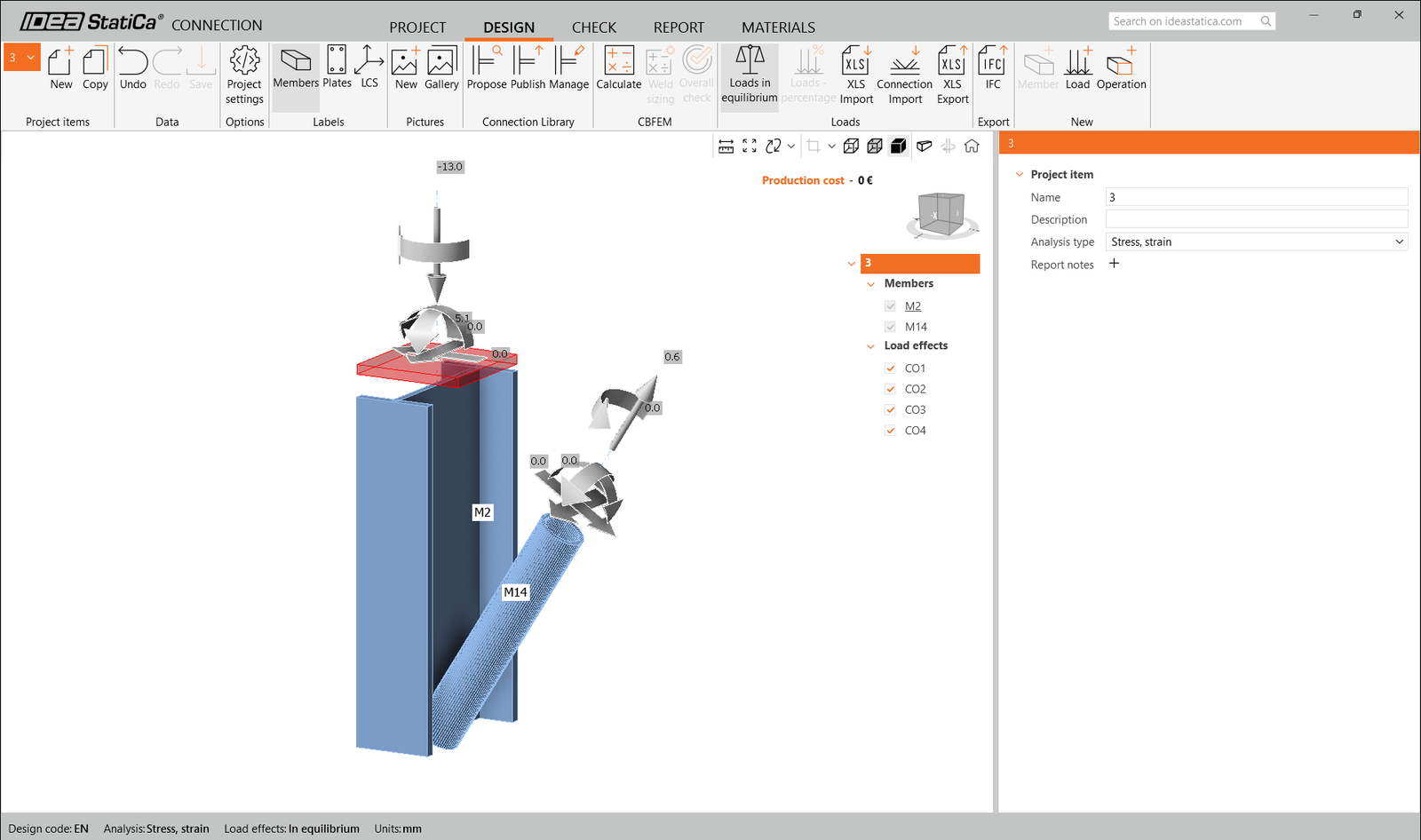
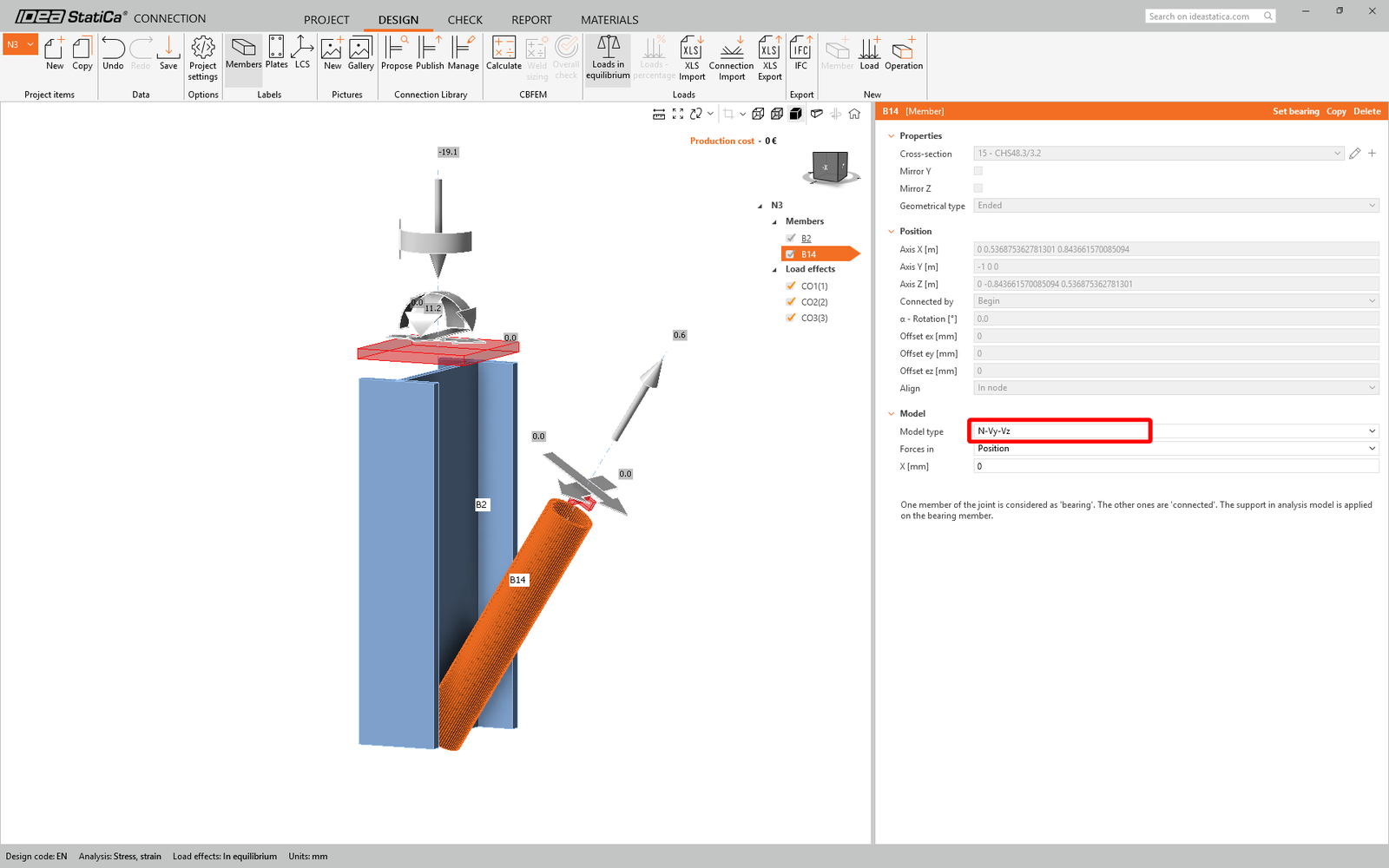
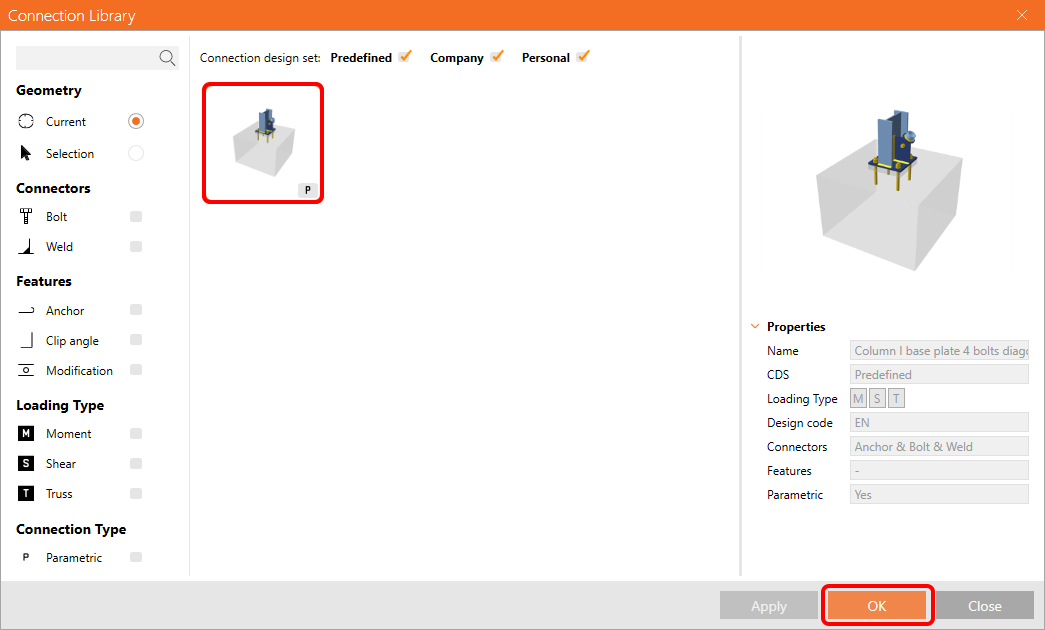
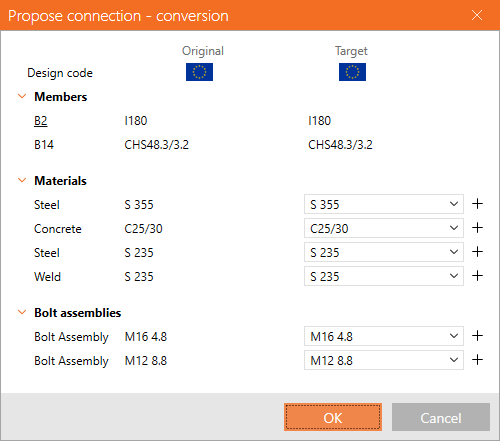
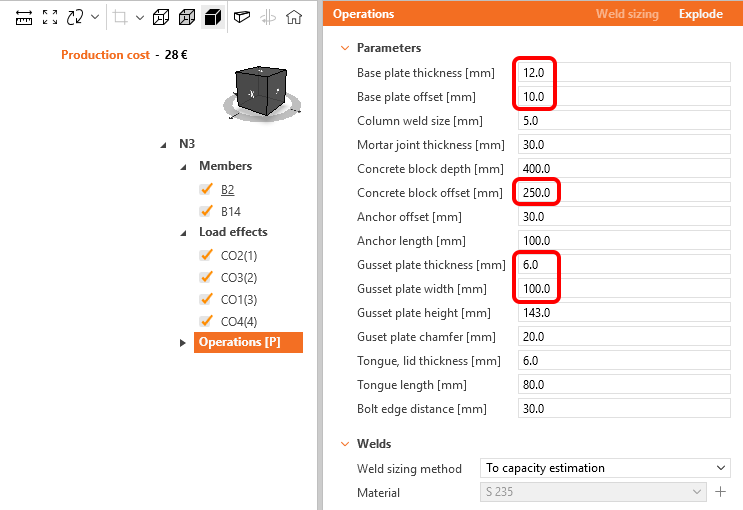
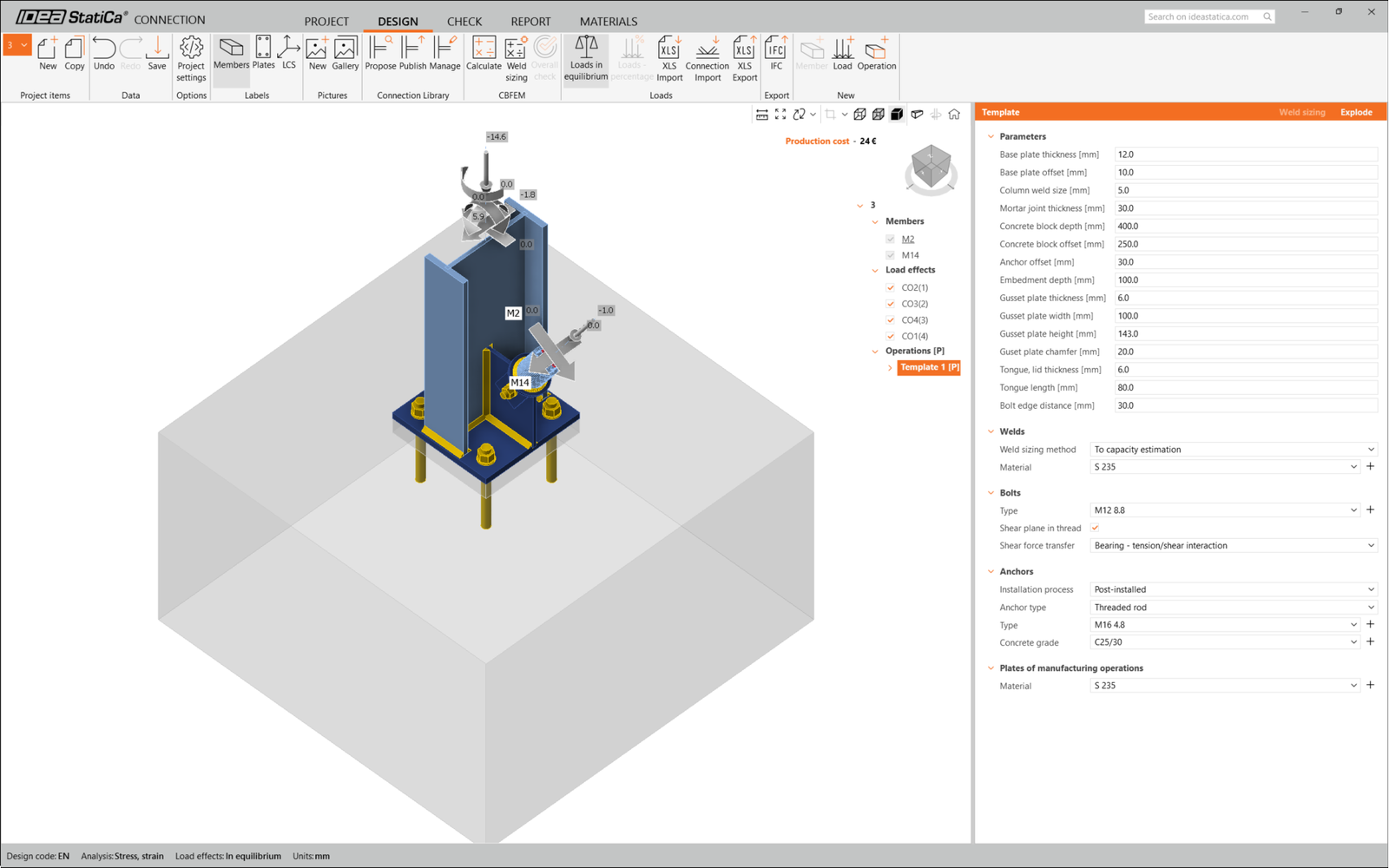
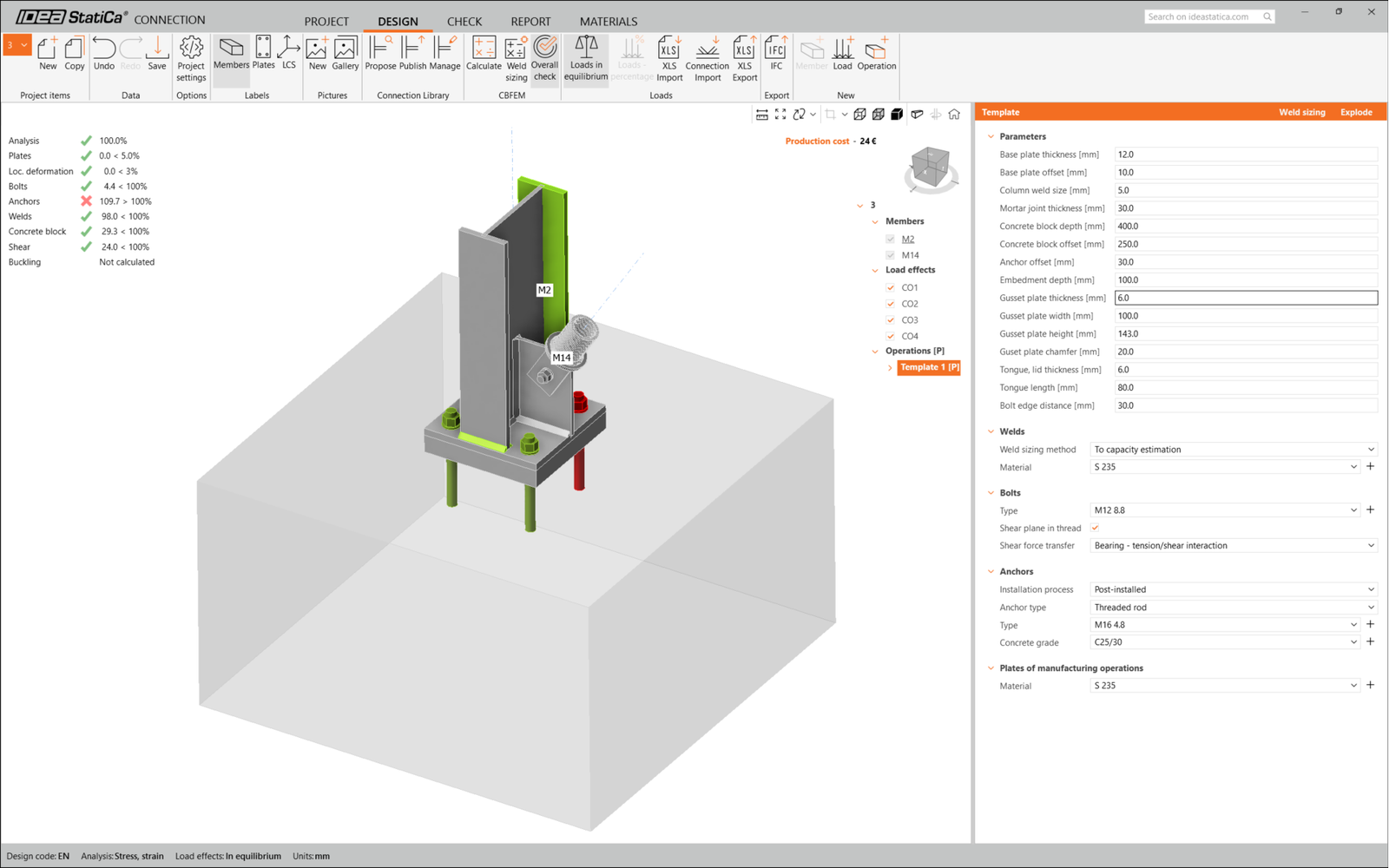
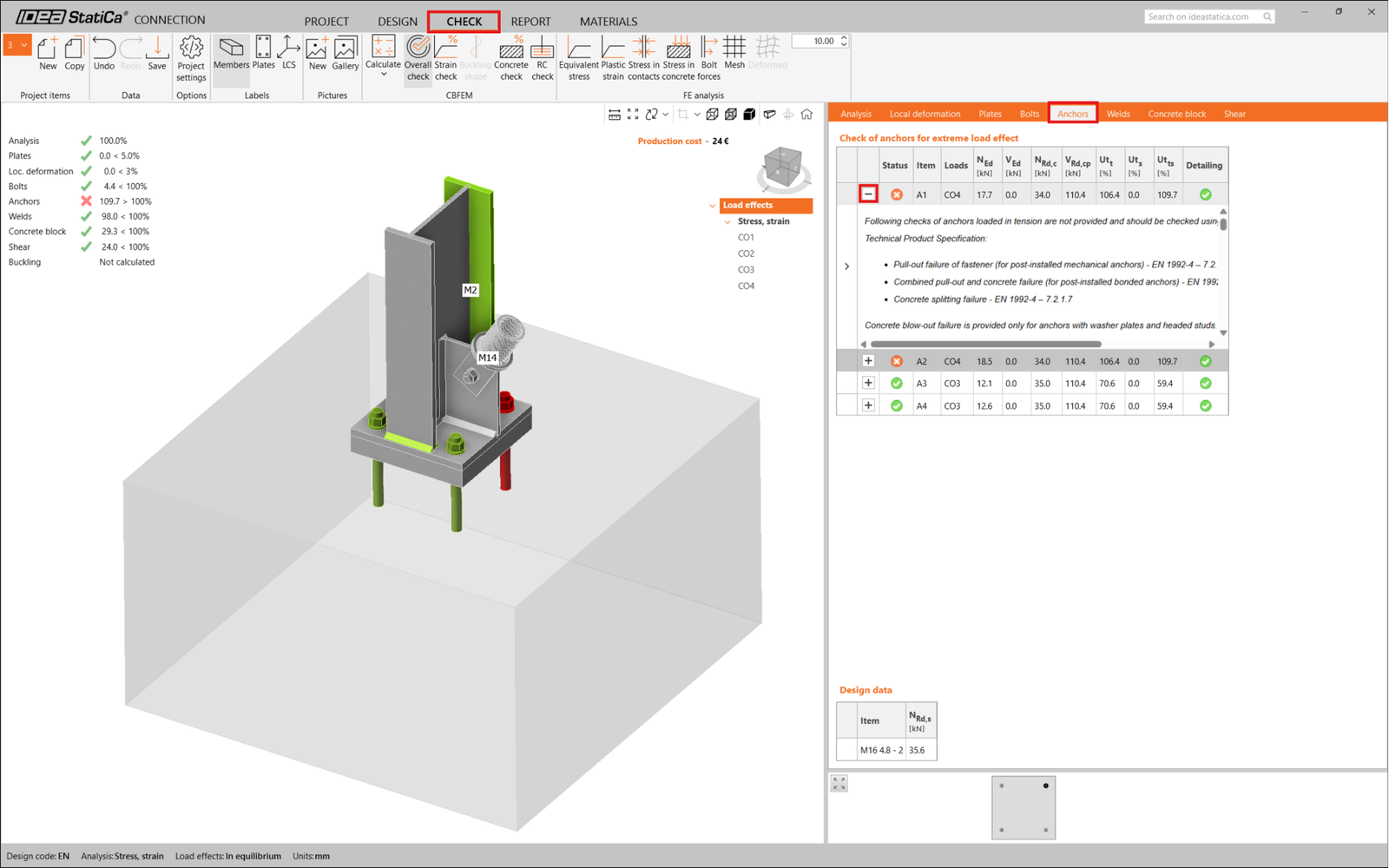
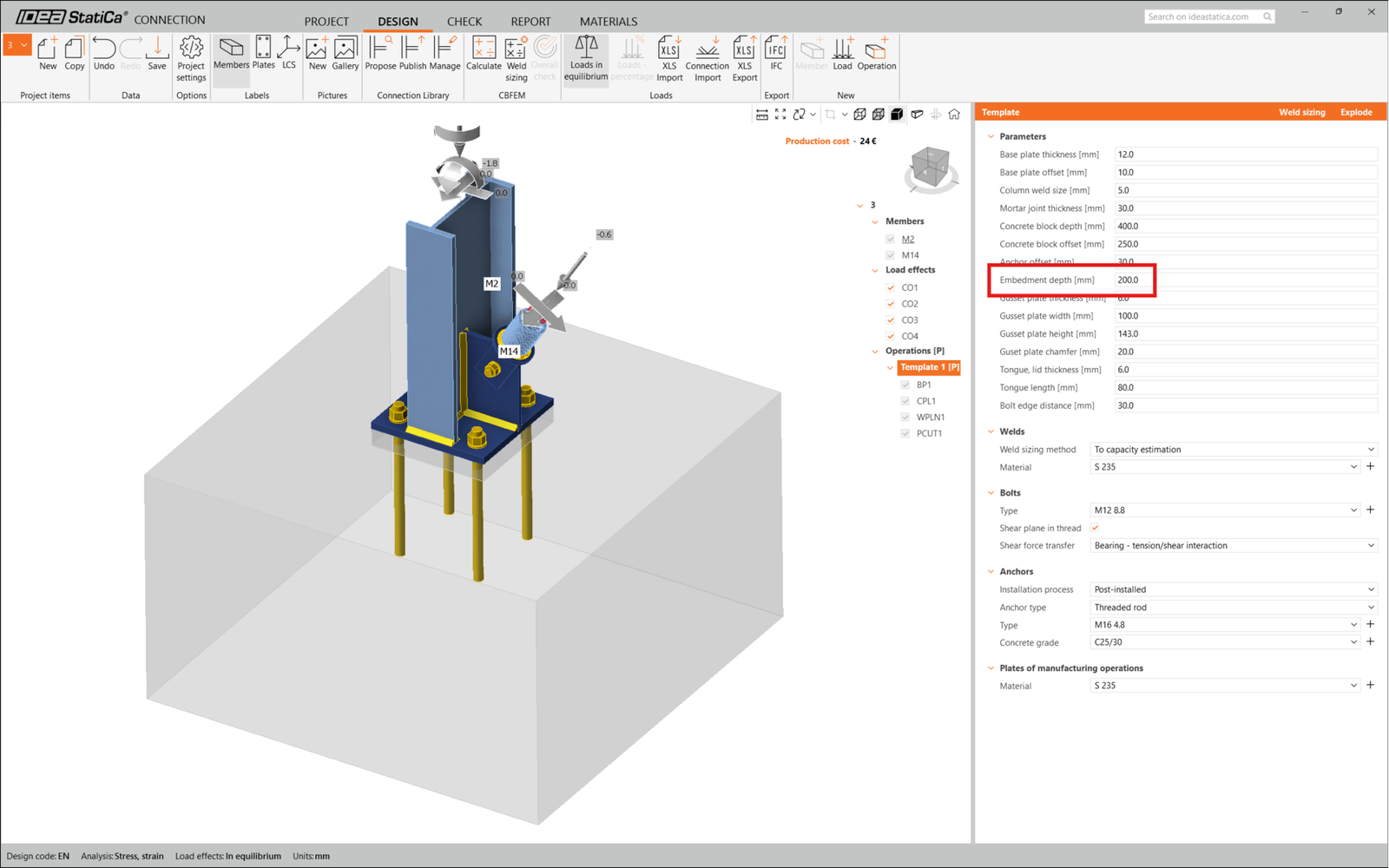
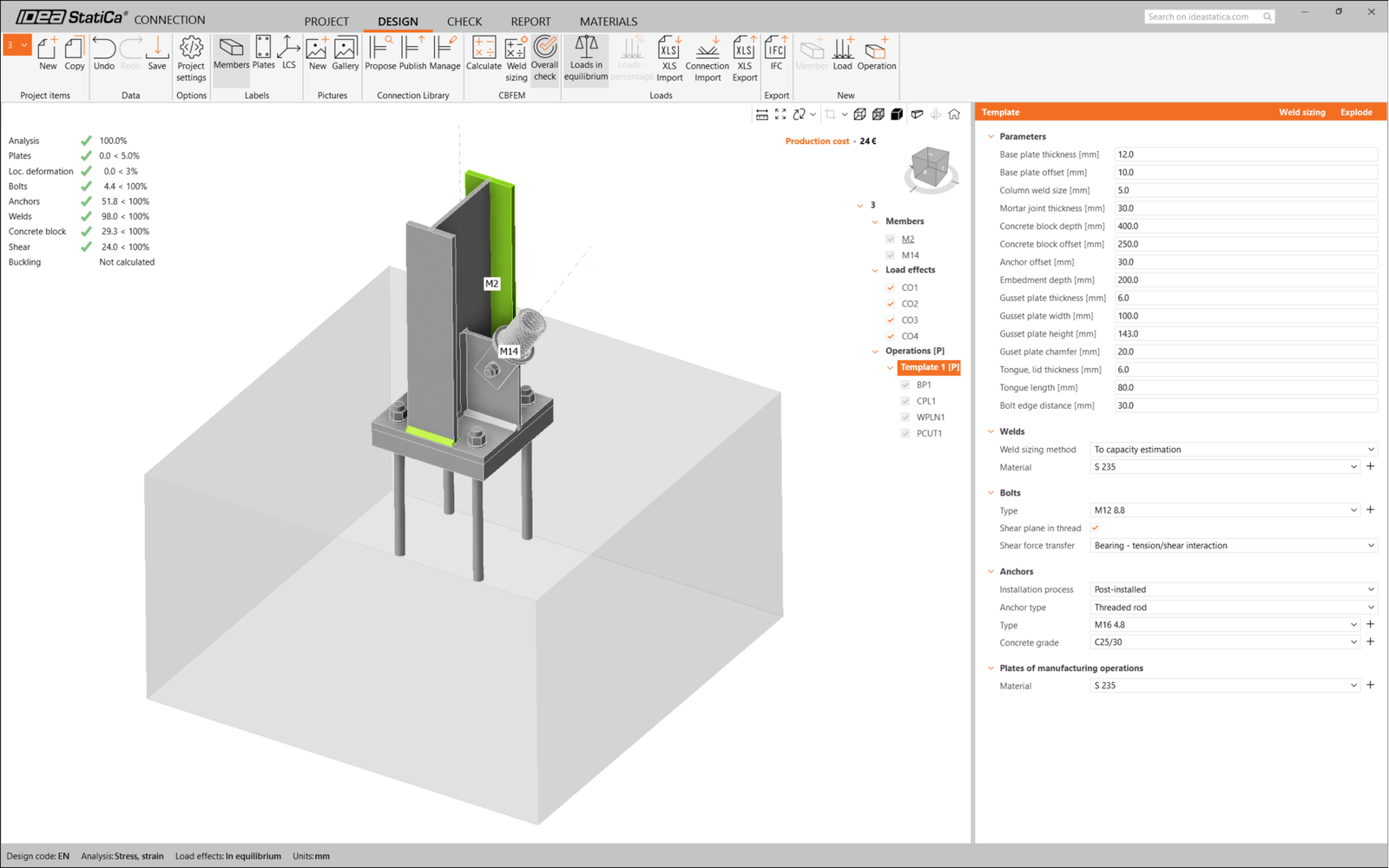
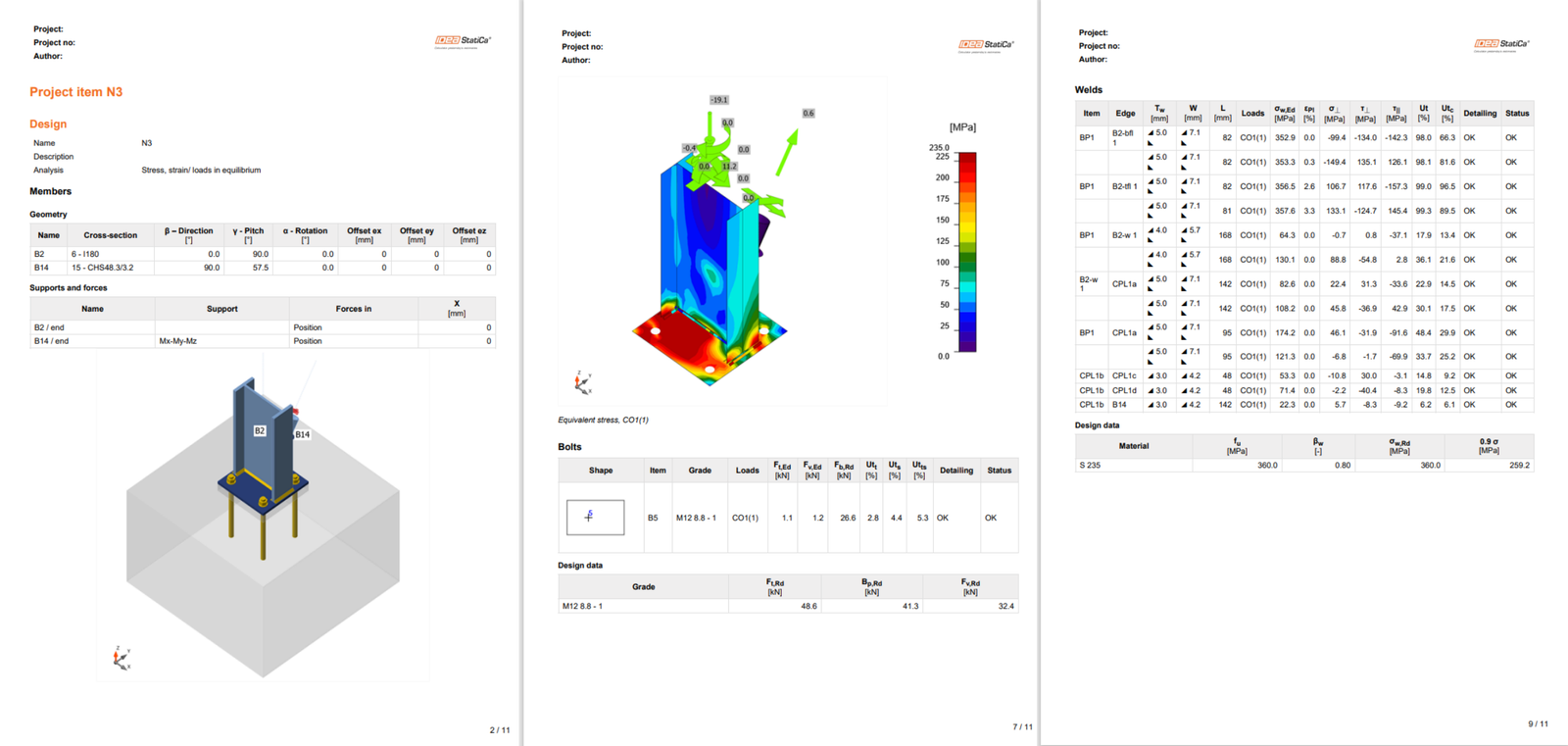
    "value": "<p>Do połączenia stężenia ukośnego użyjemy <a href=\"https://www.ideastatica.com/support-center/how-to-model-one-bolt-connection\" title=\"Single bolt connections\">połączenia jednośrubowego</a>. W przypadku tego typu połączenia należy również zmienić <strong>Typ modelu</strong> elementu stężenia na <strong>N-Vy-Vz</strong>. Wybierz stężenie z listy elementów i zmień typ modelu z listy rozwijanej.</p>\n<figure data-asset-id=\"5d50d85b-4229-49ee-bbfd-873de39cb3e9\" data-image-id=\"5d50d85b-4229-49ee-bbfd-873de39cb3e9\"><img src=\"https://assets-us-01.kc-usercontent.com:443/66e7a155-be94-0096-73e6-c55dfc7e5788/3b20dc20-a84b-4f94-bcd3-09ddb17bf97c/4.png\" data-asset-id=\"5d50d85b-4229-49ee-bbfd-873de39cb3e9\" data-image-id=\"5d50d85b-4229-49ee-bbfd-873de39cb3e9\" alt=\"\"></figure>\n<p>Do wygenerowania połączenia użyjemy&nbsp;Connection Library. Wybierz&nbsp;<strong>Propose</strong>&nbsp;a IDEA StatiCa zaproponuje możliwe rozwiązania dla&nbsp;bieżącej geometrii.</p>\n<figure data-asset-id=\"2f31bf0c-8a40-4523-99e3-38b883907181\" data-image-id=\"2f31bf0c-8a40-4523-99e3-38b883907181\"><img src=\"https://assets-us-01.kc-usercontent.com:443/66e7a155-be94-0096-73e6-c55dfc7e5788/fab207f8-65d2-436f-b113-7f344aac3621/5.png\" data-asset-id=\"2f31bf0c-8a40-4523-99e3-38b883907181\" data-image-id=\"2f31bf0c-8a40-4523-99e3-38b883907181\" alt=\"\"></figure>\n<p><a data-item-id=\"37fb73bf-dfd3-46d7-ae57-ee0e9c4cdb75\" href=\"\">Connection Library</a> pokazuje możliwe rozwiązania dla bieżącej geometrii. Wybierz szablon <strong>Column I base plate 4 bolts diagonal bolted weak</strong> i naciśnij <strong>OK</strong>.</p>\n<figure data-asset-id=\"aa53b13b-04e3-40c0-9da7-40d545a500d4\" data-image-id=\"aa53b13b-04e3-40c0-9da7-40d545a500d4\"><img src=\"https://assets-us-01.kc-usercontent.com:443/66e7a155-be94-0096-73e6-c55dfc7e5788/94d4a2a5-4eeb-49dd-8dbf-489fd86fa331/Design2B.png\" data-asset-id=\"aa53b13b-04e3-40c0-9da7-40d545a500d4\" data-image-id=\"aa53b13b-04e3-40c0-9da7-40d545a500d4\" alt=\"\"></figure>\n<p>Zaakceptuj proponowane wartości na karcie konwersji i naciśnij <strong>OK</strong>.</p>\n<figure data-asset-id=\"f5507c07-0f64-469a-ab46-2d9445d77865\" data-image-id=\"f5507c07-0f64-469a-ab46-2d9445d77865\"><img src=\"https://assets-us-01.kc-usercontent.com:443/66e7a155-be94-0096-73e6-c55dfc7e5788/19d7bb85-18e2-4a99-9b0c-6a210607d43c/Design2Ca.png\" data-asset-id=\"f5507c07-0f64-469a-ab46-2d9445d77865\" data-image-id=\"f5507c07-0f64-469a-ab46-2d9445d77865\" alt=\"\"></figure>\n<p>Edytuj parametry tego szablonu, aby dopasować go do żądanego projektu – <strong>Grubość płyty podstawy </strong>na 12 mm, <strong>Odsunięcie płyty podstawy</strong> na 10 mm, <strong>Odsunięcie bloku betonowego</strong> na 250 mm, <strong>Grubość blachy węzłowej </strong>na 6 mm oraz <strong>Szerokość blachy węzłowej</strong> na 100 mm.</p>\n<figure data-asset-id=\"817e17bf-e3c3-4e68-a523-504d1ae3af67\" data-image-id=\"817e17bf-e3c3-4e68-a523-504d1ae3af67\"><img src=\"https://assets-us-01.kc-usercontent.com:443/66e7a155-be94-0096-73e6-c55dfc7e5788/f9846e79-3e28-46e8-b99b-1399ced3e2b7/Design3Ca.png\" data-asset-id=\"817e17bf-e3c3-4e68-a523-504d1ae3af67\" data-image-id=\"817e17bf-e3c3-4e68-a523-504d1ae3af67\" alt=\"\"></figure>\n<p>Tak wygląda wstępne połączenie.</p>\n<figure data-asset-id=\"b7b90869-cc6f-447e-a24a-49a8d4e66356\" data-image-id=\"b7b90869-cc6f-447e-a24a-49a8d4e66356\"><img src=\"https://assets-us-01.kc-usercontent.com:443/66e7a155-be94-0096-73e6-c55dfc7e5788/2d1df896-2a42-43e1-bba1-eafbb7c25b54/RFEM%20-%20connection%20final.png\" data-asset-id=\"b7b90869-cc6f-447e-a24a-49a8d4e66356\" data-image-id=\"b7b90869-cc6f-447e-a24a-49a8d4e66356\" alt=\"\"></figure>\n<p>To kończy projekt połączenia dla płyty podstawy słupa ze stężeniem ukośnym.</p>\n<h2>Sprawdzenie normowe i raport</h2>\n<p>Uruchom teraz sprawdzenie normowe, używając ikony <strong>Oblicz </strong>w panelu <a data-item-id=\"06158daa-1491-4e83-ac34-4964bd5a3c63\" href=\"\">CBFEM</a> na górnej wstążce.<br>W <a data-item-id=\"b0a659df-8f92-4d1f-abb6-2efa02bad946\" href=\"\">IDEA StatiCa Connection</a> można przeprowadzać wiele różnych rodzajów analiz i sprawdzeń normowych. Więcej informacji znajdziesz <a href=\"https://www.ideastatica.com/support-center/checkbot-bulk-bim-workflows\" data-new-window=\"true\" title=\"Checkbot\" target=\"_blank\" rel=\"noopener noreferrer\">tutaj</a>.</p>\n<figure data-asset-id=\"aff89a25-eb57-41a4-a406-5ea04d04427b\" data-image-id=\"aff89a25-eb57-41a4-a406-5ea04d04427b\"><img src=\"https://assets-us-01.kc-usercontent.com:443/66e7a155-be94-0096-73e6-c55dfc7e5788/e2064bf5-fe9f-4f15-86fc-8e371ac2124f/8.png\" data-asset-id=\"aff89a25-eb57-41a4-a406-5ea04d04427b\" data-image-id=\"aff89a25-eb57-41a4-a406-5ea04d04427b\" alt=\"\"></figure>\n<p>Wyniki mogą być niedopuszczalne. W tym przypadku kotwy nie spełniają wymagań ze względu na zbyt małą wartość obliczeniową nośności.</p>\n<figure data-asset-id=\"10916e97-a2ac-4cef-90f8-e0212129bd66\" data-image-id=\"10916e97-a2ac-4cef-90f8-e0212129bd66\"><img src=\"https://assets-us-01.kc-usercontent.com:443/66e7a155-be94-0096-73e6-c55dfc7e5788/6707198c-521f-4f35-b163-120790d09bba/RFEM%20-%20connection%20failing.png\" data-asset-id=\"10916e97-a2ac-4cef-90f8-e0212129bd66\" data-image-id=\"10916e97-a2ac-4cef-90f8-e0212129bd66\" alt=\"\"></figure>\n<p>Możesz przejść do karty <strong>Sprawdzenie</strong>, aby przejrzeć wyniki i dokładniej przyjrzeć się kotwom, rozwijając obliczenia za pomocą symbolu '<strong>+</strong>'. &nbsp;Widać, że kotwy nie spełniają wymagań na rozciąganie w bloku betonowym.</p>\n<figure data-asset-id=\"1bfcf362-ab36-4e14-b774-fb5e46663670\" data-image-id=\"1bfcf362-ab36-4e14-b774-fb5e46663670\"><img src=\"https://assets-us-01.kc-usercontent.com:443/66e7a155-be94-0096-73e6-c55dfc7e5788/fa7baf74-b381-4f4f-aab8-1a4b1f4e914a/RFEM%20-%20connection%20failing.png\" data-asset-id=\"1bfcf362-ab36-4e14-b774-fb5e46663670\" data-image-id=\"1bfcf362-ab36-4e14-b774-fb5e46663670\" alt=\"\"></figure>\n<p>Należy zoptymalizować projekt, aby znaleźć rozwiązanie spełniające wymagania. Wróć do karty <strong>Projekt</strong>, kliknij <strong>operację</strong> i zmień <strong>Długość zakotwienia</strong> na 200 mm. Następnie ponownie uruchom analizę i sprawdzenie normowe.</p>\n<figure data-asset-id=\"7fbf37d6-f5af-44a4-ae1d-3eb76a2823ed\" data-image-id=\"7fbf37d6-f5af-44a4-ae1d-3eb76a2823ed\"><img src=\"https://assets-us-01.kc-usercontent.com:443/66e7a155-be94-0096-73e6-c55dfc7e5788/4f9aa168-f31c-4230-a94e-5fb7425cc825/RFEM%20-%20connection%20length.png\" data-asset-id=\"7fbf37d6-f5af-44a4-ae1d-3eb76a2823ed\" data-image-id=\"7fbf37d6-f5af-44a4-ae1d-3eb76a2823ed\" alt=\"\"></figure>\n<p>Po zakończeniu sprawdzenia normowego na karcie <strong>Raport</strong> możesz utworzyć raport zawierający wyniki i diagramy dla modelu <a data-item-id=\"b0a659df-8f92-4d1f-abb6-2efa02bad946\" href=\"\">połączenia</a>.</p>\n<figure data-asset-id=\"41af0bb7-1cc4-4e0b-8932-8c5f879cf7a0\" data-image-id=\"41af0bb7-1cc4-4e0b-8932-8c5f879cf7a0\"><img src=\"https://assets-us-01.kc-usercontent.com:443/66e7a155-be94-0096-73e6-c55dfc7e5788/2b3f0982-263a-4069-a5b7-14778a184e30/RFEM%20-%20ok.png\" data-asset-id=\"41af0bb7-1cc4-4e0b-8932-8c5f879cf7a0\" data-image-id=\"41af0bb7-1cc4-4e0b-8932-8c5f879cf7a0\" alt=\"\"></figure>\n<p>Raport można wydrukować lub zapisać w kilku formatach. Więcej informacji znajdziesz <a data-item-id=\"dfedaf85-c16f-5228-849c-0bfe09e9e8d1\" href=\"\">tutaj</a>.</p>\n<figure data-asset-id=\"2e83a5fc-2434-4927-b3e2-463303abf93e\" data-image-id=\"2e83a5fc-2434-4927-b3e2-463303abf93e\"><img src=\"https://assets-us-01.kc-usercontent.com:443/66e7a155-be94-0096-73e6-c55dfc7e5788/6c2cdb78-c06c-4ef2-87a8-e8e480861647/report.png\" data-asset-id=\"2e83a5fc-2434-4927-b3e2-463303abf93e\" data-image-id=\"2e83a5fc-2434-4927-b3e2-463303abf93e\" alt=\"\"></figure>\n<p><strong>Zapisz </strong>to połączenie i wróć do okna Checkbot (możesz pozostawić okno Connection otwarte).</p>\n<p>W Checkbot zobaczysz zielony znacznik obok połączenia oraz węzeł wypełniony zielonym kolorem. Oznacza to, że połączenie przeszło wszystkie sprawdzenia normowe. W panelu Connection możesz również zobaczyć reprezentację połączenia oraz podsumowanie wyników sprawdzenia normowego.</p>\n<figure data-asset-id=\"0c24db03-0d22-413b-94f7-54a884235afa\" data-image-id=\"0c24db03-0d22-413b-94f7-54a884235afa\"><img src=\"https://assets-us-01.kc-usercontent.com:443/66e7a155-be94-0096-73e6-c55dfc7e5788/c9c367ee-919a-477e-adea-097a5792034f/RFEM%20-%20ok%20Checkbot.png\" data-asset-id=\"0c24db03-0d22-413b-94f7-54a884235afa\" data-image-id=\"0c24db03-0d22-413b-94f7-54a884235afa\" alt=\"\"></figure>\n<p>W poniższym przykładzie widać, że tylko jedno połączenie przeszło odpowiednie sprawdzenie normowe, podczas gdy pozostałe połączenia nie zostały jeszcze zaprojektowane.</p>\n<figure data-asset-id=\"37a17af2-1908-46df-bf9b-dc3217b22840\" data-image-id=\"37a17af2-1908-46df-bf9b-dc3217b22840\"><img src=\"https://assets-us-01.kc-usercontent.com:443/66e7a155-be94-0096-73e6-c55dfc7e5788/33edf21a-db64-4609-8de1-a452d0a8df46/RFEM%20-%20ok%20Checkbot%202.png\" data-asset-id=\"37a17af2-1908-46df-bf9b-dc3217b22840\" data-image-id=\"37a17af2-1908-46df-bf9b-dc3217b22840\" alt=\"\"></figure>\n<p>Możesz kontynuować projektowanie pozostałych połączeń, jedno po drugim lub korzystając z <a data-item-id=\"4074acd5-0f5f-40f9-aa70-ac1ff373919d\" href=\"\">przepływów pracy zbiorczej</a>.</p>"

  },
  "linked_items": {
    "name": "Linked items",
    "type": "modular_content",
    "value": [],
    "linkedItems": []
  },
  "regions": {
    "name": "Region",
    "type": "taxonomy",
    "value": [
      {
        "name": "EMEA",
        "codename": "emea"
      },
      {
        "name": "APAC",
        "codename": "apac"
      }
    ],
    "taxonomyGroup": "region"
  },
  "product_groups": {
    "name": "Product group",
    "type": "taxonomy",
    "value": [
      {
        "name": "Connection design",
        "codename": "connection_design"
      },
      {
        "name": "Steel",
        "codename": "steel"
      }
    ],
    "taxonomyGroup": "product_group"
  },
  "support_center_article_types": {
    "name": "Support center article",
    "type": "taxonomy",
    "value": [
      {
        "name": "Knowledge base",
        "codename": "knowledgebase_article"
      }
    ],
    "taxonomyGroup": "support_center_article"
  },
  "expertise_levels": {
    "name": "Expertise level",
    "type": "taxonomy",
    "value": [
      {
        "name": "Beginner",
        "codename": "beginner"
      },
      {
        "name": "Intermediate",
        "codename": "intermediate"
      }
    ],
    "taxonomyGroup": "expertise_level"
  },
  "labels": {
    "name": "Labels",
    "type": "taxonomy",
    "value": [
      {
        "name": "BIM link",
        "codename": "bim_links"
      }
    ],
    "taxonomyGroup": "labels"
  },
  "attachments__files": {
    "name": "Attachments",
    "type": "asset",
    "value": []
  },
  "content_priority__value": {
    "name": "Content priority value",
    "type": "number",
    "value": null
  },
  "options": {
    "name": "Options",
    "type": "multiple_choice",
    "value": []
  },
  "url_slug": {
    "name": "Url slug",
    "type": "url_slug",
    "value": "design"
  },
  "unique_url_slug": {
    "name": "Unique URL slug",
    "type": "custom",
    "value": "[\"design\",\"[autogenerated]\"]"
  },
  "content_settings__sitemap": {
    "name": "Show in sitemap",
    "type": "multiple_choice",
    "value": [
      {
        "name": "default",
        "codename": "default"
      }
    ]
  },
  "content_settings__robots": {
    "name": "Search engine indexing",
    "type": "multiple_choice",
    "value": [
      {
        "name": "default",
        "codename": "default"
      }
    ]
  },
  "content_settings__is_hidden": {
    "name": "Hidden nested content",
    "type": "multiple_choice",
    "value": [
      {
        "name": "yes",
        "codename": "yes"
      }
    ]
  },
  "content_settings__is_topped": {
    "name": "Topped",
    "type": "multiple_choice",
    "value": []
  },
  "metadata__page_title": {
    "name": "Page title",
    "type": "text",
    "value": "Konstrukcyjny projekt śrubowego połączenia stalowego"
  },
  "metadata__page_description": {
    "name": "Page description",
    "type": "text",
    "value": "Samouczek krok po kroku IDEA StatiCa dotyczący konstrukcyjnego projektu śrubowego połączenia stalowego w oprogramowaniu do analizy naprężeń."
  },
  "metadata__page_keywords": {
    "name": "Page keywords",
    "type": "text",
    "value": ""
  },
  "metadata__canonical_url": {
    "name": "Canonical URL",
    "type": "text",
    "value": ""
  },
  "metadata__og_title": {
    "name": "OG:title",
    "type": "text",
    "value": ""
  },
  "metadata__og_description": {
    "name": "OG:description",
    "type": "text",
    "value": ""
  },
  "metadata__og_image": {
    "name": "OG:image",
    "type": "asset",
    "value": []
  },
  "translation__translation_connector": {
    "name": "Translation Connector",
    "type": "taxonomy",
    "value": [],
    "taxonomyGroup": "languages"
  },
  "translation__force_translation": {
    "name": "Force translation",
    "type": "multiple_choice",
    "value": []
  },
  "translation__translate_standalone_nested_content_items": {
    "name": "Translate standalone nested content items",
    "type": "multiple_choice",
    "value": []
  },
  "translation__last_translation": {
    "images": [],
    "linkedItemCodenames": [],
    "linkedItems": [],
    "links": [],
    "name": "Last translation",
    "type": "rich_text",
    "value": "<p>Translation info:</p>\n<ul>\n  <li>cs-CZ: Never translated</li>\n  <li>de-DE: Never translated</li>\n  <li>en-US: Never translated</li>\n  <li>es-ES: Never translated</li>\n  <li>fr-FR: Never translated</li>\n  <li>hu-HU: Never translated</li>\n  <li>it-IT: Never translated</li>\n  <li>nl-NL: Never translated</li>\n  <li>pl-PL: Translated on 29.4.2026 13:34</li>\n  <li>pt-PT: Never translated</li>\n  <li>ro-RO: Never translated</li>\n  <li>ru-RU: Never translated</li>\n  <li>th-TH: Never translated</li>\n  <li>zh-CN: Never translated</li>\n</ul>\n<p>Publish info:</p>\n<ul>\n  <li>Publish info is available only in the main language</li>\n</ul>"
  },
  "translation__ai_translated": {
    "name": "AI translated",
    "type": "multiple_choice",
    "value": [
      {
        "name": "Translated",
        "codename": "translated"
      }
    ]
  },
  "page_tree_settings__page_label": {
    "name": "Page label",
    "type": "text",
    "value": ""
  },
  "page_tree_settings__path_segment": {
    "name": "Path segment",
    "type": "text",
    "value": ""
  },
  "page_tree_settings__breadcrumb_style": {
    "name": "Breadcrumb style",
    "type": "multiple_choice",
    "value": []
  },
  "page_tree_settings__hide_in_breadcrumbs": {
    "name": "Hide in breadcrumbs",
    "type": "multiple_choice",
    "value": []
  }
}

Widget #NaN: support_center_article

Name: General BIM Link connection tutorial - Synchronize model

ID: 69626664-8ef3-4051-80e0-33bc98c97204

Show Raw Data
{
  "title": {
    "name": "Main headline (H1)",
    "type": "text",
    "value": "Synchronizuj połączenia"
  },
  "preview_image": {
    "name": "Preview image",
    "type": "asset",
    "value": []
  },
  "post_date": {
    "name": "Post date",
    "type": "date_time",
    "value": null,
    "displayTimeZone": null
  },
  "perex_content": {
    "name": "Lead paragraph",
    "type": "text",
    "value": ""
  },
  "content": {
    "images": [
      {
        "description": null,
        "imageId": "18a161cd-b9f4-4804-94c8-b0d5cd4daa30",
        "url": "https://assets-us-01.kc-usercontent.com:443/66e7a155-be94-0096-73e6-c55dfc7e5788/38ea9cc2-af57-4394-b1b7-35e74da0f274/Synchronize7E.png",
        "height": 572,
        "width": 699
      },
      {
        "description": null,
        "imageId": "4344be68-957d-4588-a2e3-aaca5fb68891",
        "url": "https://assets-us-01.kc-usercontent.com:443/66e7a155-be94-0096-73e6-c55dfc7e5788/5244afa6-7e11-439b-ba18-497e5fe6daf3/synch1.png",
        "height": 169,
        "width": 1920
      },
      {
        "description": null,
        "imageId": "3a97df76-4575-4692-a16c-46585dd7ba0c",
        "url": "https://assets-us-01.kc-usercontent.com:443/66e7a155-be94-0096-73e6-c55dfc7e5788/c129071a-c72c-49ee-8d38-9fb417ffbb35/16..png",
        "height": 1200,
        "width": 1920
      },
      {
        "description": null,
        "imageId": "dff2a457-eb0f-4571-ae70-9a094f04185f",
        "url": "https://assets-us-01.kc-usercontent.com:443/66e7a155-be94-0096-73e6-c55dfc7e5788/7cefb65e-f0d0-4361-8b72-d1d0afd73cb3/synch3.png",
        "height": 169,
        "width": 1920
      }
    ],
    "linkedItemCodenames": [],
    "linkedItems": [],
    "links": [
      {
        "codename": "checkbot",
        "linkId": "caeb1a6c-2621-446f-8005-4d2799496a39",
        "urlSlug": "checkbot",
        "type": "landing_page"
      }
    ],
    "name": "Content",
    "type": "rich_text",
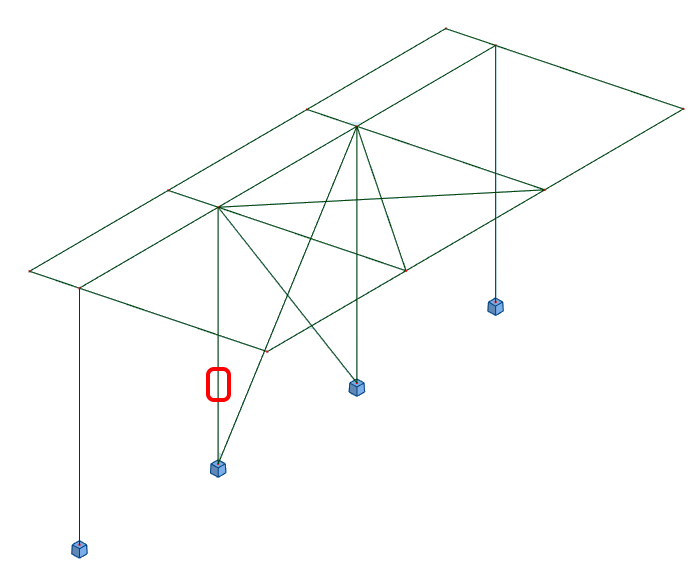
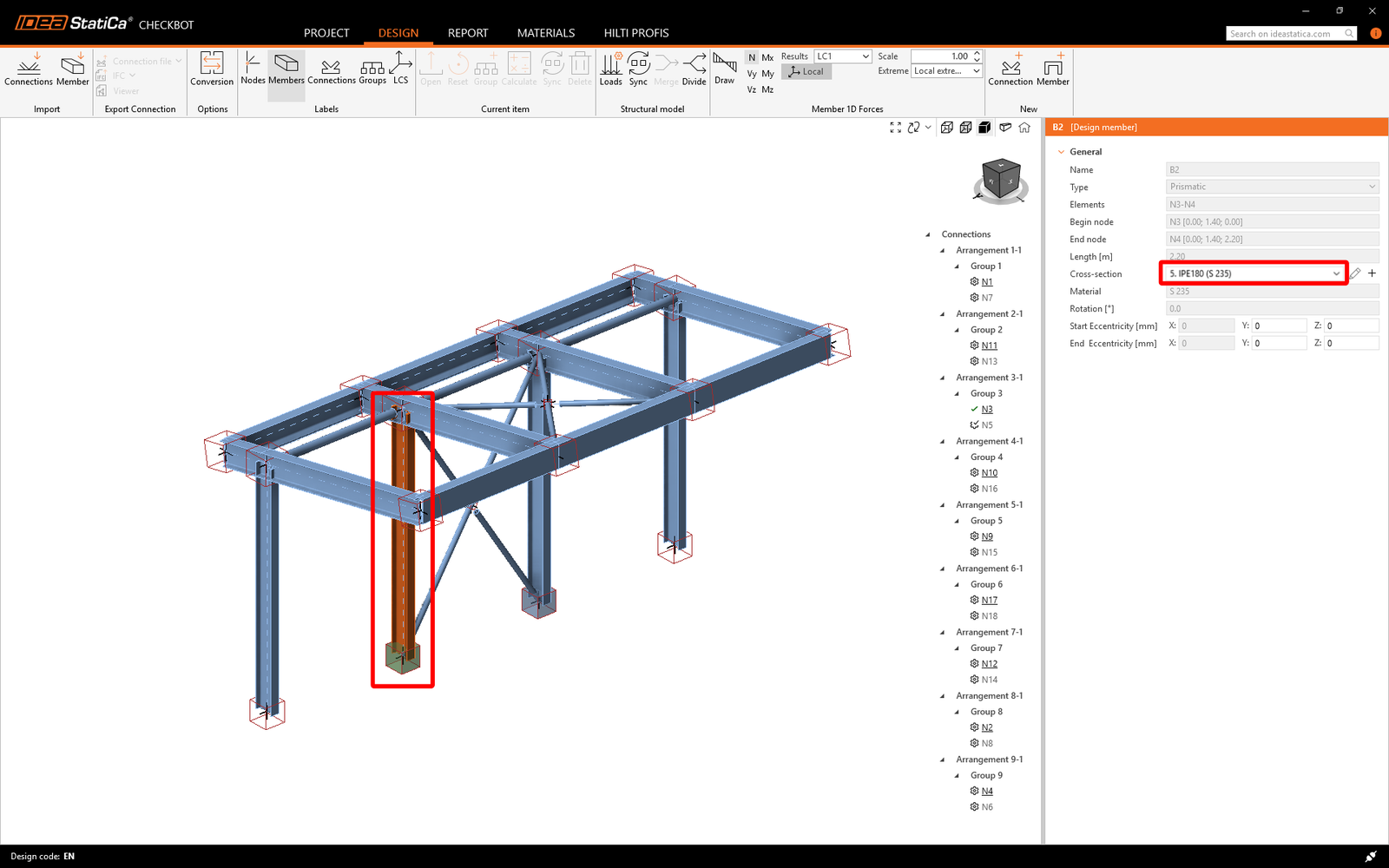
    "value": "<p>Czasami w modelu MES wprowadzane są zmiany, takie jak inny przekrój elementu lub zwiększone obciążenie. Można je synchronizować między <a data-item-id=\"caeb1a6c-2621-446f-8005-4d2799496a39\" href=\"\">Checkbot</a> a modelem MES.</p>\n<p>Dostępne są dwie możliwości:</p>\n<ul>\n  <li>Synchronizacja <strong>bieżącego elementu</strong> (jeśli wybrano jedno lub więcej złączy)</li>\n  <li>Synchronizacja całego zaimportowanego <strong>modelu konstrukcji</strong></li>\n</ul>\n<p>Aby przetestować tę funkcję, można zmienić przekrój elementu w aplikacji MES. Pamiętaj, aby ponownie przeprowadzić analizę modelu MES w celu synchronizacji aktualnych wyników.</p>\n<figure data-asset-id=\"18a161cd-b9f4-4804-94c8-b0d5cd4daa30\" data-image-id=\"18a161cd-b9f4-4804-94c8-b0d5cd4daa30\"><img src=\"https://assets-us-01.kc-usercontent.com:443/66e7a155-be94-0096-73e6-c55dfc7e5788/38ea9cc2-af57-4394-b1b7-35e74da0f274/Synchronize7E.png\" data-asset-id=\"18a161cd-b9f4-4804-94c8-b0d5cd4daa30\" data-image-id=\"18a161cd-b9f4-4804-94c8-b0d5cd4daa30\" alt=\"\"></figure>\n<p>W Checkbot wybierz projektowane połączenia (może ich być więcej niż jedno) i z panelu <strong>Bieżący element</strong> wybierz <strong>Synchronizuj</strong>.</p>\n<figure data-asset-id=\"4344be68-957d-4588-a2e3-aaca5fb68891\" data-image-id=\"4344be68-957d-4588-a2e3-aaca5fb68891\"><img src=\"https://assets-us-01.kc-usercontent.com:443/66e7a155-be94-0096-73e6-c55dfc7e5788/5244afa6-7e11-439b-ba18-497e5fe6daf3/synch1.png\" data-asset-id=\"4344be68-957d-4588-a2e3-aaca5fb68891\" data-image-id=\"4344be68-957d-4588-a2e3-aaca5fb68891\" alt=\"\"></figure>\n<p>Projekt Checkbot zostanie zaktualizowany. Wcześniej ukończony projekt połączenia zostaje zachowany, ale sprawdzenia normowe zostaną unieważnione. Widać, że słup jest teraz zaktualizowany – zgodnie ze zmianą w modelu MES.</p>\n<figure data-asset-id=\"3a97df76-4575-4692-a16c-46585dd7ba0c\" data-image-id=\"3a97df76-4575-4692-a16c-46585dd7ba0c\"><img src=\"https://assets-us-01.kc-usercontent.com:443/66e7a155-be94-0096-73e6-c55dfc7e5788/c129071a-c72c-49ee-8d38-9fb417ffbb35/16..png\" data-asset-id=\"3a97df76-4575-4692-a16c-46585dd7ba0c\" data-image-id=\"3a97df76-4575-4692-a16c-46585dd7ba0c\" alt=\"\"></figure>\n<p>Wystarczy ponownie wykonać sprawdzenie normowe wyróżnionych połączeń, wybierając <strong>Oblicz </strong>z panelu <strong>Bieżący element</strong>.<br>Jeśli połączenia nie dają pożądanych wyników, można je ponownie otworzyć w celu optymalizacji projektu (tj. wzmocnienia, jeśli nie spełniają sprawdzenia normowego, lub odciążenia, jeśli stopień wykorzystania jest zbyt niski).</p>\n<p>Większe zmiany w modelu MES mogą wymagać synchronizacji całego modelu konstrukcji w Checkbot, zamiast tylko bieżącego elementu.</p>\n<figure data-asset-id=\"dff2a457-eb0f-4571-ae70-9a094f04185f\" data-image-id=\"dff2a457-eb0f-4571-ae70-9a094f04185f\"><img src=\"https://assets-us-01.kc-usercontent.com:443/66e7a155-be94-0096-73e6-c55dfc7e5788/7cefb65e-f0d0-4361-8b72-d1d0afd73cb3/synch3.png\" data-asset-id=\"dff2a457-eb0f-4571-ae70-9a094f04185f\" data-image-id=\"dff2a457-eb0f-4571-ae70-9a094f04185f\" alt=\"\"></figure>\n<p>Należy pamiętać, że nowo dodanych elementów ani obciążeń nie można synchronizować – w takim przypadku należy utworzyć nowy projekt Checkbot.</p>"
  },
  "linked_items": {
    "name": "Linked items",
    "type": "modular_content",
    "value": [],
    "linkedItems": []
  },
  "regions": {
    "name": "Region",
    "type": "taxonomy",
    "value": [
      {
        "name": "EMEA",
        "codename": "emea"
      },
      {
        "name": "AMER",
        "codename": "amer"
      },
      {
        "name": "APAC",
        "codename": "apac"
      }
    ],
    "taxonomyGroup": "region"
  },
  "product_groups": {
    "name": "Product group",
    "type": "taxonomy",
    "value": [
      {
        "name": "Connection design",
        "codename": "connection_design"
      },
      {
        "name": "Steel",
        "codename": "steel"
      }
    ],
    "taxonomyGroup": "product_group"
  },
  "support_center_article_types": {
    "name": "Support center article",
    "type": "taxonomy",
    "value": [
      {
        "name": "Knowledge base",
        "codename": "knowledgebase_article"
      }
    ],
    "taxonomyGroup": "support_center_article"
  },
  "expertise_levels": {
    "name": "Expertise level",
    "type": "taxonomy",
    "value": [
      {
        "name": "Beginner",
        "codename": "beginner"
      },
      {
        "name": "Intermediate",
        "codename": "intermediate"
      }
    ],
    "taxonomyGroup": "expertise_level"
  },
  "labels": {
    "name": "Labels",
    "type": "taxonomy",
    "value": [
      {
        "name": "Connection",
        "codename": "connection"
      },
      {
        "name": "Checkbot",
        "codename": "checkbot"
      }
    ],
    "taxonomyGroup": "labels"
  },
  "attachments__files": {
    "name": "Attachments",
    "type": "asset",
    "value": []
  },
  "content_priority__value": {
    "name": "Content priority value",
    "type": "number",
    "value": null
  },
  "options": {
    "name": "Options",
    "type": "multiple_choice",
    "value": []
  },
  "url_slug": {
    "name": "Url slug",
    "type": "url_slug",
    "value": "synchronize-connections"
  },
  "unique_url_slug": {
    "name": "Unique URL slug",
    "type": "custom",
    "value": "[\"synchronize-connections\",\"[autogenerated]\"]"
  },
  "content_settings__sitemap": {
    "name": "Show in sitemap",
    "type": "multiple_choice",
    "value": [
      {
        "name": "default",
        "codename": "default"
      }
    ]
  },
  "content_settings__robots": {
    "name": "Search engine indexing",
    "type": "multiple_choice",
    "value": [
      {
        "name": "default",
        "codename": "default"
      }
    ]
  },
  "content_settings__is_hidden": {
    "name": "Hidden nested content",
    "type": "multiple_choice",
    "value": [
      {
        "name": "yes",
        "codename": "yes"
      }
    ]
  },
  "content_settings__is_topped": {
    "name": "Topped",
    "type": "multiple_choice",
    "value": []
  },
  "metadata__page_title": {
    "name": "Page title",
    "type": "text",
    "value": "Synchronizacja modelu połączenia stalowego między CAD/MES a Checkbot"
  },
  "metadata__page_description": {
    "name": "Page description",
    "type": "text",
    "value": "IDEA StatiCa – samouczek krok po kroku dotyczący synchronizacji połączenia stalowego między MES/CAD a Checkbot. Projektowanie konstrukcyjne spawanych i śrubowych połączeń stalowych."
  },
  "metadata__page_keywords": {
    "name": "Page keywords",
    "type": "text",
    "value": ""
  },
  "metadata__canonical_url": {
    "name": "Canonical URL",
    "type": "text",
    "value": ""
  },
  "metadata__og_title": {
    "name": "OG:title",
    "type": "text",
    "value": ""
  },
  "metadata__og_description": {
    "name": "OG:description",
    "type": "text",
    "value": ""
  },
  "metadata__og_image": {
    "name": "OG:image",
    "type": "asset",
    "value": []
  },
  "translation__translation_connector": {
    "name": "Translation Connector",
    "type": "taxonomy",
    "value": [],
    "taxonomyGroup": "languages"
  },
  "translation__force_translation": {
    "name": "Force translation",
    "type": "multiple_choice",
    "value": []
  },
  "translation__translate_standalone_nested_content_items": {
    "name": "Translate standalone nested content items",
    "type": "multiple_choice",
    "value": []
  },
  "translation__last_translation": {
    "images": [],
    "linkedItemCodenames": [],
    "linkedItems": [],
    "links": [],
    "name": "Last translation",
    "type": "rich_text",
    "value": "<p>Translation info:</p>\n<ul>\n  <li>cs-CZ: Never translated</li>\n  <li>de-DE: Never translated</li>\n  <li>en-US: Never translated</li>\n  <li>es-ES: Never translated</li>\n  <li>fr-FR: Never translated</li>\n  <li>hu-HU: Never translated</li>\n  <li>it-IT: Never translated</li>\n  <li>nl-NL: Never translated</li>\n  <li>pl-PL: Translated on 29.4.2026 13:31</li>\n  <li>pt-PT: Never translated</li>\n  <li>ro-RO: Never translated</li>\n  <li>ru-RU: Never translated</li>\n  <li>th-TH: Never translated</li>\n  <li>zh-CN: Never translated</li>\n</ul>\n<p>Publish info:</p>\n<ul>\n  <li>Publish info is available only in the main language</li>\n</ul>"
  },
  "translation__ai_translated": {
    "name": "AI translated",
    "type": "multiple_choice",
    "value": [
      {
        "name": "Translated",
        "codename": "translated"
      }
    ]
  },
  "page_tree_settings__page_label": {
    "name": "Page label",
    "type": "text",
    "value": ""
  },
  "page_tree_settings__path_segment": {
    "name": "Path segment",
    "type": "text",
    "value": ""
  },
  "page_tree_settings__breadcrumb_style": {
    "name": "Breadcrumb style",
    "type": "multiple_choice",
    "value": []
  },
  "page_tree_settings__hide_in_breadcrumbs": {
    "name": "Hide in breadcrumbs",
    "type": "multiple_choice",
    "value": []
  }
}

Pomyślnie połączono Tekla Structural Designer z IDEA StatiCa Connection za pośrednictwem Checkbot.
Przeczytaj więcej o znanych ograniczeniach łącza BIM Tekla Structural Designer do IDEA StatiCa.

Otwórz w przeglądarcePobierz

Dowiedz się, jak efektywnie korzystać z IDEA StatiCa dzięki naszym kursom e-learningowym realizowanym we własnym tempie

Rozpocznij naukę

Zapisz się do naszego newslettera

Firma

  • About us
  • Partnerstwa
  • Careers
  • Opatentowana technologia dla inżynierów konstruktorów

Zasoby

  • Sample projects
  • Case studies
  • IDEA StatiCa Connection Library
  • Verification books

Prawne

  • IDEA StatiCa UMOWA LICENCYJNA UŻYTKOWNIKA KOŃCOWEGO
  • Polityka prywatności
  • Warunki korzystania z usługi – IDEA StatiCa Viewer
  • Licencjonowanie

Pomoc

  • Contact
  • Uzyskaj wycenę
  • Resellers
  • Pobierz najnowszą wersję
FacebookInstagramLinkedInYouTube

© IDEA StatiCa 2009-2026

Zaufany i używany na całym świecie przez inżynierów, producentów i konsultantów.