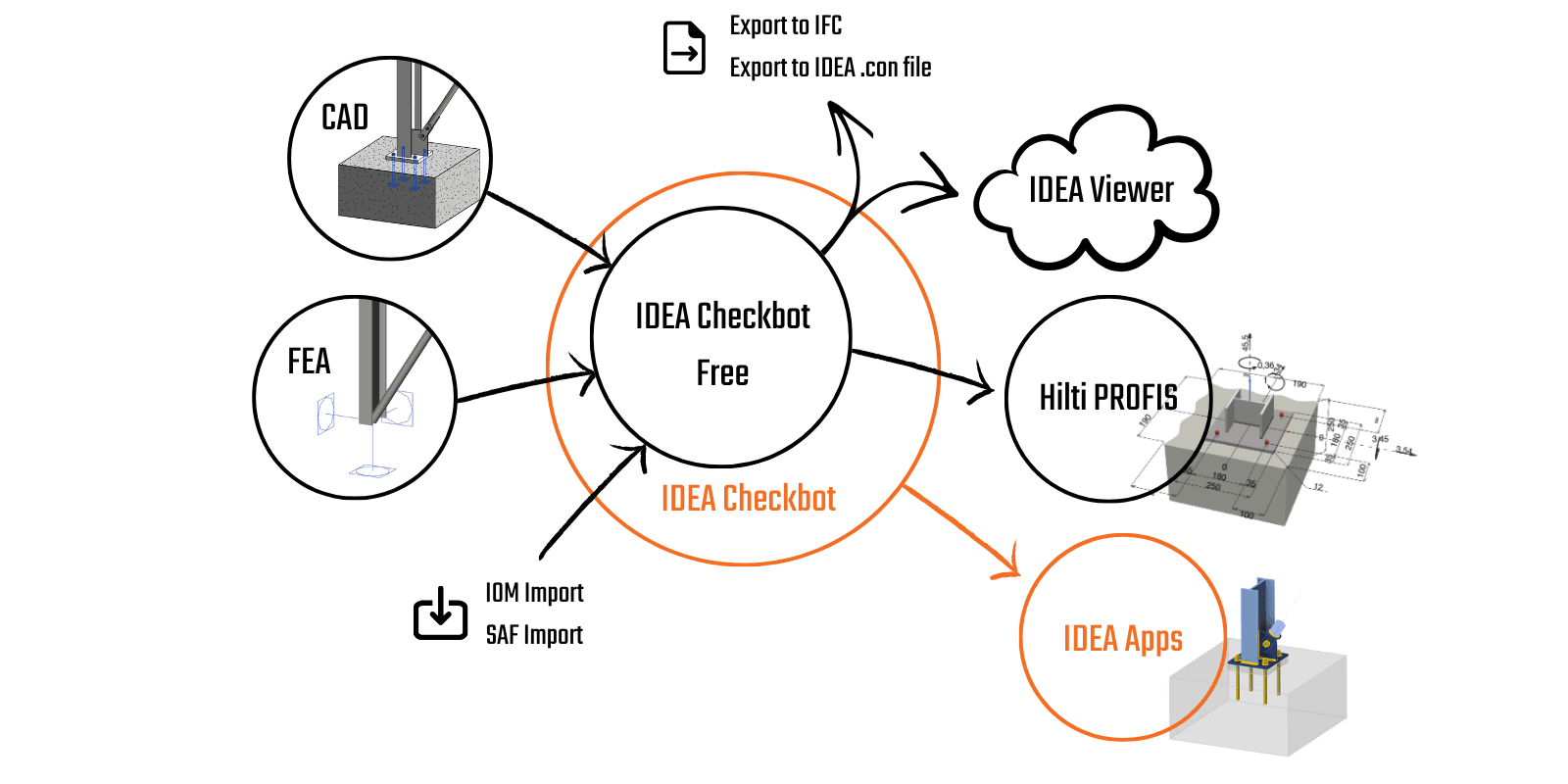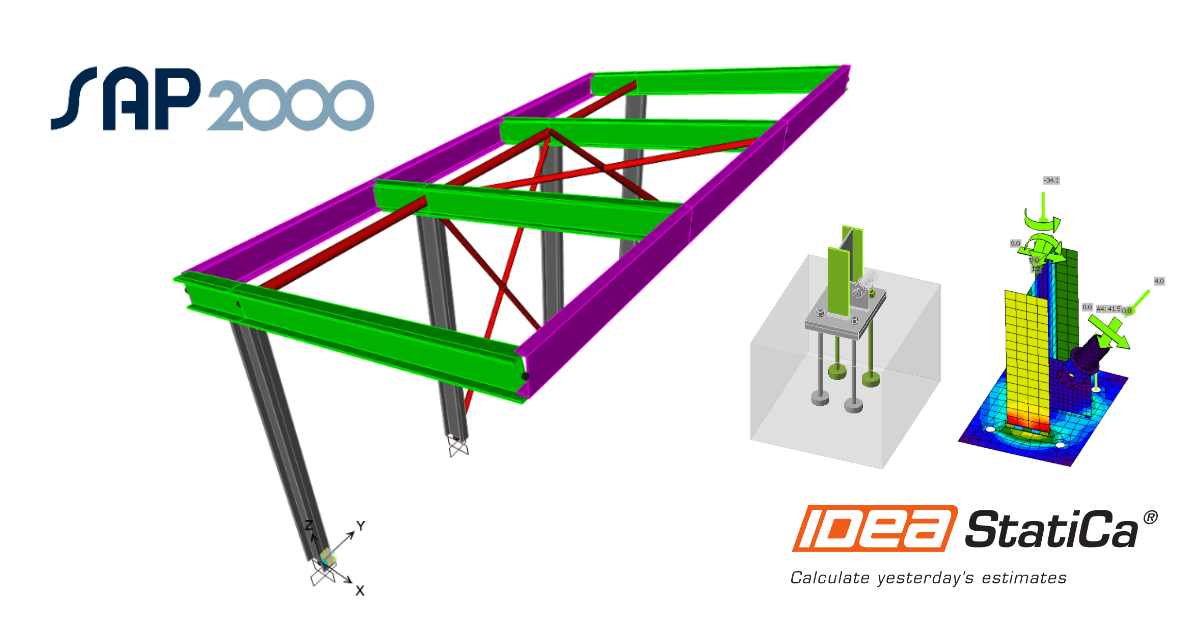


Widget #NaN: support_center_article
Name: General BIM Link tutorial - How to activate the link
ID: dd351d35-2833-4fa2-a88f-9c0c8769c77d
Show Raw Data
{
  "title": {
    "name": "Main headline (H1)",
    "type": "text",
    "value": "Jak aktywować łącze"
  },
  "preview_image": {
    "name": "Preview image",
    "type": "asset",
    "value": []
  },
  "post_date": {
    "name": "Post date",
    "type": "date_time",
    "value": null,
    "displayTimeZone": null
  },
  "perex_content": {
    "name": "Lead paragraph",
    "type": "text",
    "value": ""
  },
  "content": {
    "images": [
      {
        "description": null,
        "imageId": "4a678807-07f6-408f-ae20-26c6a018d269",
        "url": "https://assets-us-01.kc-usercontent.com:443/66e7a155-be94-0096-73e6-c55dfc7e5788/649a6f99-4ce2-4fa9-9ccf-876c0578ab47/IDEA%20start%20up%20window.jpg",
        "height": 857,
        "width": 1680
      },
      {
        "description": null,
        "imageId": "7633f2b4-f9be-41c3-9208-3f7031d8b5ab",
        "url": "https://assets-us-01.kc-usercontent.com:443/66e7a155-be94-0096-73e6-c55dfc7e5788/5d2e07d6-e3ba-4c8d-b7cc-3d2e765eb5c4/bim-link.png",
        "height": 1200,
        "width": 1143
      }
    ],
    "linkedItemCodenames": [],
    "linkedItems": [],
    "links": [
      {
        "codename": "landing_page___downloads",
        "linkId": "0dff6482-3e17-4ca2-bb66-b4abc6a8dde4",
        "urlSlug": "product-downloads",
        "type": "landing_page"
      },
      {
        "codename": "bim_links__supported_versions",
        "linkId": "eeb85fd1-4708-4f88-ad36-cbe30ac41eb7",
        "urlSlug": "bim-links-supported-versions-of-3rd-party-applications",
        "type": "support_center_article"
      }
    ],
    "name": "Content",
    "type": "rich_text",
    "value": "<ul>\n  <li>Pobierz i zainstaluj <a data-item-id=\"0dff6482-3e17-4ca2-bb66-b4abc6a8dde4\" href=\"\">najnowszą wersję IDEA StatiCa</a></li>\n  <li>Upewnij się, że używasz <a data-item-id=\"eeb85fd1-4708-4f88-ad36-cbe30ac41eb7\" href=\"\">obsługiwanej wersji</a> swojego oprogramowania MES</li>\n</ul>\n<p>IDEA StatiCa integruje łącza BIM z oprogramowaniem MES podczas instalacji. Możesz sprawdzić status i ewentualnie zintegrować więcej łączy BIM, uruchamiając IDEA StatiCa i otwierając <strong>BIM links</strong>. Należy pamiętać, że niektóre programy MES wymagają dodatkowych kroków w celu pełnej aktywacji łącza BIM do IDEA StatiCa.</p>\n<figure data-asset-id=\"4a678807-07f6-408f-ae20-26c6a018d269\" data-image-id=\"4a678807-07f6-408f-ae20-26c6a018d269\"><img src=\"https://assets-us-01.kc-usercontent.com:443/66e7a155-be94-0096-73e6-c55dfc7e5788/649a6f99-4ce2-4fa9-9ccf-876c0578ab47/IDEA%20start%20up%20window.jpg\" data-asset-id=\"4a678807-07f6-408f-ae20-26c6a018d269\" data-image-id=\"4a678807-07f6-408f-ae20-26c6a018d269\" alt=\"\"></figure>\n<p>Może pojawić się powiadomienie „<em>Czy chcesz zezwolić tej aplikacji na wprowadzanie zmian na urządzeniu?</em>\" – jeśli tak, potwierdź przyciskiem <strong>Tak</strong>.</p>\n<p>Klikając <strong>Instaluj</strong>, łącze BIM dla wybranego oprogramowania zostaje zintegrowane. Na ekranie wyświetlany jest również status pozostałych łączy BIM.</p>\n<figure data-asset-id=\"7633f2b4-f9be-41c3-9208-3f7031d8b5ab\" data-image-id=\"7633f2b4-f9be-41c3-9208-3f7031d8b5ab\"><img src=\"https://assets-us-01.kc-usercontent.com:443/66e7a155-be94-0096-73e6-c55dfc7e5788/5d2e07d6-e3ba-4c8d-b7cc-3d2e765eb5c4/bim-link.png\" data-asset-id=\"7633f2b4-f9be-41c3-9208-3f7031d8b5ab\" data-image-id=\"7633f2b4-f9be-41c3-9208-3f7031d8b5ab\" alt=\"\"></figure>"
  },
  "linked_items": {
    "name": "Linked items",
    "type": "modular_content",
    "value": [],
    "linkedItems": []
  },
  "regions": {
    "name": "Region",
    "type": "taxonomy",
    "value": [
      {
        "name": "EMEA",
        "codename": "emea"
      },
      {
        "name": "AMER",
        "codename": "amer"
      },
      {
        "name": "APAC",
        "codename": "apac"
      }
    ],
    "taxonomyGroup": "region"
  },
  "product_groups": {
    "name": "Product group",
    "type": "taxonomy",
    "value": [
      {
        "name": "Steel",
        "codename": "steel"
      }
    ],
    "taxonomyGroup": "product_group"
  },
  "support_center_article_types": {
    "name": "Support center article",
    "type": "taxonomy",
    "value": [
      {
        "name": "Knowledge base",
        "codename": "knowledgebase_article"
      }
    ],
    "taxonomyGroup": "support_center_article"
  },
  "expertise_levels": {
    "name": "Expertise level",
    "type": "taxonomy",
    "value": [
      {
        "name": "Beginner",
        "codename": "beginner"
      },
      {
        "name": "Intermediate",
        "codename": "intermediate"
      }
    ],
    "taxonomyGroup": "expertise_level"
  },
  "labels": {
    "name": "Labels",
    "type": "taxonomy",
    "value": [
      {
        "name": "BIM link",
        "codename": "bim_links"
      }
    ],
    "taxonomyGroup": "labels"
  },
  "attachments__files": {
    "name": "Attachments",
    "type": "asset",
    "value": []
  },
  "content_priority__value": {
    "name": "Content priority value",
    "type": "number",
    "value": null
  },
  "options": {
    "name": "Options",
    "type": "multiple_choice",
    "value": []
  },
  "url_slug": {
    "name": "Url slug",
    "type": "url_slug",
    "value": "how-to-activate-the-link"
  },
  "unique_url_slug": {
    "name": "Unique URL slug",
    "type": "custom",
    "value": "[\"how-to-activate-the-link\",\"[autogenerated]\"]"
  },
  "content_settings__sitemap": {
    "name": "Show in sitemap",
    "type": "multiple_choice",
    "value": [
      {
        "name": "default",
        "codename": "default"
      }
    ]
  },
  "content_settings__robots": {
    "name": "Search engine indexing",
    "type": "multiple_choice",
    "value": [
      {
        "name": "default",
        "codename": "default"
      }
    ]
  },
  "content_settings__is_hidden": {
    "name": "Hidden nested content",
    "type": "multiple_choice",
    "value": []
  },
  "content_settings__is_topped": {
    "name": "Topped",
    "type": "multiple_choice",
    "value": []
  },
  "metadata__page_title": {
    "name": "Page title",
    "type": "text",
    "value": ""
  },
  "metadata__page_description": {
    "name": "Page description",
    "type": "text",
    "value": ""
  },
  "metadata__page_keywords": {
    "name": "Page keywords",
    "type": "text",
    "value": ""
  },
  "metadata__canonical_url": {
    "name": "Canonical URL",
    "type": "text",
    "value": ""
  },
  "metadata__og_title": {
    "name": "OG:title",
    "type": "text",
    "value": ""
  },
  "metadata__og_description": {
    "name": "OG:description",
    "type": "text",
    "value": ""
  },
  "metadata__og_image": {
    "name": "OG:image",
    "type": "asset",
    "value": []
  },
  "translation__translation_connector": {
    "name": "Translation Connector",
    "type": "taxonomy",
    "value": [],
    "taxonomyGroup": "languages"
  },
  "translation__force_translation": {
    "name": "Force translation",
    "type": "multiple_choice",
    "value": []
  },
  "translation__translate_standalone_nested_content_items": {
    "name": "Translate standalone nested content items",
    "type": "multiple_choice",
    "value": []
  },
  "translation__last_translation": {
    "images": [],
    "linkedItemCodenames": [],
    "linkedItems": [],
    "links": [],
    "name": "Last translation",
    "type": "rich_text",
    "value": "<p>Translation info:</p>\n<ul>\n  <li>cs-CZ: Never translated</li>\n  <li>de-DE: Never translated</li>\n  <li>en-US: Never translated</li>\n  <li>es-ES: Never translated</li>\n  <li>fr-FR: Never translated</li>\n  <li>hu-HU: Never translated</li>\n  <li>it-IT: Never translated</li>\n  <li>nl-NL: Never translated</li>\n  <li>pl-PL: Translated on 29.4.2026 15:29</li>\n  <li>pt-PT: Never translated</li>\n  <li>ro-RO: Never translated</li>\n  <li>ru-RU: Never translated</li>\n  <li>th-TH: Never translated</li>\n  <li>zh-CN: Never translated</li>\n</ul>\n<p>Publish info:</p>\n<ul>\n  <li>Publish info is available only in the main language</li>\n</ul>"
  },
  "translation__ai_translated": {
    "name": "AI translated",
    "type": "multiple_choice",
    "value": [
      {
        "name": "Translated",
        "codename": "translated"
      }
    ]
  },
  "page_tree_settings__page_label": {
    "name": "Page label",
    "type": "text",
    "value": ""
  },
  "page_tree_settings__path_segment": {
    "name": "Path segment",
    "type": "text",
    "value": ""
  },
  "page_tree_settings__breadcrumb_style": {
    "name": "Breadcrumb style",
    "type": "multiple_choice",
    "value": []
  },
  "page_tree_settings__hide_in_breadcrumbs": {
    "name": "Hide in breadcrumbs",
    "type": "multiple_choice",
    "value": []
  }
}
W SAP2000 wymagane są dodatkowe ręczne kroki w celu zakończenia procedury integracji. Różnią się one w zależności od wersji SAP2000:
Jak korzystać z łącza
Otwórz załączony projekt w SAP2000 i uruchom obliczenia.
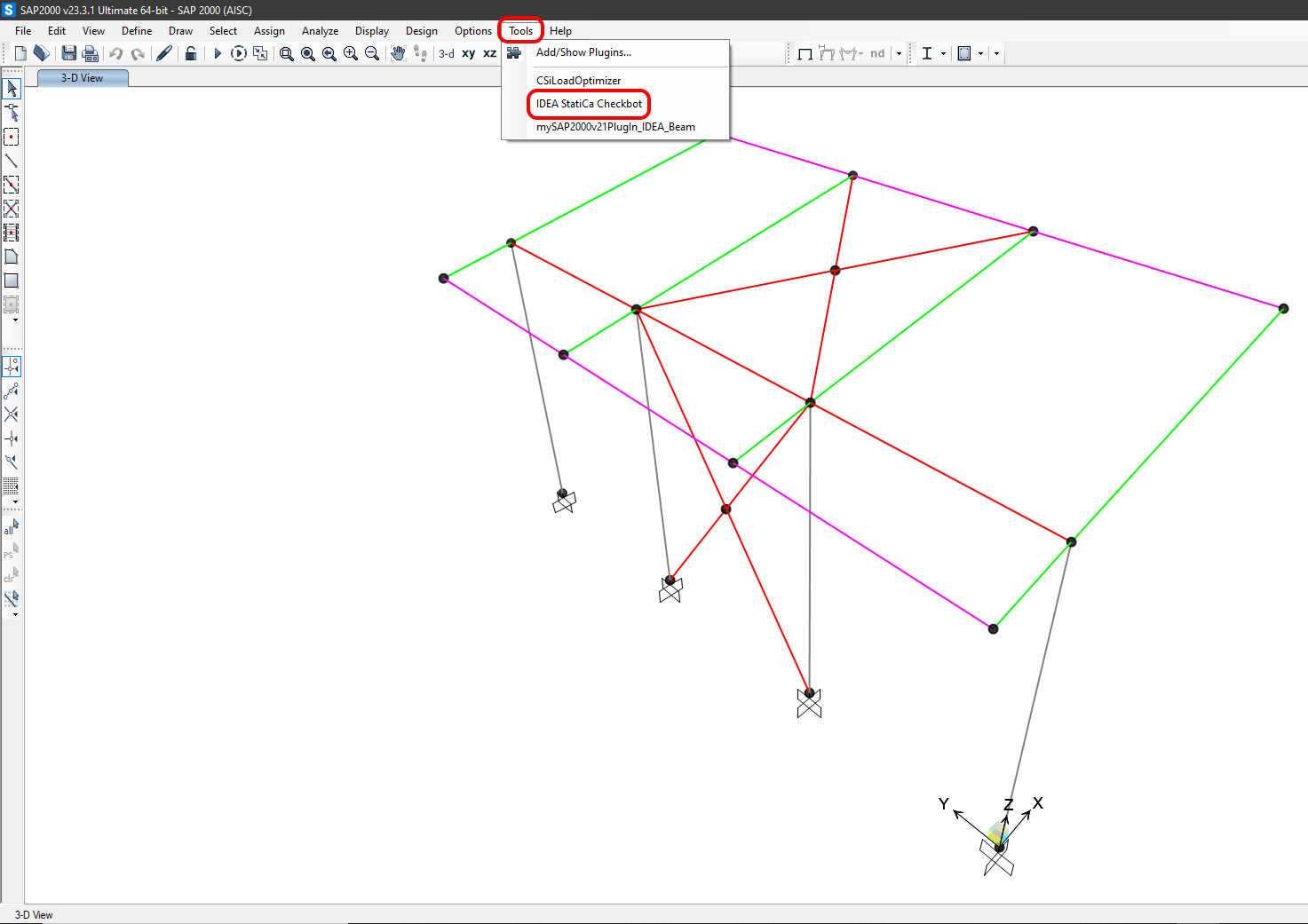
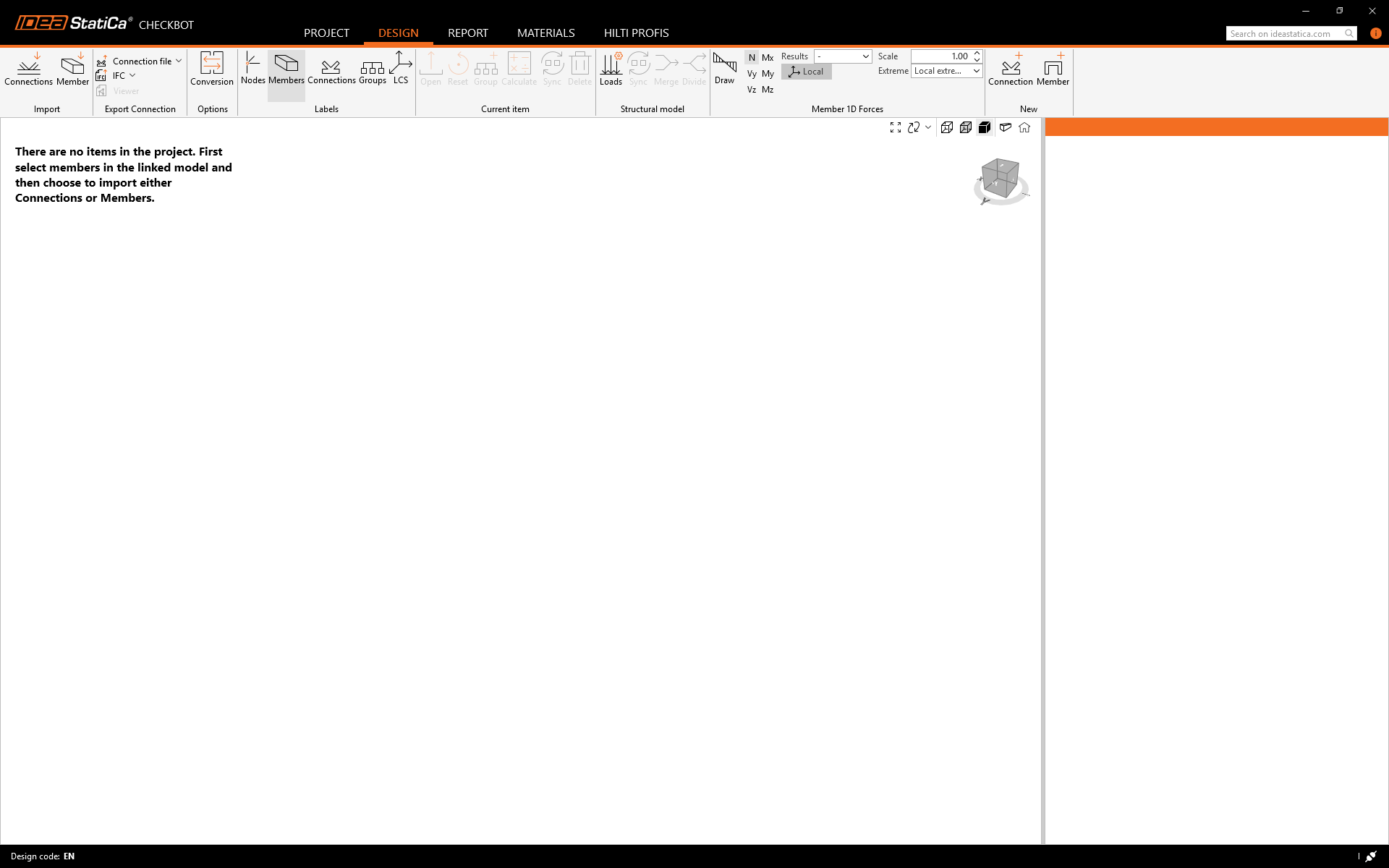
Łącze BIM powinno być już zintegrowane. Można je znaleźć na górnej wstążce w menu Tools -> IDEA StatiCa Checkbot. Spowoduje to otwarcie aplikacji Checkbot.
Wybierz opcję New z typem projektu Steel, norma obliczeniowa EN. Następnie wybierz Create project.
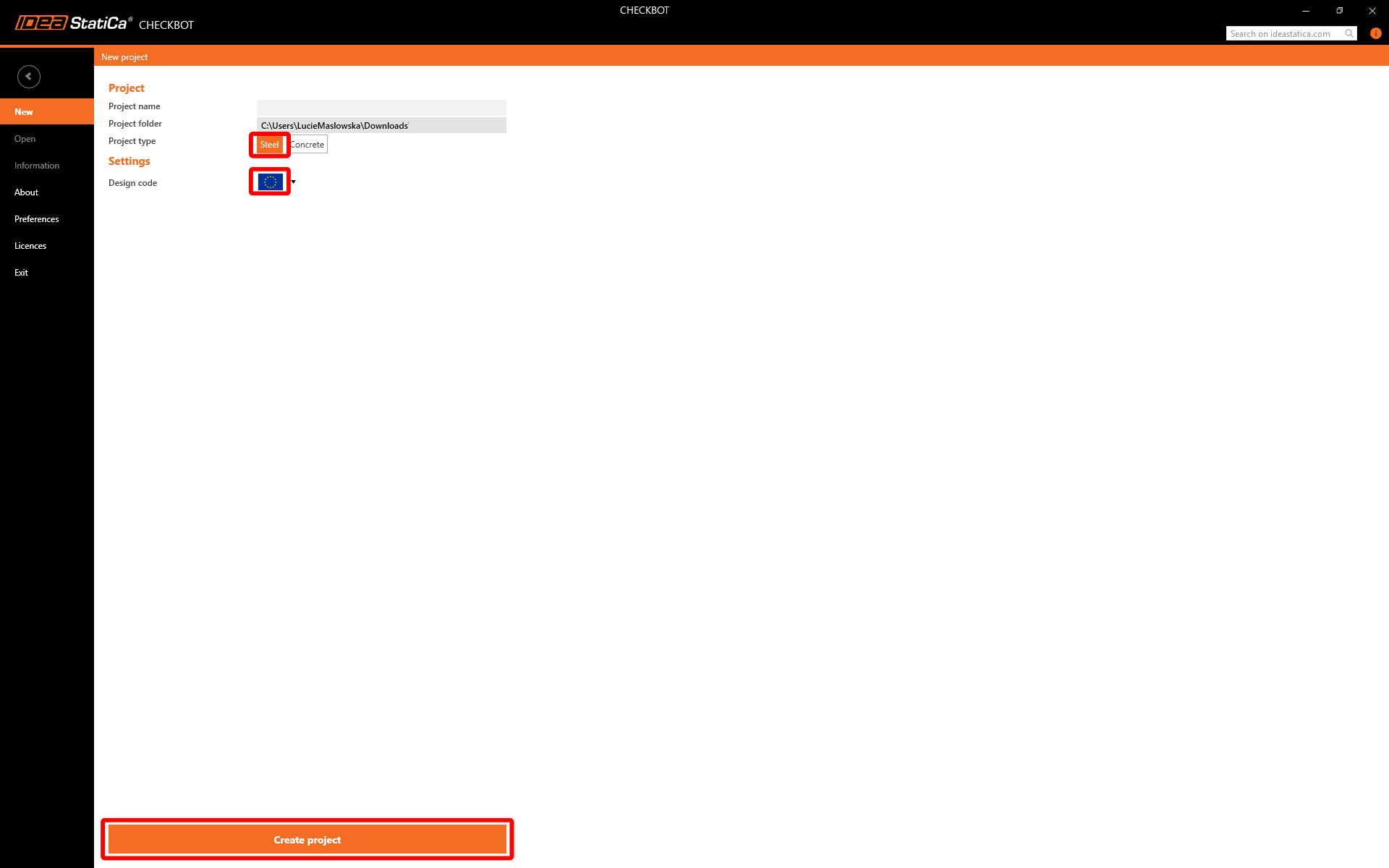
Nowy projekt Checkbot jest gotowy do importu połączeń z SAP2000.
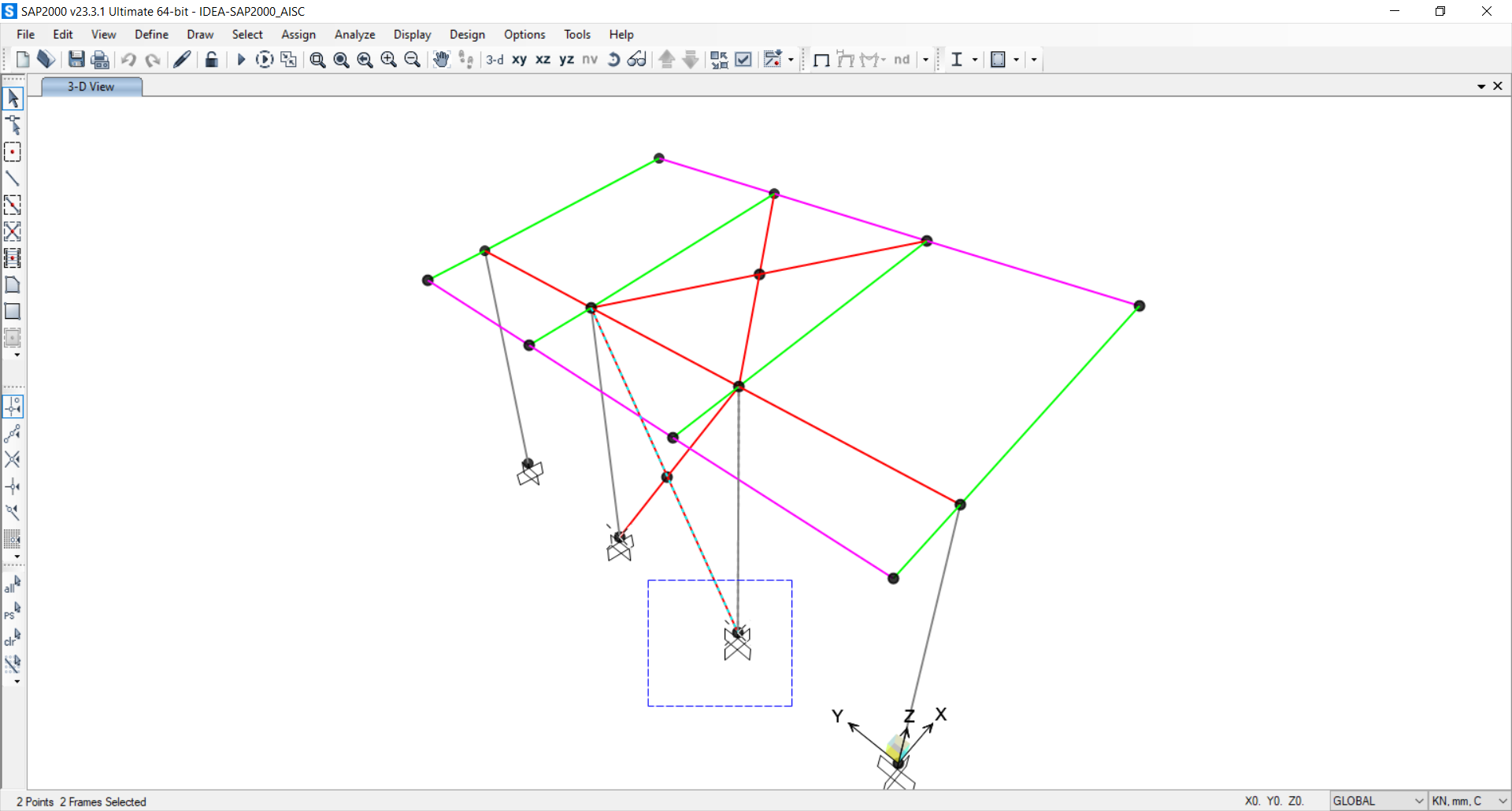
W SAP2000 wybierz jeden ze słupów wewnętrznych, upewniając się, że zaznaczasz również najniższy węzeł.
Widget #NaN: support_center_article
Name: General BIM Link tutorial - Import
ID: 4014d755-0bf0-43d9-a46c-da9ce928f004
Show Raw Data
{
"title": {
"name": "Main headline (H1)",
"type": "text",
"value": "Import"
},
"preview_image": {
"name": "Preview image",
"type": "asset",
"value": []
},
"post_date": {
"name": "Post date",
"type": "date_time",
"value": null,
"displayTimeZone": null
},
"perex_content": {
"name": "Lead paragraph",
"type": "text",
"value": ""
},
"content": {
"images": [
{
"description": null,
"imageId": "9e8f6845-e105-4892-a3bd-9def81d98bb6",
"url": "https://assets-us-01.kc-usercontent.com:443/66e7a155-be94-0096-73e6-c55dfc7e5788/e734e597-4d88-471b-80f1-6b622107eea4/import%20node.png",
"height": 1032,
"width": 1920
},
{
"description": null,
"imageId": "4cd06b43-6f27-4e21-ab5b-13b6520951eb",
"url": "https://assets-us-01.kc-usercontent.com:443/66e7a155-be94-0096-73e6-c55dfc7e5788/fc21c861-7d5f-4418-af2a-f7ee319aa914/single%20connection%20in%20checkbot.png",
"height": 1032,
"width": 1920
},
{
"description": null,
"imageId": "be4f07d7-d6e4-4bd3-8acd-2507951101d8",
"url": "https://assets-us-01.kc-usercontent.com:443/66e7a155-be94-0096-73e6-c55dfc7e5788/43f14268-3a11-43ba-9e9a-b5a84af9d4cf/RFEM%20-%20load%20configurator.png",
"height": 1136,
"width": 1918
},
{
"description": null,
"imageId": "bb64cd03-216e-4036-b058-f51b5bef237a",
"url": "https://assets-us-01.kc-usercontent.com:443/66e7a155-be94-0096-73e6-c55dfc7e5788/1803d6c5-85a0-42ec-97de-fcb751b17a46/all%20structure.png",
"height": 1032,
"width": 1920
}
],
"linkedItemCodenames": [],
"linkedItems": [],
"links": [],
"name": "Content",
"type": "rich_text",
"value": "<p>Następnie w Checkbot wybierz <strong>Connections</strong>.</p>\n<figure data-asset-id=\"9e8f6845-e105-4892-a3bd-9def81d98bb6\" data-image-id=\"9e8f6845-e105-4892-a3bd-9def81d98bb6\"><img src=\"https://assets-us-01.kc-usercontent.com:443/66e7a155-be94-0096-73e6-c55dfc7e5788/e734e597-4d88-471b-80f1-6b622107eea4/import%20node.png\" data-asset-id=\"9e8f6845-e105-4892-a3bd-9def81d98bb6\" data-image-id=\"9e8f6845-e105-4892-a3bd-9def81d98bb6\" alt=\"\"></figure>\n<p>Spowoduje to import słupa wraz z efektami obciążeń do Checkbot – z tymi samymi współrzędnymi, orientacjami i wymiarami przekrojów, co w modelu MES.</p>\n<p>Należy pamiętać, że numeracja węzłów i elementów może być różna.</p>\n<figure data-asset-id=\"4cd06b43-6f27-4e21-ab5b-13b6520951eb\" data-image-id=\"4cd06b43-6f27-4e21-ab5b-13b6520951eb\"><img src=\"https://assets-us-01.kc-usercontent.com:443/66e7a155-be94-0096-73e6-c55dfc7e5788/fc21c861-7d5f-4418-af2a-f7ee319aa914/single%20connection%20in%20checkbot.png\" data-asset-id=\"4cd06b43-6f27-4e21-ab5b-13b6520951eb\" data-image-id=\"4cd06b43-6f27-4e21-ab5b-13b6520951eb\" alt=\"\"></figure>\n<p><strong>Przed uruchomieniem analizy należy sprawdzić klasy wyników dla sprawdzeń normowych </strong>i odpowiednio dostosować przypadki obciążeń<strong>.</strong> W oknie dialogowym <strong>Load configurator </strong>można zobaczyć wszystkie zaimportowane przypadki obciążeń i kombinacje obciążeń po lewej stronie oraz klasy wyników używane do sprawdzeń normowych w środkowej części. Jeśli niektóre przypadki obciążeń nie są istotne dla weryfikacji projektowej, należy je wykluczyć, klikając prawym przyciskiem myszy na wybrane obciążenia i usuwając je z listy klas wyników.</p>\n<figure data-asset-id=\"be4f07d7-d6e4-4bd3-8acd-2507951101d8\" data-image-id=\"be4f07d7-d6e4-4bd3-8acd-2507951101d8\"><img src=\"https://assets-us-01.kc-usercontent.com:443/66e7a155-be94-0096-73e6-c55dfc7e5788/43f14268-3a11-43ba-9e9a-b5a84af9d4cf/RFEM%20-%20load%20configurator.png\" data-asset-id=\"be4f07d7-d6e4-4bd3-8acd-2507951101d8\" data-image-id=\"be4f07d7-d6e4-4bd3-8acd-2507951101d8\" alt=\"\"></figure>\n<p>Należy pamiętać, że przestrzeń robocza 3D jest zaprojektowana w celu pokazania przeglądu zaimportowanej konstrukcji, a nie szczegółowego widoku rzeczywistych połączeń. Więcej informacji na temat Checkbot można znaleźć <a href=\"https://www.ideastatica.com/support-center/checkbot-bulk-bim-workflows\" title=\"Checkbot\">tutaj</a>.</p>\n<p>W przypadku kilku rozwiązań MES można również importować wiele połączeń do Checkbot w ten sam sposób, jak opisano powyżej. Zamiast wybierać jeden węzeł i połączone elementy, można wybrać wiele węzłów i elementów oraz zaimportować je wszystkie jednocześnie.</p>\n<figure data-asset-id=\"bb64cd03-216e-4036-b058-f51b5bef237a\" data-image-id=\"bb64cd03-216e-4036-b058-f51b5bef237a\"><img src=\"https://assets-us-01.kc-usercontent.com:443/66e7a155-be94-0096-73e6-c55dfc7e5788/1803d6c5-85a0-42ec-97de-fcb751b17a46/all%20structure.png\" data-asset-id=\"bb64cd03-216e-4036-b058-f51b5bef237a\" data-image-id=\"bb64cd03-216e-4036-b058-f51b5bef237a\" alt=\"\"></figure>"
},
"linked_items": {
"name": "Linked items",
"type": "modular_content",
"value": [],
"linkedItems": []
},
"regions": {
"name": "Region",
"type": "taxonomy",
"value": [
{
"name": "EMEA",
"codename": "emea"
},
{
"name": "AMER",
"codename": "amer"
},
{
"name": "APAC",
"codename": "apac"
}
],
"taxonomyGroup": "region"
},
"product_groups": {
"name": "Product group",
"type": "taxonomy",
"value": [
{
"name": "Connection design",
"codename": "connection_design"
},
{
"name": "Steel",
"codename": "steel"
}
],
"taxonomyGroup": "product_group"
},
"support_center_article_types": {
"name": "Support center article",
"type": "taxonomy",
"value": [
{
"name": "Knowledge base",
"codename": "knowledgebase_article"
}
],
"taxonomyGroup": "support_center_article"
},
"expertise_levels": {
"name": "Expertise level",
"type": "taxonomy",
"value": [
{
"name": "Beginner",
"codename": "beginner"
},
{
"name": "Intermediate",
"codename": "intermediate"
}
],
"taxonomyGroup": "expertise_level"
},
"labels": {
"name": "Labels",
"type": "taxonomy",
"value": [
{
"name": "Connection",
"codename": "connection"
},
{
"name": "Checkbot",
"codename": "checkbot"
},
{
"name": "EN (Eurocode)",
"codename": "eurocode"
},
{
"name": "BIM link",
"codename": "bim_links"
},
{
"name": "AISC (USA)",
"codename": "aisc"
}
],
"taxonomyGroup": "labels"
},
"attachments__files": {
"name": "Attachments",
"type": "asset",
"value": []
},
"content_priority__value": {
"name": "Content priority value",
"type": "number",
"value": null
},
"options": {
"name": "Options",
"type": "multiple_choice",
"value": []
},
"url_slug": {
"name": "Url slug",
"type": "url_slug",
"value": "import"
},
"unique_url_slug": {
"name": "Unique URL slug",
"type": "custom",
"value": "[\"import\",\"[autogenerated]\"]"
},
"content_settings__sitemap": {
"name": "Show in sitemap",
"type": "multiple_choice",
"value": [
{
"name": "default",
"codename": "default"
}
]
},
"content_settings__robots": {
"name": "Search engine indexing",
"type": "multiple_choice",
"value": [
{
"name": "default",
"codename": "default"
}
]
},
"content_settings__is_hidden": {
"name": "Hidden nested content",
"type": "multiple_choice",
"value": [
{
"name": "yes",
"codename": "yes"
}
]
},
"content_settings__is_topped": {
"name": "Topped",
"type": "multiple_choice",
"value": []
},
"metadata__page_title": {
"name": "Page title",
"type": "text",
"value": "Import połączenia stalowego z MES/CAD do Checkbot"
},
"metadata__page_description": {
"name": "Page description",
"type": "text",
"value": "Samouczek krok po kroku IDEA StatiCa dotyczący importu połączenia stalowego i jego efektów obciążeń z MES/CAD do Checkbot. Projektowanie konstrukcyjne spawanych i śrubowych połączeń stalowych."
},
"metadata__page_keywords": {
"name": "Page keywords",
"type": "text",
"value": ""
},
"metadata__canonical_url": {
"name": "Canonical URL",
"type": "text",
"value": ""
},
"metadata__og_title": {
"name": "OG:title",
"type": "text",
"value": ""
},
"metadata__og_description": {
"name": "OG:description",
"type": "text",
"value": ""
},
"metadata__og_image": {
"name": "OG:image",
"type": "asset",
"value": []
},
"translation__translation_connector": {
"name": "Translation Connector",
"type": "taxonomy",
"value": [],
"taxonomyGroup": "languages"
},
"translation__force_translation": {
"name": "Force translation",
"type": "multiple_choice",
"value": []
},
"translation__translate_standalone_nested_content_items": {
"name": "Translate standalone nested content items",
"type": "multiple_choice",
"value": []
},
"translation__last_translation": {
"images": [],
"linkedItemCodenames": [],
"linkedItems": [],
"links": [],
"name": "Last translation",
"type": "rich_text",
"value": "<p>Translation info:</p>\n<ul>\n <li>cs-CZ: Never translated</li>\n <li>de-DE: Never translated</li>\n <li>en-US: Never translated</li>\n <li>es-ES: Never translated</li>\n <li>fr-FR: Never translated</li>\n <li>hu-HU: Never translated</li>\n <li>it-IT: Never translated</li>\n <li>nl-NL: Never translated</li>\n <li>pl-PL: Translated on 29.4.2026 15:29</li>\n <li>pt-PT: Never translated</li>\n <li>ro-RO: Never translated</li>\n <li>ru-RU: Never translated</li>\n <li>th-TH: Never translated</li>\n <li>zh-CN: Never translated</li>\n</ul>\n<p>Publish info:</p>\n<ul>\n <li>Publish info is available only in the main language</li>\n</ul>"
},
"translation__ai_translated": {
"name": "AI translated",
"type": "multiple_choice",
"value": [
{
"name": "Translated",
"codename": "translated"
}
]
},
"page_tree_settings__page_label": {
"name": "Page label",
"type": "text",
"value": ""
},
"page_tree_settings__path_segment": {
"name": "Path segment",
"type": "text",
"value": ""
},
"page_tree_settings__breadcrumb_style": {
"name": "Breadcrumb style",
"type": "multiple_choice",
"value": []
},
"page_tree_settings__hide_in_breadcrumbs": {
"name": "Hide in breadcrumbs",
"type": "multiple_choice",
"value": []
}
}Widget #NaN: support_center_article
Name: General BIM Link tutorial - Geometry
ID: c25dad44-9532-49cb-8c34-b7d536fec247
Show Raw Data
{
"title": {
"name": "Main headline (H1)",
"type": "text",
"value": "Geometria"
},
"preview_image": {
"name": "Preview image",
"type": "asset",
"value": []
},
"post_date": {
"name": "Post date",
"type": "date_time",
"value": null,
"displayTimeZone": null
},
"perex_content": {
"name": "Lead paragraph",
"type": "text",
"value": ""
},
"content": {
"images": [
{
"description": null,
"imageId": "6c4c6a6e-7ce1-4bae-bf35-efa7734a4f6e",
"url": "https://assets-us-01.kc-usercontent.com:443/66e7a155-be94-0096-73e6-c55dfc7e5788/b89e2ac5-d8cc-486c-b656-940f237d733c/2.png",
"height": 1000,
"width": 1199
},
{
"description": null,
"imageId": "55b67a24-3191-4f70-bcdf-91dc514d1a54",
"url": "https://assets-us-01.kc-usercontent.com:443/66e7a155-be94-0096-73e6-c55dfc7e5788/95fb28b7-e444-4e2e-aa19-1725d7e0b736/RFEM%20-%20connection.png",
"height": 1135,
"width": 1920
}
],
"linkedItemCodenames": [],
"linkedItems": [],
"links": [],
"name": "Content",
"type": "rich_text",
"value": "<p>Na liście elementów projektu w sekcji Connections, po zaznaczeniu połączenia w Checkbot, można kliknąć prawym przyciskiem myszy i wybrać <strong>Open </strong>lub kliknąć polecenie na wstążce <strong>Open</strong> , aby rozpocząć projektowanie, sprawdzenie normowe i generowanie raportów.</p>\n<figure data-asset-id=\"6c4c6a6e-7ce1-4bae-bf35-efa7734a4f6e\" data-image-id=\"6c4c6a6e-7ce1-4bae-bf35-efa7734a4f6e\"><img src=\"https://assets-us-01.kc-usercontent.com:443/66e7a155-be94-0096-73e6-c55dfc7e5788/b89e2ac5-d8cc-486c-b656-940f237d733c/2.png\" data-asset-id=\"6c4c6a6e-7ce1-4bae-bf35-efa7734a4f6e\" data-image-id=\"6c4c6a6e-7ce1-4bae-bf35-efa7734a4f6e\" alt=\"\"></figure>\n<p>Ustawienia elementów są pobierane z oryginalnej aplikacji MES. Można jednak zmienić rozmiar przekroju dowolnego elementu na głównym ekranie Checkbot, ale spowoduje to zerwanie połączenia z aplikacją MES w bieżącej sesji, chyba że zostanie ono ponownie zsynchronizowane.</p>\n<p>Zaimportowane połączenie jest otwierane w aplikacji IDEA StatiCa Connection.</p>\n<figure data-asset-id=\"55b67a24-3191-4f70-bcdf-91dc514d1a54\" data-image-id=\"55b67a24-3191-4f70-bcdf-91dc514d1a54\"><img src=\"https://assets-us-01.kc-usercontent.com:443/66e7a155-be94-0096-73e6-c55dfc7e5788/95fb28b7-e444-4e2e-aa19-1725d7e0b736/RFEM%20-%20connection.png\" data-asset-id=\"55b67a24-3191-4f70-bcdf-91dc514d1a54\" data-image-id=\"55b67a24-3191-4f70-bcdf-91dc514d1a54\" alt=\"\"></figure>\n<p>W zależności od sposobu zdefiniowania kombinacji przypadków obciążeń, w rozwiązaniu MES mogą być widoczne żadne lub różne efekty obciążeń. Domyślnie IDEA StatiCa wybiera najbardziej niekorzystne dla celów sprawdzenia normowego. (* Niektóre rozwiązania BIM nie są w stanie przechowywać wyników kombinacji przypadków obciążeń)</p>\n<p>Więcej informacji na temat efektów obciążeń można znaleźć <a href=\"https://www.ideastatica.com/support-center/checkbot-bulk-bim-workflows\" title=\"Checkbot\">tutaj</a>.</p>"
},
"linked_items": {
"name": "Linked items",
"type": "modular_content",
"value": [],
"linkedItems": []
},
"regions": {
"name": "Region",
"type": "taxonomy",
"value": [
{
"name": "EMEA",
"codename": "emea"
},
{
"name": "AMER",
"codename": "amer"
},
{
"name": "APAC",
"codename": "apac"
}
],
"taxonomyGroup": "region"
},
"product_groups": {
"name": "Product group",
"type": "taxonomy",
"value": [
{
"name": "Connection design",
"codename": "connection_design"
},
{
"name": "Steel",
"codename": "steel"
}
],
"taxonomyGroup": "product_group"
},
"support_center_article_types": {
"name": "Support center article",
"type": "taxonomy",
"value": [
{
"name": "Knowledge base",
"codename": "knowledgebase_article"
}
],
"taxonomyGroup": "support_center_article"
},
"expertise_levels": {
"name": "Expertise level",
"type": "taxonomy",
"value": [
{
"name": "Beginner",
"codename": "beginner"
},
{
"name": "Intermediate",
"codename": "intermediate"
}
],
"taxonomyGroup": "expertise_level"
},
"labels": {
"name": "Labels",
"type": "taxonomy",
"value": [
{
"name": "Connection",
"codename": "connection"
},
{
"name": "EN (Eurocode)",
"codename": "eurocode"
},
{
"name": "AISC (USA)",
"codename": "aisc"
},
{
"name": "BIM link",
"codename": "bim_links"
},
{
"name": "Checkbot",
"codename": "checkbot"
}
],
"taxonomyGroup": "labels"
},
"attachments__files": {
"name": "Attachments",
"type": "asset",
"value": []
},
"content_priority__value": {
"name": "Content priority value",
"type": "number",
"value": null
},
"options": {
"name": "Options",
"type": "multiple_choice",
"value": []
},
"url_slug": {
"name": "Url slug",
"type": "url_slug",
"value": "geometry"
},
"unique_url_slug": {
"name": "Unique URL slug",
"type": "custom",
"value": "[\"geometry\",\"[autogenerated]\"]"
},
"content_settings__sitemap": {
"name": "Show in sitemap",
"type": "multiple_choice",
"value": [
{
"name": "default",
"codename": "default"
}
]
},
"content_settings__robots": {
"name": "Search engine indexing",
"type": "multiple_choice",
"value": [
{
"name": "default",
"codename": "default"
}
]
},
"content_settings__is_hidden": {
"name": "Hidden nested content",
"type": "multiple_choice",
"value": [
{
"name": "yes",
"codename": "yes"
}
]
},
"content_settings__is_topped": {
"name": "Topped",
"type": "multiple_choice",
"value": []
},
"metadata__page_title": {
"name": "Page title",
"type": "text",
"value": "Import połączenia stalowego z MES/CAD do Checkbot"
},
"metadata__page_description": {
"name": "Page description",
"type": "text",
"value": "Przewodnik krok po kroku IDEA StatiCa dotyczący importu połączenia stalowego i jego efektów obciążeń z MES/CAD do Checkbot. Projektowanie konstrukcyjne spawanych i śrubowych połączeń stalowych."
},
"metadata__page_keywords": {
"name": "Page keywords",
"type": "text",
"value": ""
},
"metadata__canonical_url": {
"name": "Canonical URL",
"type": "text",
"value": ""
},
"metadata__og_title": {
"name": "OG:title",
"type": "text",
"value": ""
},
"metadata__og_description": {
"name": "OG:description",
"type": "text",
"value": ""
},
"metadata__og_image": {
"name": "OG:image",
"type": "asset",
"value": []
},
"translation__translation_connector": {
"name": "Translation Connector",
"type": "taxonomy",
"value": [],
"taxonomyGroup": "languages"
},
"translation__force_translation": {
"name": "Force translation",
"type": "multiple_choice",
"value": []
},
"translation__translate_standalone_nested_content_items": {
"name": "Translate standalone nested content items",
"type": "multiple_choice",
"value": []
},
"translation__last_translation": {
"images": [],
"linkedItemCodenames": [],
"linkedItems": [],
"links": [],
"name": "Last translation",
"type": "rich_text",
"value": "<p>Translation info:</p>\n<ul>\n <li>cs-CZ: Never translated</li>\n <li>de-DE: Never translated</li>\n <li>en-US: Never translated</li>\n <li>es-ES: Never translated</li>\n <li>fr-FR: Never translated</li>\n <li>hu-HU: Never translated</li>\n <li>it-IT: Never translated</li>\n <li>nl-NL: Never translated</li>\n <li>pl-PL: Translated on 29.4.2026 15:30</li>\n <li>pt-PT: Never translated</li>\n <li>ro-RO: Never translated</li>\n <li>ru-RU: Never translated</li>\n <li>th-TH: Never translated</li>\n <li>zh-CN: Never translated</li>\n</ul>\n<p>Publish info:</p>\n<ul>\n <li>Publish info is available only in the main language</li>\n</ul>"
},
"translation__ai_translated": {
"name": "AI translated",
"type": "multiple_choice",
"value": [
{
"name": "Translated",
"codename": "translated"
}
]
},
"page_tree_settings__page_label": {
"name": "Page label",
"type": "text",
"value": ""
},
"page_tree_settings__path_segment": {
"name": "Path segment",
"type": "text",
"value": ""
},
"page_tree_settings__breadcrumb_style": {
"name": "Breadcrumb style",
"type": "multiple_choice",
"value": []
},
"page_tree_settings__hide_in_breadcrumbs": {
"name": "Hide in breadcrumbs",
"type": "multiple_choice",
"value": []
}
}Widget #NaN: support_center_article
Name: General BIM Link tutorial - Design Example (EN)
ID: e07071db-5126-40e2-a3ab-7d86be4a2f24
Show Raw Data
{
"title": {
"name": "Main headline (H1)",
"type": "text",
"value": "Projekt"
},
"preview_image": {
"name": "Preview image",
"type": "asset",
"value": []
},
"post_date": {
"name": "Post date",
"type": "date_time",
"value": null,
"displayTimeZone": null
},
"perex_content": {
"name": "Lead paragraph",
"type": "text",
"value": ""
},
"content": {
"images": [
{
"description": null,
"imageId": "5d50d85b-4229-49ee-bbfd-873de39cb3e9",
"url": "https://assets-us-01.kc-usercontent.com:443/66e7a155-be94-0096-73e6-c55dfc7e5788/3b20dc20-a84b-4f94-bcd3-09ddb17bf97c/4.png",
"height": 1200,
"width": 1920
},
{
"description": null,
"imageId": "2f31bf0c-8a40-4523-99e3-38b883907181",
"url": "https://assets-us-01.kc-usercontent.com:443/66e7a155-be94-0096-73e6-c55dfc7e5788/fab207f8-65d2-436f-b113-7f344aac3621/5.png",
"height": 143,
"width": 1920
},
{
"description": null,
"imageId": "aa53b13b-04e3-40c0-9da7-40d545a500d4",
"url": "https://assets-us-01.kc-usercontent.com:443/66e7a155-be94-0096-73e6-c55dfc7e5788/94d4a2a5-4eeb-49dd-8dbf-489fd86fa331/Design2B.png",
"height": 630,
"width": 1045
},
{
"description": null,
"imageId": "f5507c07-0f64-469a-ab46-2d9445d77865",
"url": "https://assets-us-01.kc-usercontent.com:443/66e7a155-be94-0096-73e6-c55dfc7e5788/19d7bb85-18e2-4a99-9b0c-6a210607d43c/Design2Ca.png",
"height": 441,
"width": 500
},
{
"description": null,
"imageId": "817e17bf-e3c3-4e68-a523-504d1ae3af67",
"url": "https://assets-us-01.kc-usercontent.com:443/66e7a155-be94-0096-73e6-c55dfc7e5788/f9846e79-3e28-46e8-b99b-1399ced3e2b7/Design3Ca.png",
"height": 510,
"width": 743
},
{
"description": null,
"imageId": "b7b90869-cc6f-447e-a24a-49a8d4e66356",
"url": "https://assets-us-01.kc-usercontent.com:443/66e7a155-be94-0096-73e6-c55dfc7e5788/2d1df896-2a42-43e1-bba1-eafbb7c25b54/RFEM%20-%20connection%20final.png",
"height": 1200,
"width": 1920
},
{
"description": null,
"imageId": "aff89a25-eb57-41a4-a406-5ea04d04427b",
"url": "https://assets-us-01.kc-usercontent.com:443/66e7a155-be94-0096-73e6-c55dfc7e5788/e2064bf5-fe9f-4f15-86fc-8e371ac2124f/8.png",
"height": 143,
"width": 1920
},
{
"description": null,
"imageId": "10916e97-a2ac-4cef-90f8-e0212129bd66",
"url": "https://assets-us-01.kc-usercontent.com:443/66e7a155-be94-0096-73e6-c55dfc7e5788/6707198c-521f-4f35-b163-120790d09bba/RFEM%20-%20connection%20failing.png",
"height": 1200,
"width": 1920
},
{
"description": null,
"imageId": "1bfcf362-ab36-4e14-b774-fb5e46663670",
"url": "https://assets-us-01.kc-usercontent.com:443/66e7a155-be94-0096-73e6-c55dfc7e5788/fa7baf74-b381-4f4f-aab8-1a4b1f4e914a/RFEM%20-%20connection%20failing.png",
"height": 1200,
"width": 1920
},
{
"description": null,
"imageId": "7fbf37d6-f5af-44a4-ae1d-3eb76a2823ed",
"url": "https://assets-us-01.kc-usercontent.com:443/66e7a155-be94-0096-73e6-c55dfc7e5788/4f9aa168-f31c-4230-a94e-5fb7425cc825/RFEM%20-%20connection%20length.png",
"height": 1200,
"width": 1920
},
{
"description": null,
"imageId": "41af0bb7-1cc4-4e0b-8932-8c5f879cf7a0",
"url": "https://assets-us-01.kc-usercontent.com:443/66e7a155-be94-0096-73e6-c55dfc7e5788/2b3f0982-263a-4069-a5b7-14778a184e30/RFEM%20-%20ok.png",
"height": 1200,
"width": 1920
},
{
"description": null,
"imageId": "2e83a5fc-2434-4927-b3e2-463303abf93e",
"url": "https://assets-us-01.kc-usercontent.com:443/66e7a155-be94-0096-73e6-c55dfc7e5788/6c2cdb78-c06c-4ef2-87a8-e8e480861647/report.png",
"height": 1200,
"width": 2523
},
{
"description": null,
"imageId": "0c24db03-0d22-413b-94f7-54a884235afa",
"url": "https://assets-us-01.kc-usercontent.com:443/66e7a155-be94-0096-73e6-c55dfc7e5788/c9c367ee-919a-477e-adea-097a5792034f/RFEM%20-%20ok%20Checkbot.png",
"height": 1200,
"width": 1920
},
{
"description": null,
"imageId": "37a17af2-1908-46df-bf9b-dc3217b22840",
"url": "https://assets-us-01.kc-usercontent.com:443/66e7a155-be94-0096-73e6-c55dfc7e5788/33edf21a-db64-4609-8de1-a452d0a8df46/RFEM%20-%20ok%20Checkbot%202.png",
"height": 1200,
"width": 1920
}
],
"linkedItemCodenames": [],
"linkedItems": [],
"links": [
{
"codename": "rn_23_1__connection_library___the_largest_database",
"linkId": "37fb73bf-dfd3-46d7-ae57-ee0e9c4cdb75",
"urlSlug": "connection-library-the-largest-database-of-downloadable-steel-connections",
"type": "support_center_article"
},
{
"codename": "landing_page___steel_verification",
"linkId": "06158daa-1491-4e83-ac34-4964bd5a3c63",
"urlSlug": "steel-verification",
"type": "landing_page"
},
{
"codename": "design_v2",
"linkId": "b0a659df-8f92-4d1f-abb6-2efa02bad946",
"urlSlug": "connection-design",
"type": "landing_page"
},
{
"codename": "how_to_export_report_to_ms_word__dxf_or_pdf_files",
"linkId": "dfedaf85-c16f-5228-849c-0bfe09e9e8d1",
"urlSlug": "how-to-create-and-export-a-report-to-ms-word-pdf-or-dxf-files",
"type": "support_center_article"
},
{
"codename": "rn_21_1__checkbot",
"linkId": "4074acd5-0f5f-40f9-aa70-ac1ff373919d",
"urlSlug": "checkbot-bulk-bim-workflows",
"type": "support_center_article"
}
],
"name": "Content",
"type": "rich_text",
"value": "<p>Do połączenia stężenia ukośnego użyjemy <a href=\"https://www.ideastatica.com/support-center/how-to-model-one-bolt-connection\" title=\"Single bolt connections\">połączenia jednośrubowego</a>. W przypadku tego typu połączenia należy również zmienić <strong>Typ modelu</strong> elementu stężenia na <strong>N-Vy-Vz</strong>. Wybierz stężenie z listy elementów i zmień typ modelu z listy rozwijanej.</p>\n<figure data-asset-id=\"5d50d85b-4229-49ee-bbfd-873de39cb3e9\" data-image-id=\"5d50d85b-4229-49ee-bbfd-873de39cb3e9\"><img src=\"https://assets-us-01.kc-usercontent.com:443/66e7a155-be94-0096-73e6-c55dfc7e5788/3b20dc20-a84b-4f94-bcd3-09ddb17bf97c/4.png\" data-asset-id=\"5d50d85b-4229-49ee-bbfd-873de39cb3e9\" data-image-id=\"5d50d85b-4229-49ee-bbfd-873de39cb3e9\" alt=\"\"></figure>\n<p>Do wygenerowania połączenia użyjemy Connection Library. Wybierz <strong>Propose</strong> a IDEA StatiCa zaproponuje możliwe rozwiązania dla bieżącej geometrii.</p>\n<figure data-asset-id=\"2f31bf0c-8a40-4523-99e3-38b883907181\" data-image-id=\"2f31bf0c-8a40-4523-99e3-38b883907181\"><img src=\"https://assets-us-01.kc-usercontent.com:443/66e7a155-be94-0096-73e6-c55dfc7e5788/fab207f8-65d2-436f-b113-7f344aac3621/5.png\" data-asset-id=\"2f31bf0c-8a40-4523-99e3-38b883907181\" data-image-id=\"2f31bf0c-8a40-4523-99e3-38b883907181\" alt=\"\"></figure>\n<p><a data-item-id=\"37fb73bf-dfd3-46d7-ae57-ee0e9c4cdb75\" href=\"\">Connection Library</a> pokazuje możliwe rozwiązania dla bieżącej geometrii. Wybierz szablon <strong>Column I base plate 4 bolts diagonal bolted weak</strong> i naciśnij <strong>OK</strong>.</p>\n<figure data-asset-id=\"aa53b13b-04e3-40c0-9da7-40d545a500d4\" data-image-id=\"aa53b13b-04e3-40c0-9da7-40d545a500d4\"><img src=\"https://assets-us-01.kc-usercontent.com:443/66e7a155-be94-0096-73e6-c55dfc7e5788/94d4a2a5-4eeb-49dd-8dbf-489fd86fa331/Design2B.png\" data-asset-id=\"aa53b13b-04e3-40c0-9da7-40d545a500d4\" data-image-id=\"aa53b13b-04e3-40c0-9da7-40d545a500d4\" alt=\"\"></figure>\n<p>Zaakceptuj proponowane wartości na karcie konwersji i naciśnij <strong>OK</strong>.</p>\n<figure data-asset-id=\"f5507c07-0f64-469a-ab46-2d9445d77865\" data-image-id=\"f5507c07-0f64-469a-ab46-2d9445d77865\"><img src=\"https://assets-us-01.kc-usercontent.com:443/66e7a155-be94-0096-73e6-c55dfc7e5788/19d7bb85-18e2-4a99-9b0c-6a210607d43c/Design2Ca.png\" data-asset-id=\"f5507c07-0f64-469a-ab46-2d9445d77865\" data-image-id=\"f5507c07-0f64-469a-ab46-2d9445d77865\" alt=\"\"></figure>\n<p>Edytuj parametry tego szablonu, aby dopasować go do żądanego projektu – <strong>Grubość płyty podstawy </strong>na 12 mm, <strong>Odsunięcie płyty podstawy</strong> na 10 mm, <strong>Odsunięcie bloku betonowego</strong> na 250 mm, <strong>Grubość blachy węzłowej </strong>na 6 mm oraz <strong>Szerokość blachy węzłowej</strong> na 100 mm.</p>\n<figure data-asset-id=\"817e17bf-e3c3-4e68-a523-504d1ae3af67\" data-image-id=\"817e17bf-e3c3-4e68-a523-504d1ae3af67\"><img src=\"https://assets-us-01.kc-usercontent.com:443/66e7a155-be94-0096-73e6-c55dfc7e5788/f9846e79-3e28-46e8-b99b-1399ced3e2b7/Design3Ca.png\" data-asset-id=\"817e17bf-e3c3-4e68-a523-504d1ae3af67\" data-image-id=\"817e17bf-e3c3-4e68-a523-504d1ae3af67\" alt=\"\"></figure>\n<p>Tak wygląda wstępne połączenie.</p>\n<figure data-asset-id=\"b7b90869-cc6f-447e-a24a-49a8d4e66356\" data-image-id=\"b7b90869-cc6f-447e-a24a-49a8d4e66356\"><img src=\"https://assets-us-01.kc-usercontent.com:443/66e7a155-be94-0096-73e6-c55dfc7e5788/2d1df896-2a42-43e1-bba1-eafbb7c25b54/RFEM%20-%20connection%20final.png\" data-asset-id=\"b7b90869-cc6f-447e-a24a-49a8d4e66356\" data-image-id=\"b7b90869-cc6f-447e-a24a-49a8d4e66356\" alt=\"\"></figure>\n<p>To kończy projekt połączenia dla płyty podstawy słupa ze stężeniem ukośnym.</p>\n<h2>Sprawdzenie normowe i raport</h2>\n<p>Uruchom teraz sprawdzenie normowe, używając ikony <strong>Oblicz </strong>w panelu <a data-item-id=\"06158daa-1491-4e83-ac34-4964bd5a3c63\" href=\"\">CBFEM</a> na górnej wstążce.<br>W <a data-item-id=\"b0a659df-8f92-4d1f-abb6-2efa02bad946\" href=\"\">IDEA StatiCa Connection</a> można przeprowadzać wiele różnych rodzajów analiz i sprawdzeń normowych. Więcej informacji znajdziesz <a href=\"https://www.ideastatica.com/support-center/checkbot-bulk-bim-workflows\" data-new-window=\"true\" title=\"Checkbot\" target=\"_blank\" rel=\"noopener noreferrer\">tutaj</a>.</p>\n<figure data-asset-id=\"aff89a25-eb57-41a4-a406-5ea04d04427b\" data-image-id=\"aff89a25-eb57-41a4-a406-5ea04d04427b\"><img src=\"https://assets-us-01.kc-usercontent.com:443/66e7a155-be94-0096-73e6-c55dfc7e5788/e2064bf5-fe9f-4f15-86fc-8e371ac2124f/8.png\" data-asset-id=\"aff89a25-eb57-41a4-a406-5ea04d04427b\" data-image-id=\"aff89a25-eb57-41a4-a406-5ea04d04427b\" alt=\"\"></figure>\n<p>Wyniki mogą być niedopuszczalne. W tym przypadku kotwy nie spełniają wymagań ze względu na zbyt małą wartość obliczeniową nośności.</p>\n<figure data-asset-id=\"10916e97-a2ac-4cef-90f8-e0212129bd66\" data-image-id=\"10916e97-a2ac-4cef-90f8-e0212129bd66\"><img src=\"https://assets-us-01.kc-usercontent.com:443/66e7a155-be94-0096-73e6-c55dfc7e5788/6707198c-521f-4f35-b163-120790d09bba/RFEM%20-%20connection%20failing.png\" data-asset-id=\"10916e97-a2ac-4cef-90f8-e0212129bd66\" data-image-id=\"10916e97-a2ac-4cef-90f8-e0212129bd66\" alt=\"\"></figure>\n<p>Możesz przejść do karty <strong>Sprawdzenie</strong>, aby przejrzeć wyniki i dokładniej przyjrzeć się kotwom, rozwijając obliczenia za pomocą symbolu '<strong>+</strong>'. Widać, że kotwy nie spełniają wymagań na rozciąganie w bloku betonowym.</p>\n<figure data-asset-id=\"1bfcf362-ab36-4e14-b774-fb5e46663670\" data-image-id=\"1bfcf362-ab36-4e14-b774-fb5e46663670\"><img src=\"https://assets-us-01.kc-usercontent.com:443/66e7a155-be94-0096-73e6-c55dfc7e5788/fa7baf74-b381-4f4f-aab8-1a4b1f4e914a/RFEM%20-%20connection%20failing.png\" data-asset-id=\"1bfcf362-ab36-4e14-b774-fb5e46663670\" data-image-id=\"1bfcf362-ab36-4e14-b774-fb5e46663670\" alt=\"\"></figure>\n<p>Należy zoptymalizować projekt, aby znaleźć rozwiązanie spełniające wymagania. Wróć do karty <strong>Projekt</strong>, kliknij <strong>operację</strong> i zmień <strong>Długość zakotwienia</strong> na 200 mm. Następnie ponownie uruchom analizę i sprawdzenie normowe.</p>\n<figure data-asset-id=\"7fbf37d6-f5af-44a4-ae1d-3eb76a2823ed\" data-image-id=\"7fbf37d6-f5af-44a4-ae1d-3eb76a2823ed\"><img src=\"https://assets-us-01.kc-usercontent.com:443/66e7a155-be94-0096-73e6-c55dfc7e5788/4f9aa168-f31c-4230-a94e-5fb7425cc825/RFEM%20-%20connection%20length.png\" data-asset-id=\"7fbf37d6-f5af-44a4-ae1d-3eb76a2823ed\" data-image-id=\"7fbf37d6-f5af-44a4-ae1d-3eb76a2823ed\" alt=\"\"></figure>\n<p>Po zakończeniu sprawdzenia normowego na karcie <strong>Raport</strong> możesz utworzyć raport zawierający wyniki i diagramy dla modelu <a data-item-id=\"b0a659df-8f92-4d1f-abb6-2efa02bad946\" href=\"\">połączenia</a>.</p>\n<figure data-asset-id=\"41af0bb7-1cc4-4e0b-8932-8c5f879cf7a0\" data-image-id=\"41af0bb7-1cc4-4e0b-8932-8c5f879cf7a0\"><img src=\"https://assets-us-01.kc-usercontent.com:443/66e7a155-be94-0096-73e6-c55dfc7e5788/2b3f0982-263a-4069-a5b7-14778a184e30/RFEM%20-%20ok.png\" data-asset-id=\"41af0bb7-1cc4-4e0b-8932-8c5f879cf7a0\" data-image-id=\"41af0bb7-1cc4-4e0b-8932-8c5f879cf7a0\" alt=\"\"></figure>\n<p>Raport można wydrukować lub zapisać w kilku formatach. Więcej informacji znajdziesz <a data-item-id=\"dfedaf85-c16f-5228-849c-0bfe09e9e8d1\" href=\"\">tutaj</a>.</p>\n<figure data-asset-id=\"2e83a5fc-2434-4927-b3e2-463303abf93e\" data-image-id=\"2e83a5fc-2434-4927-b3e2-463303abf93e\"><img src=\"https://assets-us-01.kc-usercontent.com:443/66e7a155-be94-0096-73e6-c55dfc7e5788/6c2cdb78-c06c-4ef2-87a8-e8e480861647/report.png\" data-asset-id=\"2e83a5fc-2434-4927-b3e2-463303abf93e\" data-image-id=\"2e83a5fc-2434-4927-b3e2-463303abf93e\" alt=\"\"></figure>\n<p><strong>Zapisz </strong>to połączenie i wróć do okna Checkbot (możesz pozostawić okno Connection otwarte).</p>\n<p>W Checkbot zobaczysz zielony znacznik obok połączenia oraz węzeł wypełniony zielonym kolorem. Oznacza to, że połączenie przeszło wszystkie sprawdzenia normowe. W panelu Connection możesz również zobaczyć reprezentację połączenia oraz podsumowanie wyników sprawdzenia normowego.</p>\n<figure data-asset-id=\"0c24db03-0d22-413b-94f7-54a884235afa\" data-image-id=\"0c24db03-0d22-413b-94f7-54a884235afa\"><img src=\"https://assets-us-01.kc-usercontent.com:443/66e7a155-be94-0096-73e6-c55dfc7e5788/c9c367ee-919a-477e-adea-097a5792034f/RFEM%20-%20ok%20Checkbot.png\" data-asset-id=\"0c24db03-0d22-413b-94f7-54a884235afa\" data-image-id=\"0c24db03-0d22-413b-94f7-54a884235afa\" alt=\"\"></figure>\n<p>W poniższym przykładzie widać, że tylko jedno połączenie przeszło odpowiednie sprawdzenie normowe, podczas gdy pozostałe połączenia nie zostały jeszcze zaprojektowane.</p>\n<figure data-asset-id=\"37a17af2-1908-46df-bf9b-dc3217b22840\" data-image-id=\"37a17af2-1908-46df-bf9b-dc3217b22840\"><img src=\"https://assets-us-01.kc-usercontent.com:443/66e7a155-be94-0096-73e6-c55dfc7e5788/33edf21a-db64-4609-8de1-a452d0a8df46/RFEM%20-%20ok%20Checkbot%202.png\" data-asset-id=\"37a17af2-1908-46df-bf9b-dc3217b22840\" data-image-id=\"37a17af2-1908-46df-bf9b-dc3217b22840\" alt=\"\"></figure>\n<p>Możesz kontynuować projektowanie pozostałych połączeń, jedno po drugim lub korzystając z <a data-item-id=\"4074acd5-0f5f-40f9-aa70-ac1ff373919d\" href=\"\">przepływów pracy zbiorczej</a>.</p>"
},
"linked_items": {
"name": "Linked items",
"type": "modular_content",
"value": [],
"linkedItems": []
},
"regions": {
"name": "Region",
"type": "taxonomy",
"value": [
{
"name": "EMEA",
"codename": "emea"
},
{
"name": "APAC",
"codename": "apac"
}
],
"taxonomyGroup": "region"
},
"product_groups": {
"name": "Product group",
"type": "taxonomy",
"value": [
{
"name": "Connection design",
"codename": "connection_design"
},
{
"name": "Steel",
"codename": "steel"
}
],
"taxonomyGroup": "product_group"
},
"support_center_article_types": {
"name": "Support center article",
"type": "taxonomy",
"value": [
{
"name": "Knowledge base",
"codename": "knowledgebase_article"
}
],
"taxonomyGroup": "support_center_article"
},
"expertise_levels": {
"name": "Expertise level",
"type": "taxonomy",
"value": [
{
"name": "Beginner",
"codename": "beginner"
},
{
"name": "Intermediate",
"codename": "intermediate"
}
],
"taxonomyGroup": "expertise_level"
},
"labels": {
"name": "Labels",
"type": "taxonomy",
"value": [
{
"name": "BIM link",
"codename": "bim_links"
}
],
"taxonomyGroup": "labels"
},
"attachments__files": {
"name": "Attachments",
"type": "asset",
"value": []
},
"content_priority__value": {
"name": "Content priority value",
"type": "number",
"value": null
},
"options": {
"name": "Options",
"type": "multiple_choice",
"value": []
},
"url_slug": {
"name": "Url slug",
"type": "url_slug",
"value": "design"
},
"unique_url_slug": {
"name": "Unique URL slug",
"type": "custom",
"value": "[\"design\",\"[autogenerated]\"]"
},
"content_settings__sitemap": {
"name": "Show in sitemap",
"type": "multiple_choice",
"value": [
{
"name": "default",
"codename": "default"
}
]
},
"content_settings__robots": {
"name": "Search engine indexing",
"type": "multiple_choice",
"value": [
{
"name": "default",
"codename": "default"
}
]
},
"content_settings__is_hidden": {
"name": "Hidden nested content",
"type": "multiple_choice",
"value": [
{
"name": "yes",
"codename": "yes"
}
]
},
"content_settings__is_topped": {
"name": "Topped",
"type": "multiple_choice",
"value": []
},
"metadata__page_title": {
"name": "Page title",
"type": "text",
"value": "Konstrukcyjny projekt śrubowego połączenia stalowego"
},
"metadata__page_description": {
"name": "Page description",
"type": "text",
"value": "Samouczek krok po kroku IDEA StatiCa dotyczący konstrukcyjnego projektu śrubowego połączenia stalowego w oprogramowaniu do analizy naprężeń."
},
"metadata__page_keywords": {
"name": "Page keywords",
"type": "text",
"value": ""
},
"metadata__canonical_url": {
"name": "Canonical URL",
"type": "text",
"value": ""
},
"metadata__og_title": {
"name": "OG:title",
"type": "text",
"value": ""
},
"metadata__og_description": {
"name": "OG:description",
"type": "text",
"value": ""
},
"metadata__og_image": {
"name": "OG:image",
"type": "asset",
"value": []
},
"translation__translation_connector": {
"name": "Translation Connector",
"type": "taxonomy",
"value": [],
"taxonomyGroup": "languages"
},
"translation__force_translation": {
"name": "Force translation",
"type": "multiple_choice",
"value": []
},
"translation__translate_standalone_nested_content_items": {
"name": "Translate standalone nested content items",
"type": "multiple_choice",
"value": []
},
"translation__last_translation": {
"images": [],
"linkedItemCodenames": [],
"linkedItems": [],
"links": [],
"name": "Last translation",
"type": "rich_text",
"value": "<p>Translation info:</p>\n<ul>\n <li>cs-CZ: Never translated</li>\n <li>de-DE: Never translated</li>\n <li>en-US: Never translated</li>\n <li>es-ES: Never translated</li>\n <li>fr-FR: Never translated</li>\n <li>hu-HU: Never translated</li>\n <li>it-IT: Never translated</li>\n <li>nl-NL: Never translated</li>\n <li>pl-PL: Translated on 29.4.2026 13:34</li>\n <li>pt-PT: Never translated</li>\n <li>ro-RO: Never translated</li>\n <li>ru-RU: Never translated</li>\n <li>th-TH: Never translated</li>\n <li>zh-CN: Never translated</li>\n</ul>\n<p>Publish info:</p>\n<ul>\n <li>Publish info is available only in the main language</li>\n</ul>"
},
"translation__ai_translated": {
"name": "AI translated",
"type": "multiple_choice",
"value": [
{
"name": "Translated",
"codename": "translated"
}
]
},
"page_tree_settings__page_label": {
"name": "Page label",
"type": "text",
"value": ""
},
"page_tree_settings__path_segment": {
"name": "Path segment",
"type": "text",
"value": ""
},
"page_tree_settings__breadcrumb_style": {
"name": "Breadcrumb style",
"type": "multiple_choice",
"value": []
},
"page_tree_settings__hide_in_breadcrumbs": {
"name": "Hide in breadcrumbs",
"type": "multiple_choice",
"value": []
}
}Widget #NaN: support_center_article
Name: General BIM Link connection tutorial - Synchronize model
ID: 69626664-8ef3-4051-80e0-33bc98c97204
Show Raw Data
{
  "title": {
    "name": "Main headline (H1)",
    "type": "text",
    "value": "Synchronizuj połączenia"
  },
  "preview_image": {
    "name": "Preview image",
    "type": "asset",
    "value": []
  },
  "post_date": {
    "name": "Post date",
    "type": "date_time",
    "value": null,
    "displayTimeZone": null
  },
  "perex_content": {
    "name": "Lead paragraph",
    "type": "text",
    "value": ""
  },
  "content": {
    "images": [
      {
        "description": null,
        "imageId": "18a161cd-b9f4-4804-94c8-b0d5cd4daa30",
        "url": "https://assets-us-01.kc-usercontent.com:443/66e7a155-be94-0096-73e6-c55dfc7e5788/38ea9cc2-af57-4394-b1b7-35e74da0f274/Synchronize7E.png",
        "height": 572,
        "width": 699
      },
      {
        "description": null,
        "imageId": "4344be68-957d-4588-a2e3-aaca5fb68891",
        "url": "https://assets-us-01.kc-usercontent.com:443/66e7a155-be94-0096-73e6-c55dfc7e5788/5244afa6-7e11-439b-ba18-497e5fe6daf3/synch1.png",
        "height": 169,
        "width": 1920
      },
      {
        "description": null,
        "imageId": "3a97df76-4575-4692-a16c-46585dd7ba0c",
        "url": "https://assets-us-01.kc-usercontent.com:443/66e7a155-be94-0096-73e6-c55dfc7e5788/c129071a-c72c-49ee-8d38-9fb417ffbb35/16..png",
        "height": 1200,
        "width": 1920
      },
      {
        "description": null,
        "imageId": "dff2a457-eb0f-4571-ae70-9a094f04185f",
        "url": "https://assets-us-01.kc-usercontent.com:443/66e7a155-be94-0096-73e6-c55dfc7e5788/7cefb65e-f0d0-4361-8b72-d1d0afd73cb3/synch3.png",
        "height": 169,
        "width": 1920
      }
    ],
    "linkedItemCodenames": [],
    "linkedItems": [],
    "links": [
      {
        "codename": "checkbot",
        "linkId": "caeb1a6c-2621-446f-8005-4d2799496a39",
        "urlSlug": "checkbot",
        "type": "landing_page"
      }
    ],
    "name": "Content",
    "type": "rich_text",
    "value": "<p>Czasami w modelu MES wprowadzane są zmiany, takie jak inny przekrój elementu lub zwiększone obciążenie. Można je synchronizować między <a data-item-id=\"caeb1a6c-2621-446f-8005-4d2799496a39\" href=\"\">Checkbot</a> a modelem MES.</p>\n<p>Dostępne są dwie możliwości:</p>\n<ul>\n  <li>Synchronizacja <strong>bieżącego elementu</strong> (jeśli wybrano jedno lub więcej złączy)</li>\n  <li>Synchronizacja całego zaimportowanego <strong>modelu konstrukcji</strong></li>\n</ul>\n<p>Aby przetestować tę funkcję, można zmienić przekrój elementu w aplikacji MES. Pamiętaj, aby ponownie przeprowadzić analizę modelu MES w celu synchronizacji aktualnych wyników.</p>\n<figure data-asset-id=\"18a161cd-b9f4-4804-94c8-b0d5cd4daa30\" data-image-id=\"18a161cd-b9f4-4804-94c8-b0d5cd4daa30\"><img src=\"https://assets-us-01.kc-usercontent.com:443/66e7a155-be94-0096-73e6-c55dfc7e5788/38ea9cc2-af57-4394-b1b7-35e74da0f274/Synchronize7E.png\" data-asset-id=\"18a161cd-b9f4-4804-94c8-b0d5cd4daa30\" data-image-id=\"18a161cd-b9f4-4804-94c8-b0d5cd4daa30\" alt=\"\"></figure>\n<p>W Checkbot wybierz projektowane połączenia (może ich być więcej niż jedno) i z panelu <strong>Bieżący element</strong> wybierz <strong>Synchronizuj</strong>.</p>\n<figure data-asset-id=\"4344be68-957d-4588-a2e3-aaca5fb68891\" data-image-id=\"4344be68-957d-4588-a2e3-aaca5fb68891\"><img src=\"https://assets-us-01.kc-usercontent.com:443/66e7a155-be94-0096-73e6-c55dfc7e5788/5244afa6-7e11-439b-ba18-497e5fe6daf3/synch1.png\" data-asset-id=\"4344be68-957d-4588-a2e3-aaca5fb68891\" data-image-id=\"4344be68-957d-4588-a2e3-aaca5fb68891\" alt=\"\"></figure>\n<p>Projekt Checkbot zostanie zaktualizowany. Wcześniej ukończony projekt połączenia zostaje zachowany, ale sprawdzenia normowe zostaną unieważnione. Widać, że słup jest teraz zaktualizowany – zgodnie ze zmianą w modelu MES.</p>\n<figure data-asset-id=\"3a97df76-4575-4692-a16c-46585dd7ba0c\" data-image-id=\"3a97df76-4575-4692-a16c-46585dd7ba0c\"><img src=\"https://assets-us-01.kc-usercontent.com:443/66e7a155-be94-0096-73e6-c55dfc7e5788/c129071a-c72c-49ee-8d38-9fb417ffbb35/16..png\" data-asset-id=\"3a97df76-4575-4692-a16c-46585dd7ba0c\" data-image-id=\"3a97df76-4575-4692-a16c-46585dd7ba0c\" alt=\"\"></figure>\n<p>Wystarczy ponownie wykonać sprawdzenie normowe wyróżnionych połączeń, wybierając <strong>Oblicz </strong>z panelu <strong>Bieżący element</strong>.<br>Jeśli połączenia nie dają pożądanych wyników, można je ponownie otworzyć w celu optymalizacji projektu (tj. wzmocnienia, jeśli nie spełniają sprawdzenia normowego, lub odciążenia, jeśli stopień wykorzystania jest zbyt niski).</p>\n<p>Większe zmiany w modelu MES mogą wymagać synchronizacji całego modelu konstrukcji w Checkbot, zamiast tylko bieżącego elementu.</p>\n<figure data-asset-id=\"dff2a457-eb0f-4571-ae70-9a094f04185f\" data-image-id=\"dff2a457-eb0f-4571-ae70-9a094f04185f\"><img src=\"https://assets-us-01.kc-usercontent.com:443/66e7a155-be94-0096-73e6-c55dfc7e5788/7cefb65e-f0d0-4361-8b72-d1d0afd73cb3/synch3.png\" data-asset-id=\"dff2a457-eb0f-4571-ae70-9a094f04185f\" data-image-id=\"dff2a457-eb0f-4571-ae70-9a094f04185f\" alt=\"\"></figure>\n<p>Należy pamiętać, że nowo dodanych elementów ani obciążeń nie można synchronizować – w takim przypadku należy utworzyć nowy projekt Checkbot.</p>"
  },
  "linked_items": {
    "name": "Linked items",
    "type": "modular_content",
    "value": [],
    "linkedItems": []
  },
  "regions": {
    "name": "Region",
    "type": "taxonomy",
    "value": [
      {
        "name": "EMEA",
        "codename": "emea"
      },
      {
        "name": "AMER",
        "codename": "amer"
      },
      {
        "name": "APAC",
        "codename": "apac"
      }
    ],
    "taxonomyGroup": "region"
  },
  "product_groups": {
    "name": "Product group",
    "type": "taxonomy",
    "value": [
      {
        "name": "Connection design",
        "codename": "connection_design"
      },
      {
        "name": "Steel",
        "codename": "steel"
      }
    ],
    "taxonomyGroup": "product_group"
  },
  "support_center_article_types": {
    "name": "Support center article",
    "type": "taxonomy",
    "value": [
      {
        "name": "Knowledge base",
        "codename": "knowledgebase_article"
      }
    ],
    "taxonomyGroup": "support_center_article"
  },
  "expertise_levels": {
    "name": "Expertise level",
    "type": "taxonomy",
    "value": [
      {
        "name": "Beginner",
        "codename": "beginner"
      },
      {
        "name": "Intermediate",
        "codename": "intermediate"
      }
    ],
    "taxonomyGroup": "expertise_level"
  },
  "labels": {
    "name": "Labels",
    "type": "taxonomy",
    "value": [
      {
        "name": "Connection",
        "codename": "connection"
      },
      {
        "name": "Checkbot",
        "codename": "checkbot"
      }
    ],
    "taxonomyGroup": "labels"
  },
  "attachments__files": {
    "name": "Attachments",
    "type": "asset",
    "value": []
  },
  "content_priority__value": {
    "name": "Content priority value",
    "type": "number",
    "value": null
  },
  "options": {
    "name": "Options",
    "type": "multiple_choice",
    "value": []
  },
  "url_slug": {
    "name": "Url slug",
    "type": "url_slug",
    "value": "synchronize-connections"
  },
  "unique_url_slug": {
    "name": "Unique URL slug",
    "type": "custom",
    "value": "[\"synchronize-connections\",\"[autogenerated]\"]"
  },
  "content_settings__sitemap": {
    "name": "Show in sitemap",
    "type": "multiple_choice",
    "value": [
      {
        "name": "default",
        "codename": "default"
      }
    ]
  },
  "content_settings__robots": {
    "name": "Search engine indexing",
    "type": "multiple_choice",
    "value": [
      {
        "name": "default",
        "codename": "default"
      }
    ]
  },
  "content_settings__is_hidden": {
    "name": "Hidden nested content",
    "type": "multiple_choice",
    "value": [
      {
        "name": "yes",
        "codename": "yes"
      }
    ]
  },
  "content_settings__is_topped": {
    "name": "Topped",
    "type": "multiple_choice",
    "value": []
  },
  "metadata__page_title": {
    "name": "Page title",
    "type": "text",
    "value": "Synchronizacja modelu połączenia stalowego między CAD/MES a Checkbot"
  },
  "metadata__page_description": {
    "name": "Page description",
    "type": "text",
    "value": "IDEA StatiCa – samouczek krok po kroku dotyczący synchronizacji połączenia stalowego między MES/CAD a Checkbot. Projektowanie konstrukcyjne spawanych i śrubowych połączeń stalowych."
  },
  "metadata__page_keywords": {
    "name": "Page keywords",
    "type": "text",
    "value": ""
  },
  "metadata__canonical_url": {
    "name": "Canonical URL",
    "type": "text",
    "value": ""
  },
  "metadata__og_title": {
    "name": "OG:title",
    "type": "text",
    "value": ""
  },
  "metadata__og_description": {
    "name": "OG:description",
    "type": "text",
    "value": ""
  },
  "metadata__og_image": {
    "name": "OG:image",
    "type": "asset",
    "value": []
  },
  "translation__translation_connector": {
    "name": "Translation Connector",
    "type": "taxonomy",
    "value": [],
    "taxonomyGroup": "languages"
  },
  "translation__force_translation": {
    "name": "Force translation",
    "type": "multiple_choice",
    "value": []
  },
  "translation__translate_standalone_nested_content_items": {
    "name": "Translate standalone nested content items",
    "type": "multiple_choice",
    "value": []
  },
  "translation__last_translation": {
    "images": [],
    "linkedItemCodenames": [],
    "linkedItems": [],
    "links": [],
    "name": "Last translation",
    "type": "rich_text",
    "value": "<p>Translation info:</p>\n<ul>\n  <li>cs-CZ: Never translated</li>\n  <li>de-DE: Never translated</li>\n  <li>en-US: Never translated</li>\n  <li>es-ES: Never translated</li>\n  <li>fr-FR: Never translated</li>\n  <li>hu-HU: Never translated</li>\n  <li>it-IT: Never translated</li>\n  <li>nl-NL: Never translated</li>\n  <li>pl-PL: Translated on 29.4.2026 13:31</li>\n  <li>pt-PT: Never translated</li>\n  <li>ro-RO: Never translated</li>\n  <li>ru-RU: Never translated</li>\n  <li>th-TH: Never translated</li>\n  <li>zh-CN: Never translated</li>\n</ul>\n<p>Publish info:</p>\n<ul>\n  <li>Publish info is available only in the main language</li>\n</ul>"
  },
  "translation__ai_translated": {
    "name": "AI translated",
    "type": "multiple_choice",
    "value": [
      {
        "name": "Translated",
        "codename": "translated"
      }
    ]
  },
  "page_tree_settings__page_label": {
    "name": "Page label",
    "type": "text",
    "value": ""
  },
  "page_tree_settings__path_segment": {
    "name": "Path segment",
    "type": "text",
    "value": ""
  },
  "page_tree_settings__breadcrumb_style": {
    "name": "Breadcrumb style",
    "type": "multiple_choice",
    "value": []
  },
  "page_tree_settings__hide_in_breadcrumbs": {
    "name": "Hide in breadcrumbs",
    "type": "multiple_choice",
    "value": []
  }
}
Pomyślnie połączono SAP2000 z IDEA StatiCa Connection za pośrednictwem Checkbot.
Uzyskaj 14 dni pełnego dostępu, całkowicie bezpłatnie.
Wypróbuj IDEA StatiCa za darmo