
Idea Statica
14-Day Trial
Support CenterKnowledge Base ArticlesSingularity detection in Member
IDEA StatiCa Member for steel
Why is 5% plastic strain limit used in material diagram for EN?
Member analysis - Interpretation of MNA and GMNIA results
How to input imperfections in Member
Singularity detection in Member
What is the singularity warning?
3D visualization of deformations
Smooth results with precise meshing
Singularity detection in Member
SteelMember designKnowledge baseMemberGeometry

Singularity detection in Member

This article is also available in
ENDEESFRITPTNLHUROKRPLTHTRVIZH

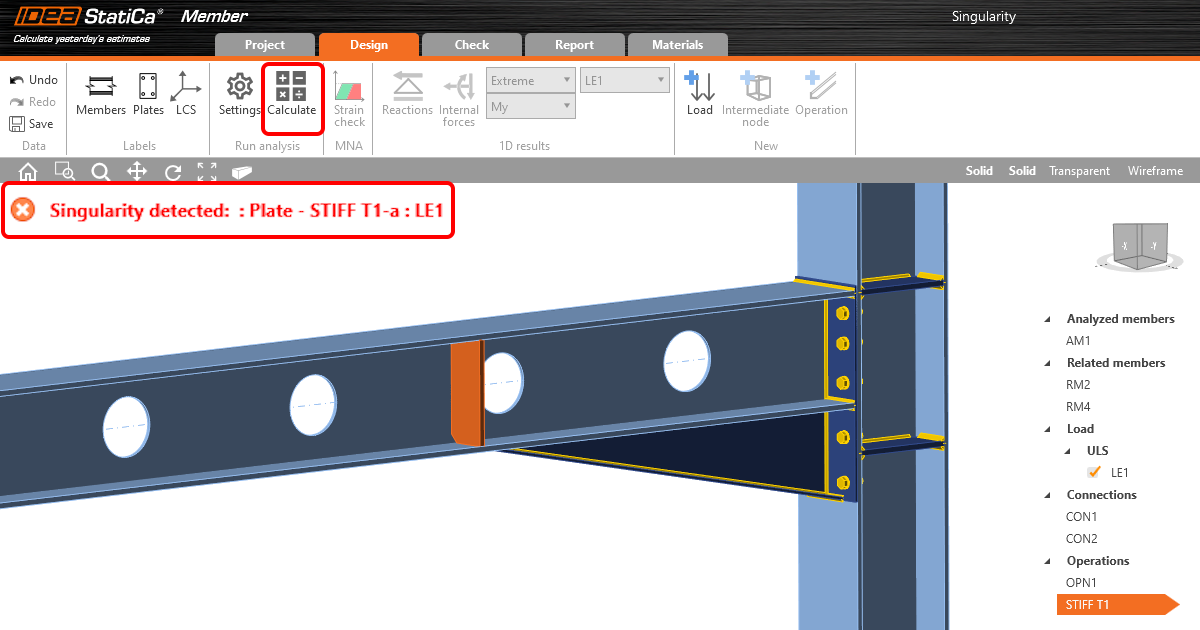
Due to modeling mistakes, there might be unconnected or unsupported parts of the structural model that cause singularity. Member now gives a description of which part is creating the problem.

If the model of Member is imperfect in terms of modeling (e.g., a stiffener plate is not welded to the beam or some connection is missing), the singularity message will appear after pushing the Calculate button, and the analysis is stopped.

This was a problem, especially in large Member models where it was difficult to identify which part of the model caused the singularity.

With the new version, the message with the description of the problematic part is shown in the 3D window, and the missing connection can be easily fixed. In case there are more singularities, the first failing part is shown, and after it is fixed, the other is revealed.

Available in IDEA StatiCa Steel.

Download new version

Subscribe to our newsletter

Company

  • About us
  • Partners
  • Careers
  • Patent

Resources

  • Sample projects
  • Case studies
  • Connection Library
  • Verification books

Legal

  • EULA
  • Privacy policy
  • TOS Viewer
  • Licensing

Help

  • Contact
  • Submit case
  • Resellers
  • Downloads
FacebookInstagramLinkedInYouTube

© IDEA StatiCa 2009-2026

Trusted and used worldwide by engineers, fabricators & consultants.